Before Annual Leave
Dear Team ,
I hope two of my queries below get answered before the annual shutdown. Please consider my questions very important and crucial
1. i am trying to understand the Slew timing of the Modules
A.Single Volume HW Slew and
B. Single Volume SW Optimized/ Accurate Slew.
I have received a pdf from a member but my question is different .
Between these two modules i would want to know the slew timing difference for a particular gain change .
Say for example i change the gain from 0 to -50 dB
How much time will the SW version take to reacb -50dB from 0dB ?
Similarly how much time will the HW version take to reach -50dB from 0dB ?
Please don't share that pdf for Slew Hardware Accelerator which does not answer my question .
Hello Harmione,
The PDF definitely does answer your questions about the HW slew. The difference you measured was because the default hardware slew setting is much faster than the software slew. If you want the hardware slew to be the same then setup the custom slew to be the same setting. You measured the software slew so you have that answer.
Please learn to use the search feature on the forum. It took me about 5 seconds to find this post:
(+) Clickless SW slew volume control Specification details - Q&A - SigmaDSP Processors and SigmaStudio Development Tool - EngineerZone (analog.com)
I used the search term "Slew Time"
What is great about that post is it shows some ways to gather the information you seek by measuring the time using SigmaStudio. It is easier to use a scope but there is a lot you can do using SigmaStudio.
There are many other posts that discuss this and you will find the document I shared with you on the private chat.
Dave T
Dear Dave ,
I think this is not helping either of us at arriving to a conclusion .
So let me try and put things in perspective.
Firstly
The Single Volume HW Slew 's default setting for Slew Type is RC and for the Single Volume SW Slew it has only RC option.
So for both, regardless of whether i use the Custom or not.,both are RC Slew and I would expect them to behave in the same way.
If you argue that this is not true then probably the term RC for HW version of fhe Volume control is a misnomer and misleading.
If you further argue that it is not,then i would want to understand how the RC slew of HW version is different from RC slew of SW version and also why should they be different ??
Secondly you referred me to a post that talks about the Slew time in terms of time constants .
For a certain gain change it tells me how much is one time constant .
But if you read my question properly the Volume Controls that i am repeatedly bringing to your notice do not have any option to set Slew rate as in the post you seem to be hinting me to refer to .
So now the problem is just this ,
I cannot set any slew rate here so i dont have that control .
In that case the only way i can compare the Slew Performance between the Single Volume Sw Slew and Single Volume HW Slew is by changing the gain ( say from x to y dB ) and measuring how much time each takes for a complete slew ( say 100%) .
The pdf you linked does talk about the way the Rc curve is calculated with an equation that tells me how gain is calculated in each step . My question however is not that .
I understand it tabulates a timing table that is beyond my comprehension.
So i will request an investigation on your end just for the one simple case, i requested and feedback to me please
Please respond to mh reply
Hello Harmione,
Let me talk about SW (software) slew first.
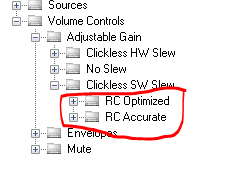
There are two basic types available in the library. There is the RC Optimized and RC Accurate.
The RC accurate is as suggested by the name, it is a more accurate calculation of an RC curve but in doing so it will consume more MIPS.
The RC Optimized is optimized to use fewer MIPS with the tradeoff being that it will not be a perfect RC curve. What it does is divide up the gain change into short linear segments. When the remaining segment is longer than the remaining about of gain to hit the target, then it will jump to the target to not overshoot the target. So for small gain changes you can see this if you look carefully. For most applications this optimized version is good enough. For critical locations where you must have a smooth RC curve then use the accurate version.
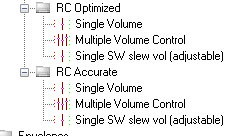
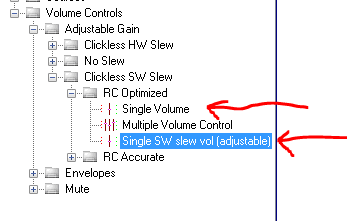
Both of these basic types have three different selections available. Here is a screenshot:
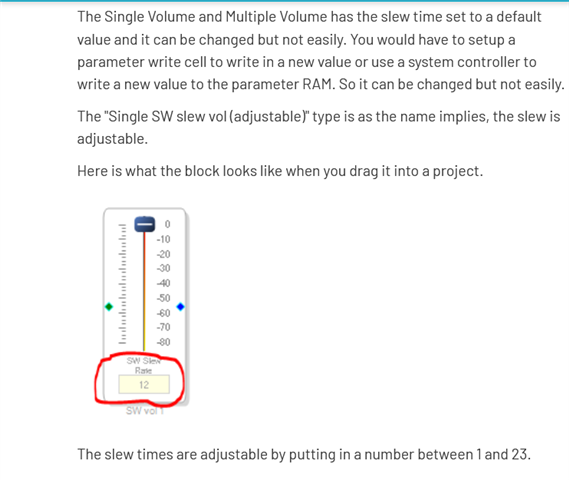
The Single Volume and Multiple Volume has the slew time set to a default value and it can be changed but not easily. You would have to setup a parameter write cell to write in a new value or use a system controller to write a new value to the parameter RAM. So it can be changed but not easily.
The "Single SW slew vol (adjustable)" type is as the name implies, the slew is adjustable.
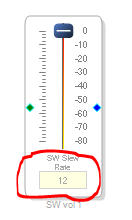
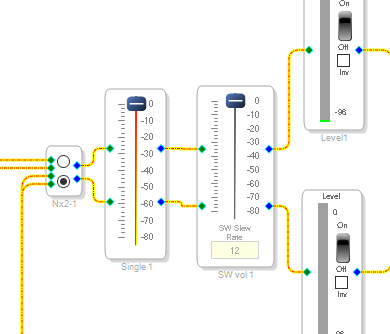
Here is what the block looks like when you drag it into a project.
The slew times are adjustable by putting in a number between 1 and 23.
The earlier posts I had linked to has lots of detail as to the slew times of these settings. It was this post: (+) Clickless SW slew volume control Specification details - Q&A - SigmaDSP Processors and SigmaStudio Development Tool - EngineerZone (analog.com)
However, this post does move into a discussion of the HW slew times and settings for the external hardware slew. So only the first few posts cover the SW slew.
So now since I mentioned the earlier post moving to HW slew let us move to the HW slew at this point!
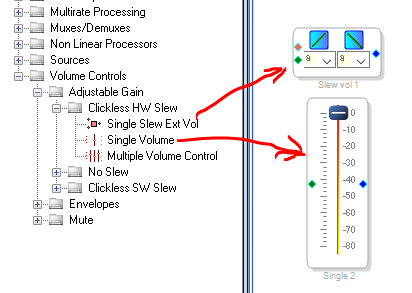
The hardware slew only has three options to pull from the library.
The multiple volume control is similar to the single volume control so I will not mention it specifically.
The external HW slew version has the slew type and slew time for both going up in volume or down in volume selectable directly from the GUI without having to go to menus. Click on the blue box or the pull down box to select.
The Single Volume can be set to any of the HW slew settings but it is not as simple.
So now I will discuss the HW Slew Accelerator document I had attached earlier. These screenshots will be from that document but I will explain them further.
The hardware slew engine has a register that has to be set before using. The program does this for you automatically each time the program is run since different volume controls in a project can have different settings, these are updated each time the volume control is changed. This is also why they use more MIPS because of this overhead. Anyhow, the register is a 32 bit register and this is the allocation of the bits:
Bits 1:0 is a two but field for the curve type for a downward volume change
Bits 3:2 is a two bit field for the curve type for an upward volume change.
Bits 9:4 is a six bit field for the time constant for the downward volume change.
Bits 15:10 is a six bit field for the time constant for the upward volume change.
The rest of the 32 bits are unused. Reserved is the usual nomenclature.
So now what is expected in these fields?
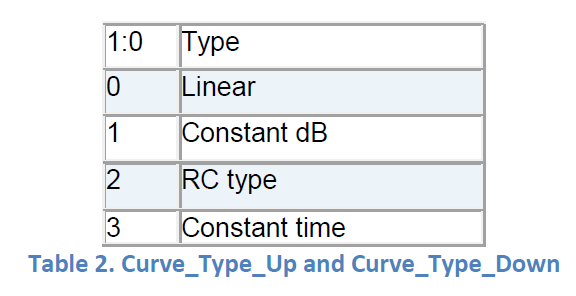
For the 2-bit curve Type field
These are the possible four types of curves available. The numbers in the table are obviously decimal and convert to binary and that will give you the value for the register.
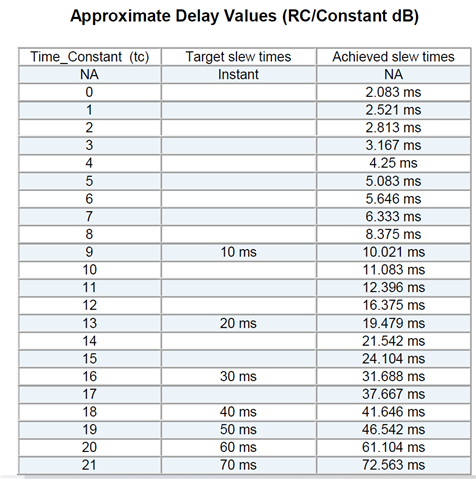
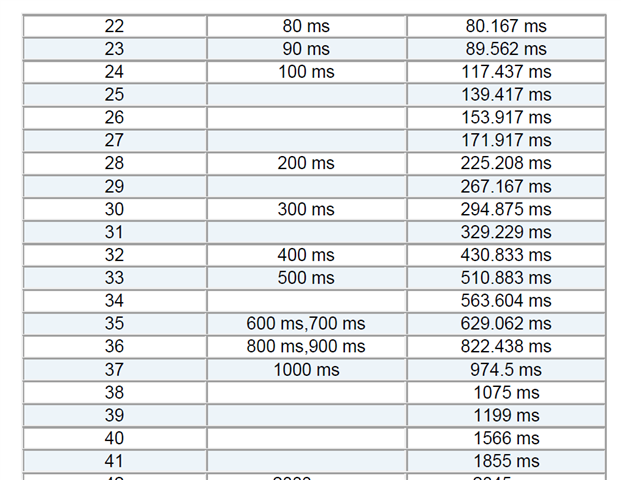
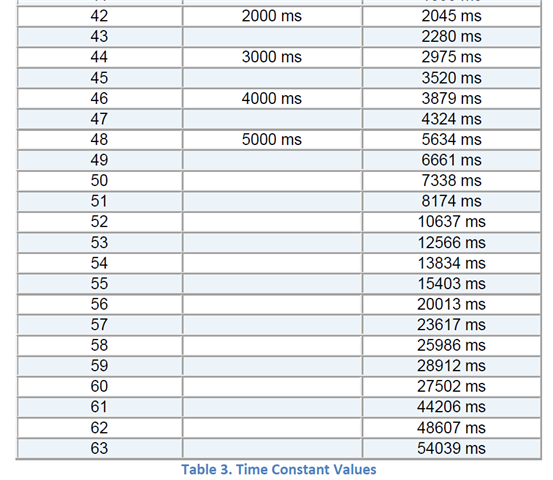
Now to the slew times field. This will take a value of 0 to 63 since it is 6 bits. So 64 different values. The document has a table for the slew times. However, there is no tables for all the types. So the document is not complete. The table says "(RC/Constant dB)" so I do not know if it pertains to both the constant dB or RC. I am not sure. This would have to be developed by measuring each setting. Some of this has been done in the earlier post I referred to. However, the document does have the equations in the document so the time could be calculated. But, some of these times will depend on the amount of gain change. So really no way to make tables of these. It would end up being a book of slew times.
So here is the table in two screenshots:
So now, how do you set up the single volume control to these settings?
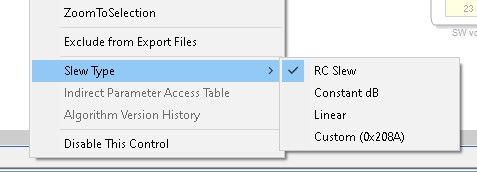
Right click on the lower part of the volume control GUI and you get this menu, go down to the Slew Type:
Here is is easy to select RC, Constant dB or Linear. You cannot select constant time directly and you cannot change the slew time directly. To do that you use the "Custom" setting.
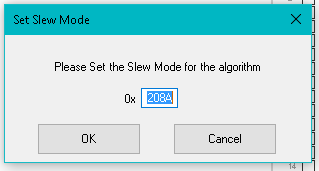
Note that the Custom setting in the menu has a Hex number with it. This is the current setting of the 32 bit Slew Mode Register that I starting talking about at the top of this post.
So you have to convert to binary and split up the fields to see what it is currently set to. Then when you select this Custom setting you get a window that opens where you can enter your custom value.
So build up the hex number from the binary fields that you need and enter it here and you will get this new slew type and time.
So I think at this point I have shown you how you can adjust the SW and HW slew times and the HW slew types. The SW slew types are only the optimized and accurate so no other choices.
Dave T

Dear Dave ,
Yes what you mentioned above is understood.
However for the Single SW Slew Volume Control
How do i change the Slew rate
There is no paramter like Slew Mode or Slew target value ..
Also the Indirect Parameter Table has alpha nd alpha om
What are these?
Hello Hermione,
Allow me to describe this and walk you through an example.
I setup a project using two different SW slew type of volume controls:
These were taken from here in the tree Toolbox:
One of them has the adjustments shown in the GUI and the other does not.
So looking at the Params window you can see they are exactly the same in the DSP. The difference is that the SigmaStudio GUI can stuff new values into the parameters.
We can use that to see what the values are for the settings.
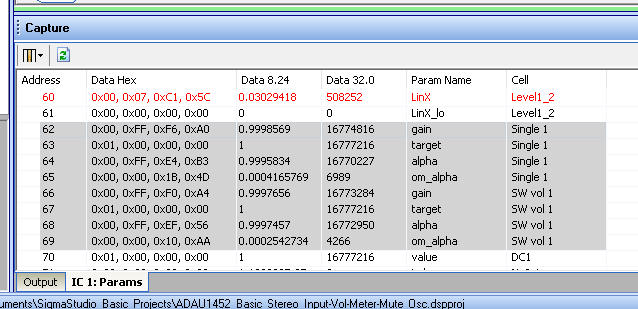
Here is a screenshot of the Params window:
You can see I highlighted the parameters for both of the meters. They both have four parameters:
1) Gain
2) Target
3) alpha
4) om_alpha
The gain is the current gain value. You should not change this directly because it messes up the slew. Let the DSP code make the changes in the gain.
The Target is what you should write to. This is what you want the gain to change to. The DSP code will slew the gain to match this level.
Then there is a formula for the slew. I do not have access to this formula. I looked on the Wiki and did not find it. We might be keeping this proprietary. There are two factors for this formula.
alpha and om_alpha. om_alpha is a cryptic variable name for One Minus alpha.
If you look at the number in the alpha variable and subtract if from 1 you will get the om_alpha parameter.
So let's see what is being stuffed in there.
When the GUI has the number "12" in the slew control, you get these numbers:
So with a "6" in the GUI you get these values:
You can look at the earlier posts I linked over to where others have measured the slew times for all of these settings.
Thanks,
Dave T


Dear EZ Team,
Since no one replied to my query or since you must be finding me asking repeated questions i will simply re frame my question and ask you again .
1. Can you take me through the procedure to Change the Slew Rate for the Single Volume SW Slew module . please !
Hello Hermione,
The attached Screenshot of above discussion does answer your question.You can drag that block into the project and write the slew rate directly into it.Dave has covered everything in this post about slews in Sigmastudio.If you still have question means, Kindly tell us about your project need or intent. May be that information will help us to answer your questions.
Regards,
Harish
Dear Harish,
Let me ask you a few questions below
1.What is the default Slew rate set for the Single volume SW Slew (both optimized and Accurate) Please give me some concrete number instead of explaining anything else.
2. The SW rate you just brought again has 4 parameters each of which must be important:
In order for me to deduce the Slew rate of the Single Slew Volume control, I must be able to exactly match the three parameters excluding the gain which should not be written to . but for none of the values that i see in the capture Window for Slew rate in the box matches the default parameter values of these Single Volume control.
How then do I ascertain what is the Slew rate being applied by default for the Single Volume SW Control???
3. What is the gain change range over which the table provided by Dave calculated???
Regards
Hermione
Hello Hermione,
1) Default rate:
Drag the block from the library into a project and you will see the default setting. I believe it is 12.
2) The posts from KJBob that I linked to earlier, does go into how time constants are calculated and is a good reference.
(+) Clickless SW slew volume control Specification details - Q&A - SigmaDSP Processors and SigmaStudio Development Tool - EngineerZone (analog.com)
Read the March 8th 2021 response. I have not verified this but the formula he shows:
v = Vmax ( 1 - e^(-t / T))
Should equate with our Alpha and 0m_alpha.
alpha would be e^(-t/T)
om_alpha would be 1-e^(-t/T), remember that om_alpha is code for One Minus Alpha.
The T should be the time constant number that is placed in the box.
His March 8th post has a lot of information.
You could also take a more direct approach by just entering the time constant values in SigmaStudio and copying down the alpha and om_alpha parameters and making a table to enter into your controller. This would save a lot of processing on your controller if it only has to use a lookup table.
3) Gain change range:
The tables I had above were for the hardware slew. They had come from this document that I had given to you in an earlier post:
When you are set to RC type it calculates the step size from the target and the current gain setting. Then produces a curve that takes that amount of time to go from current setting to the target. So going 60dB or 6dB will take the same amount of time. There is the constant dB type that will change by a constant dB so that time will change depending on the span of dB that needs to be traversed. Also, keep in mind that once the step size is greater than the difference, the DSP code will jump to the final value to avoid shooting past the target.
Dave T
Dear Dave,
i am asking the default Slew rate for the following module:

Dear Dave, Harish,
Please let me know the default Slew rate for the module above.
Regards
Hermione
Hello Hermione,
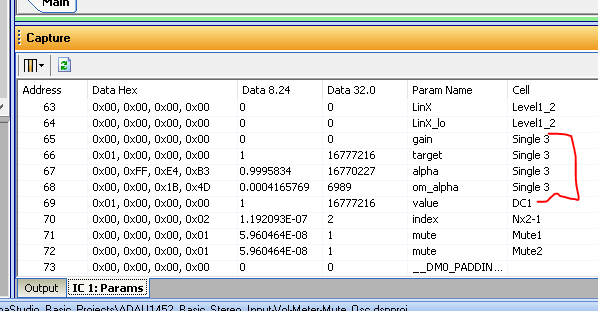
The info is all in the Params window for you to see. You can work the formula backwards or just measure it.
Dave T
Please log in to reply.