Momentary Button Sinus Push
I would need a method to connect a momentary button that plays a sine tone but never as long as the button is pressed and automatically stops again
Audio Signal Processors
button
SigmaDSP Audio Processors
sinus
adau1701
Hello Lorenzo,
This should be quite doable. Which SigmaDSP are you working with? Knowing this would help us arrive at a solution. The general idea would be the same across the entire DSP family; yet there's a few differences to account for.
Best regards,
Bob
Hey i Use Sigma Studio 4.5.1 or 4.6
and Adau1701
Hello Lorenzo,
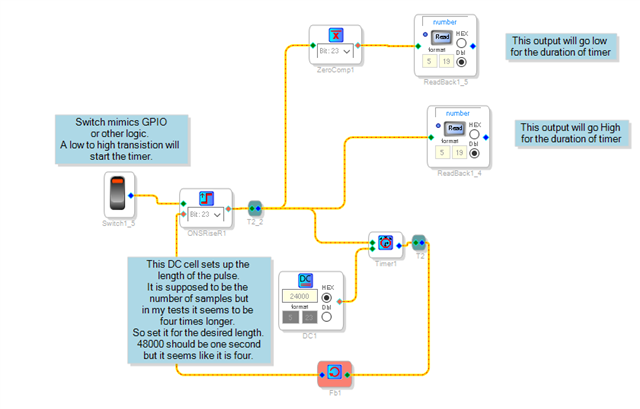
I will first attach a project that is what I call a true one-shot or pulse stretcher. Any low to high transition will trigger a timer to output a pulse of a defined length.
You will have to change the switch in the project with a GPIO input and then set that up in the registers.
This is what the project looks like:
This project is setup to connect to a volume control with an external input. If you end up using a MUX to switch the oscillator then you need to change the data from a 5.23 number to be an integer. Here is the project file:
ADAU1701 One Shot from positive pulse.dspproj
Then this next project will show you how to use the MUX.
5127.ADAU1701 Index Selectable MUX using GPIO Input.dspproj
Sorry that I did not have time to put this all in one project. Give it a go and if you have trouble then post your project up here so we can see it and edit it.
Thanks,
Dave T
Sorry i dont understand this
The wohne thing Sound be between the audio signal so That Sound be like a Horn wegen you press the Button
I would be very grateful if you could explain this to me more easily, I'm not that good yet
Hello Lorenzo,
Then you need to provide more detailed information. So I will ask more questions:
It seems you want a horn-like sound?
What hardware are you using? Is it our 1701MINIZ eval board?
Do you want the sound to start when the button is pressed?
Do you want the sound to only play for X amount of time and then stop, even if the person is still pressing the button? So if the person wants the sound again the operator will have to release the button and press it again?
So how long does the sound need to be?
Your application details might be handy to help understand.
Thanks,
Dave T
Hello, good evening
i have the wondom dsb board
I would like to generate a sound that should act as a start signal
and it should only be played back as long as the button is pressed
it is best to turn the music volume down a bit when it is operated
I hope you understand what I mean
Hello Lorenzo,
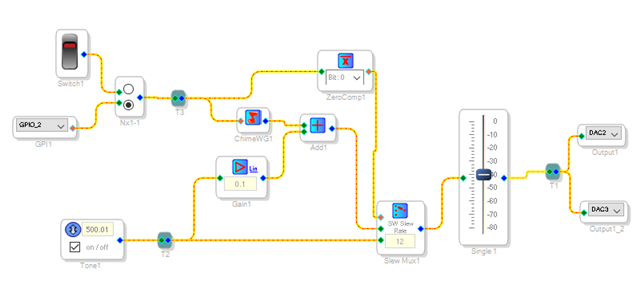
There is a Chime block that does this. There is a continuous play type so I used that. This is the default chime, just clock on the blue box and you can define your own chime.
The audio is ducked using a gain block. You can adjust the amount of ducking by changing the gain factor. I included a switch to allow you to test this on the Wondom board as it comes from the factory. There is no built in switch so you will have to wire up a switch. Ask them for support for that but good luck on that. I recently purchased some boards for a personal project and contacted them and they were ZERO help. All I wanted was the mating connector part number and they just referred me to their documents online that did not have the information.
Anyhow, you will have to change the GPIO setting to the proper port you are using. I have it setup for the MINI eval boards we produce and it works great. There is also a register setting you will have to change.
Here is what the project looks like:
Here it is:
ADAU1701 GPIO controlled Chime with Ducking.dspproj
For your information. Here is where you can find some help information:
SigmaStudio and SigmaDSP Documentation [Analog Devices Wiki]
Then there is a lot of information regarding the 1701 on this forum. Search the forum and you will usually find the answers.
Dave T
Sorry, I come from Germany and therefore did not understand your question correctly Does this circuit now only work as long as I keep the button pressed or Sorry that I didn't understand that correctly
and Merry Christmas
thank you everything worked
Please log in to reply.