Peak Compressor Unexpected Output
Dear Team,
I am using the Peak( no gain ) N Channel Peak Compressor.
I have the Compressor set as Limiter .
Threshold : 0dB
Ratio : Infinity.
When i supply a 0dB sine wave as input to this module i receive a -1dB output which isn't expected .
Since my input is same as the threshold, there should be no gain reduction at the Compressor output .
I would have expected the same 0dB output , but that is not what is observed infact the output is -1dB
Can anyone explain this observation to me.
Please refer the schematic below:
Edit Notes
Edited
[edited by: Hermione at 1:03 PM (GMT -5) on 22 Dec 2021]
KJ BOB
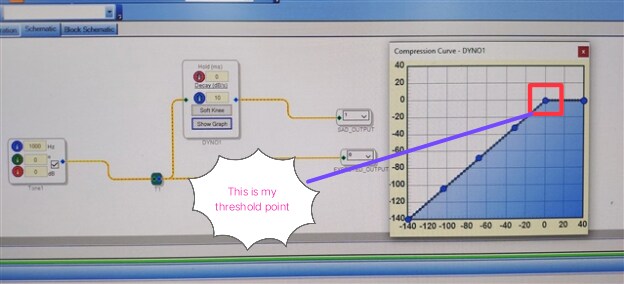
Did you set the compression level exactly to 0 dB by right-clicking the point in the compression curve?
Yes , i double checked my x and y axis co-ordinates and can say for certain that they remained to set the threshold as 0dB
Dear Team,
Can someone please explain this observation???
Regards.
Hermione
Hello Hermione,
You are right on the edge of an infinite ratio ( brick wall) so when you present a level exactly on the knee the result being 1dB off means to me that there may be some roundoff errors in the calculation of the level such that you are getting the 1dB of reduction. It is right on the knee so this is really not a problem when you are actually using the compressor. I actually think this is good because it will prevent any clipping from a 0dBFS signal. So I think you have unreasonable expectations with a signal exactly on a knee with an infinite ratio.
Dave T
Dear Dave ,
Thanks a lot for your efforts and explanations!
I however have two questions:
1. Input: 0dB Threshold: 0dB
Output observed: 0.57 dB
2.Input : -20dB Threshold:-20 dB
Output observed: -20.09 dB
Why is the effect of rounding error more pronounced when both my input and threshold are set to 0dB
Regards.
Hermione
Hi Hermione,
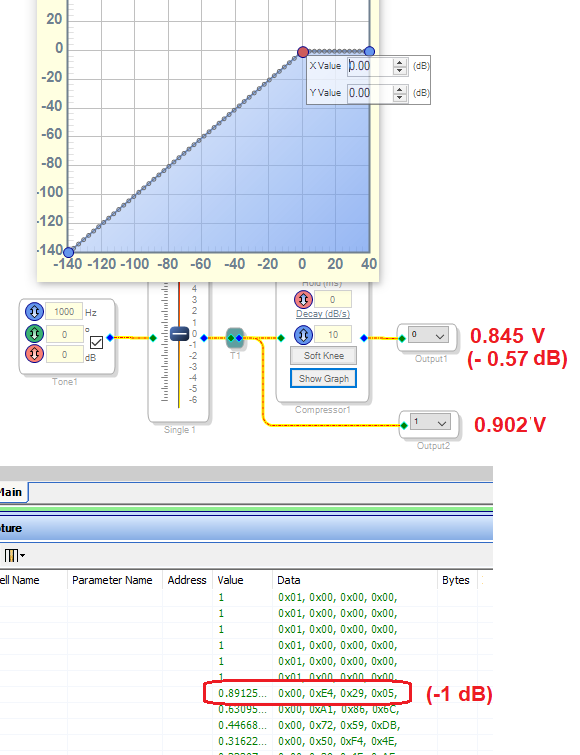
I tested the Peak Compressor and got essentially the same results, as shown below:
The key to understanding the result is what shows in the Capture Window. SigmaStudio calculates this table which downloads to the compressor at runtime. Each table row represents the compressor's gain for a given input in 3 dB steps. The first table entry (not shown) is for -140 dB input, the next is for -137 dB, and so on. All the entries for the inputs below 0 dB are unity, so the compressor does not attenuate below its 0 dB threshold. Thus for example with a -20 dB input, the compressor provides an exact -20 dB output as expected. When the input level is high enough to call for limiting, then the table provides reduced gain so that the output remains limited.
Since the table is in 3 dB steps and 140 / 3 = 46.67 -- the nonzero remainder shows that 0 dB does not fall on an exact row in the table. Thus the compressor likely interpolates between two rows -- the -1 dB (0.89 gain) which goes with +1 dB input, and the 0 dB (1.0 gain) row before it, which corresponds with a -2 dB input. The result is the small attenuation we measure. Thus I conclude that Dave had it right -- the issue is in effect, roundoff errors as the compressor's algorithm attempts to handle this input right at threshold. If the table were in 1 dB steps it could have been exact -- but this would use three times as much Parameter memory for what amounts to a trivial accuracy improvement.
The only way you'll get a more precise answer to your question is if the person who designed the Peak Compressor algorithm were willing to research their notes from years ago and painstakingly present a theoretical answer. They might not even work at ADI anymore.
Best regards,
Bob
Dear Bob
Brilliant ! You nailed it
I will get back to you on this
Hello,
Attached is a more accurate peak compressor/limiter. With a limiter threshold = 0dB and a 0dB input the output will be 0 dB. It uses a table for the compressor/limiter curve which covers a range of -42 to +42 dB in 1.5 dB steps. For a signal level below -42dB the gain=1.0 i.e. 0dB. There is Matlab code in the project to calculate the table values for a limiter at a given threshold. However, you could create any desired compression curve for the table. Note: two tables are needed but they have the same values.
PeakLimiterAccurate.dspproj
Please log in to reply.