One LEFT digital PDM microphone input but signal goes to both LEFT and RIGHT outputs
Hi Team,
Please help.
I am connecting only one digital PDM microphone to the LRCLK_IN2 and BCLK_IN2 on PDM channel 0 (with LR selection signal raised for LEFT side in my digital microphone) but the output goes to both LEFT and RIGHT side.
ST MP23DB01HP digital PDM microphone is connecting to J3 of EVAL-ADAU1452 with SigamStudio v4.6.
and the .dspproj file
MP23DB01HP.dspproj
regards,
ping
Audio Signal Processors
adau1452
SigmaDSP Audio Processors
adau1452 pdm microphone
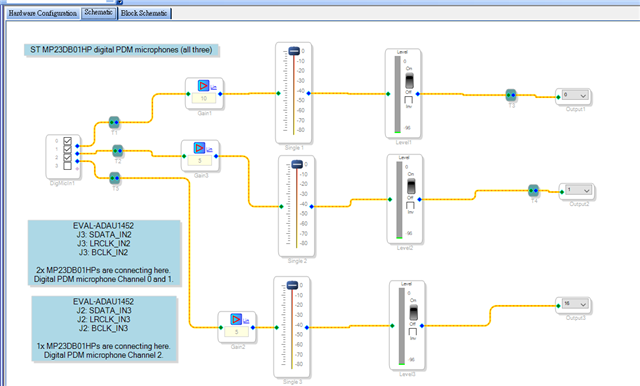

the dspproj file is here.
5531.MP23DB01HP.dspproj
Hi Team,
Please forget this case.
The display numbers shown in the level detection cells have become have different level numbers as long as there are two PDM microphones are connecting to the LRCLK_IN2 pin.
Again, please forget this case.
regards,
ping
Hello Ping,
I need to comment on this. There is an easy explanation. A PDM mic is designed to drive only during one edge of the clock. Rising or Falling. Then it tri-states by the time the other edge comes along and then turns on again for the next clock cycle. With a 3MHz clock the time is very short. So what happens is when the PDM mic outputs a high the capacitance on the data line will hold this high for a short time. It will decay but much slower than the clock frequency. When you have two mics the second mic starts driving the data line but with only one mic the data line will just float.
So when the one mic is driving a low it stays low on the other edge of the clock. When it is high the capacitance on the board will hold the high for the other edge. So the result is that the signal is on both edges and so on both channels. So there is nothing wrong with any of the parts or with the circuit design. It is just physics.
Dave T
Hi Dave,
Thanks for your comment. Is this why both two PDM digital microphones are attached on the same signal line (LRCLK_IN2) then the LRCLK_IN2 are driven by these two PDM microphones and the remained data are then changed correspondingly.
By the way, where do I set up the PDM microphone's clock frequency to meet 2.4 MHz in the EVAL-ADAU1452 board?
regards,
ping
Hello Ping,
Just to avoid confusion here, I will mention to others who may be reading this that you are bringing the PDM data into MP Pin 12 which also happens to be the LRCLK_IN2 pin. So that pin would be set to be a multifuction pin and the function set to Digital Mic Data In.
The way PDM works is to only drive the data line during one edge, the rising or falling edge. The rest of the time it tri-states. So they can share the same data line. The diagram I had put into one of the other questions you asked shows this.
Here is the diagram:
I circled the places where it shows that the mic for the left channel or the mic for the right channel will be driving the line. The gap between the diagrams is where neither mic should be driving. This will avoid the situation where both mics will be driving and fighting each other.
This is also why when only using one mic it will tri-state and the capacitance on the PCB will hold the data so the one mic will show up on both channels.
So you want to have a PDM clock of 2.4MHz. Since the decimation ratio of the PDM converter in the ADAU1452 is 64. So this means the PDM demodulator will be producing an output of 37.5kHz fs. You will most likely have to run this through an ASRC to get to the sampling rate of the core. Depending on the rest of your system setup.
I am also assuming your DSP setup is for a sampling rate of 48kHz in the DSP?
So this means your internal system clock is 294,912,000 Hz. From there we need to setup one of the clock generators to develop this unusual clock rate.
I am realizing that I am making too many guesses. Please look at the Clock Generator 3 section of the datasheet and use that info to setup clock gen 3 to produce 37.5kHz.
It is on pages 37-39.
Dave T

Please log in to reply.