ADAU1452 ASRC lock status inconsistent
Hello!
I am using an ADAU1452 for playing sound off a TI PCM2707 USB -> I2S bridge.
For automatic channel switching and automatic mute, I employ the ASRC lock register (0xF580). With it, I check the status of multiple ASRCs, including ASRC2, where a USB I2S bridge is connected. The problem that I describe is not limited to ASRC2, it occurs in the same way on all ASRCs.
I can observe two different cases:
1) After flashing my DSP application to an SPI flash and booting the DSP from there, everything works as expected. The register shows a successful lock and sound plays fine.
2) When I "link/compile/upload" from SigmaStudio, this is not the case. The ASRC lock register never shows a lock.
I investigated further in case 2):
I checked the ASRC ratio register (0xF584 for ASRC2) and to my surprise, even though the ASRC lock register was all zeros, the sample rate ratio was correct. I then switched the sample rate of the USB I2S bridge between 32 kHz, 41 kHz, and 48 kHz, and these changes were reflected immediately in the ASRC ratio register. All this time, the lock register stayed at zero.
I assume that, if the ratio register gives a meaningful number, that the ASRC locked successfully. Otherwise, it wouldn't know the sample rate ratio between its input and output. So, why is the lock register not working properly after I "link/compile/upload" from SigmaStudio? As stated, the lock register works correctly when booting from SPI flash, but I noticed occasional hickups with lock detection after a while of running the program.
In conclusion, I am currently "abusing" the ASRC ratio registers for lock detection, as, if lock is lost, they also return to zero.
Thanks in advance!
Edit Notes
Further clarification
[edited by: el_agil at 11:37 AM (GMT -5) on 6 Feb 2022]
Audio Signal Processors
adau1452
SigmaDSP Audio Processors
asrc
Hello el_agil
I actually am not certain if the ratio register changes to zero when it is not locked. I think it will hold the value of the last time it was locked. However, you did say it does return to zero when lock is lost. So you I guess you have tested this well at this point.
The larger question is why are you not seeing a lock when you use the USBi running the code from SigmaStudio?
I am thinking that it may be a USB issue in the computer since you are using a USB bridge and the USBi at the same time. There might be some buffering of the data. Is it possible to use two different computers?
The occasional hiccups you are noticing might also be related to the USB bridge not being able to keep the audio flow going.
So I do not have a great answer since I have not seen or heard of this issue before. However, not many people have used this USB bridge you are using that I am aware of.
Dave T
Hello Dave,
thanks for your answer! Below, I add some more information, as I think that I kept my initial question too broad.
DaveThib said:
However, you did say it does return to zero when lock is lost. So you I guess you have tested this well at this point.
Yes, it seems to be that way. In addition, I combine the lock detection (by means of a lock/ratio register) with a signal detection block.
DaveThib said:
The larger question is why are you not seeing a lock when you use the USBi running the code from SigmaStudio?
Reading this, I noticed that I should have clarified that I am not using a USBi interface to connect to the DSP. Instead, I use an Ethernet->SPI bridge, similar to sigmatcp but self-written. Writing and reading back registers works reliably, as far as I can tell, but I cannot confirm.
DaveThib said:
The occasional hiccups you are noticing might also be related to the USB bridge not being able to keep the audio flow going.
To further clarify what these hiccups are: I use multiple inputs on the DSP, including SPDIF via a SPDIF->I2S converter, which requires another ASRC. I use the DSP's internal SPDIF for other purposes. On that ASRC, I sometimes lose lock and have to unplug/replug the SPDIF input, so that the DSP registers a lock on the ASRC.
Find attached the project file for reference. There are four "Input detection" blocks, which lead into an "Input decision" block that selects an input by means of a lookup table.
blus_D2603_830000_18W_8531G00_v1.dspproj
Best regards,
Adrian
Hello Adrian,
I think I see where some of this "flakiness" might be coming from.
When you changed from the ASRC lock bits register over to the ASRC Ratio register, you kept the logic test the same.
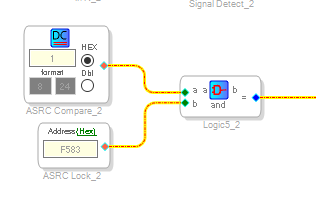
Here is what you have now:
What this is doing is comparing the LSB only to the ratio register.
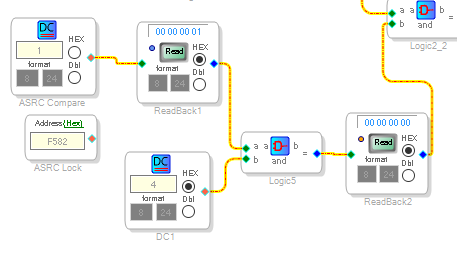
The ratio will be a 4.12 number and there is no guarantee that the LSB will be a "1". The ratio could easily be calculated and have a result with the LSB = 0. So it is locked but will not be detected.
I added a couple of redbacks and a DC cell to demonstrate this.
You see I have a "4" in the DC cell to simulate a number in the ratio register that has a zero in the LSB position. You can see that the output of the AND is zero.
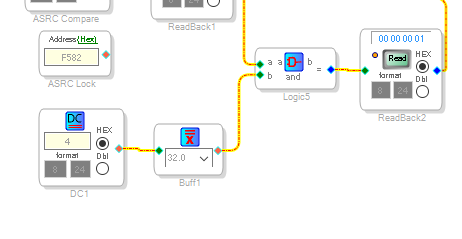
The solution is to add a Buffer Gate on the output of the Ratio register read.
Like this:
See what you get after this fix.
Dave T
Thanks a lot for your suggestion! Indeed, I assumed the "AND" block to read 1 if both of its inputs are non-zero in any bit position. I corrected this mistake. Actually, I wil remove the AND gate altogether, it doesn't serve any purpose.
DaveThib said:
I think I see where some of this "flakiness" might be coming from.
Well, that flakiness was present only when I previously used the ASRC lock register, instead of the ratio register. I guess that I got lucky with the ratio register, so that (until now) the LSB was always 1 in case of a lock.
Anyway, I will observe how it goes with the ratio register as a basis for input detection, but I still don't understand why the lock register (0xF580) does not consistently show a lock, even though I can use the ASRC output and play music.
So, a final question: when the ASRC is not locked, can it output audio data? If not, then I must assume that my ASRC lock register reading is sometimes incorrect, as I have a situation, where I get an audio signal from the ASRC, even when no lock is indicated.
Best regards,
Adrian
Hello Adrian,
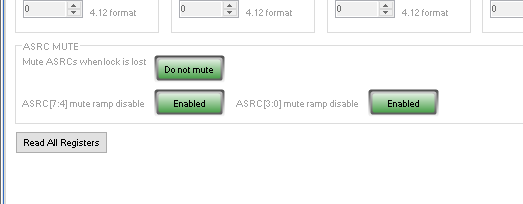
There is a register setting for muting or not muting when the ASRC lock is lost.
You may have an issue where the clocks to the ASRC are either not very stable or there are signal integrity issues. The sample rates you are using are not very high at all so I am doubtful there are any signal integrity issues but you should look at it on a scope.
I assume all the parts are running using a 3.3V IOVDD?
Dave T
Hi Dave,
thanks for your suggestions. I do already use the ASRC mute setting as shown.
About the signal integrity issue: I will investigate in that direction, but I get occasional hickups on most ASRCs, even the one that handles the DSPs own SPDIF input. At least the SPDIF ASRC should not suffer from any signal distribution issues, caused by my PCB layout.
Where I never get any problem is with the ASRC that handles the I2S input from an attached Raspberry Pi. The Pi switches off the I2S clock completely, when no audio is on its output. I guess that the ASRC is then forced to re-lock, when the Raspberry Pi enables its clocks for playback. All other sources seem to supply continuous clocks to the DSP, as I could verify with my scope.
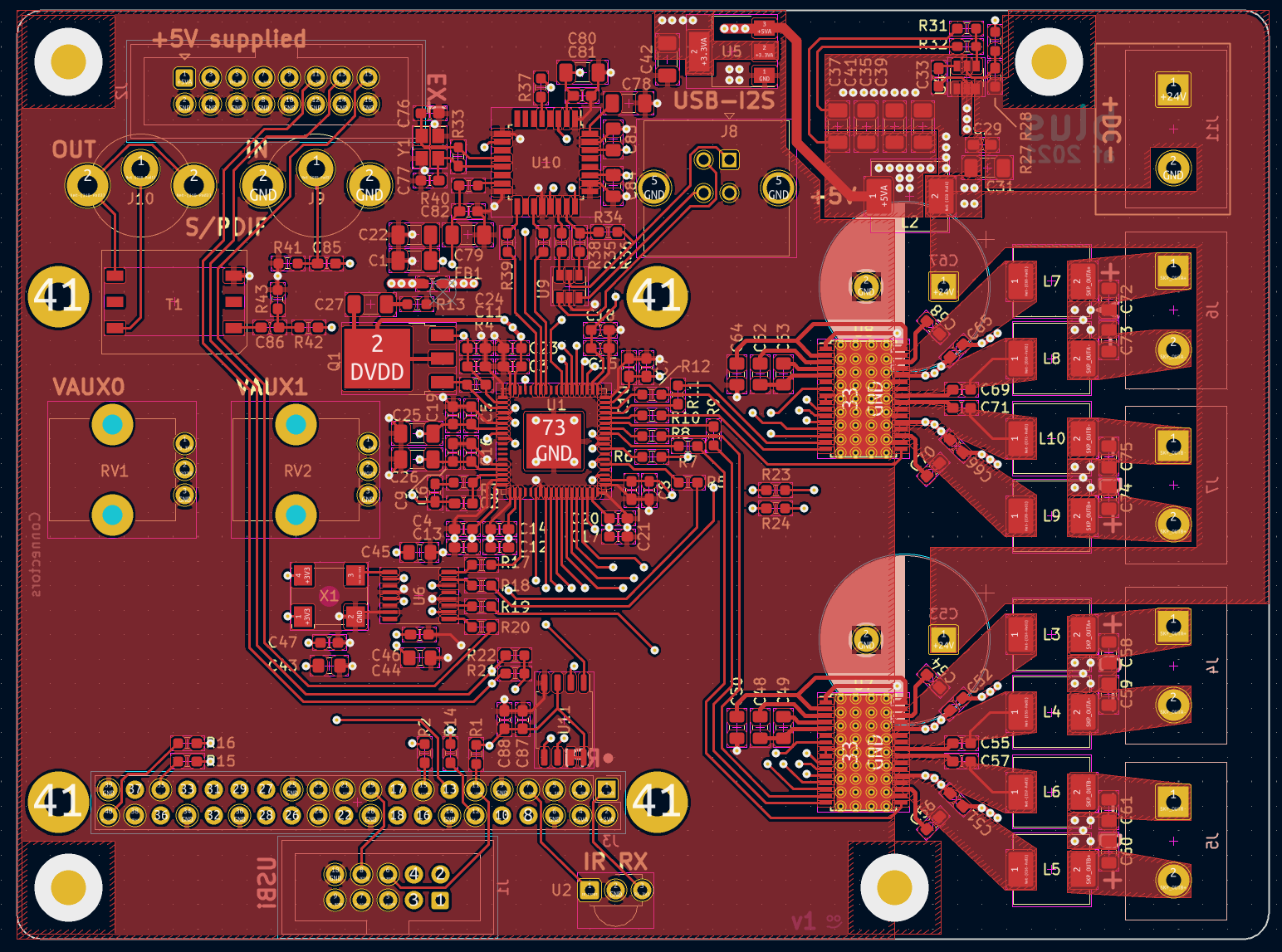
Generally, I keep the I2S lines short and use series termination on them. The parts are all supplied with 3.3V, which I verified to be stable. The DSP lives on a 4-layer board with separate GND and supply layers (see the top layer routing below).
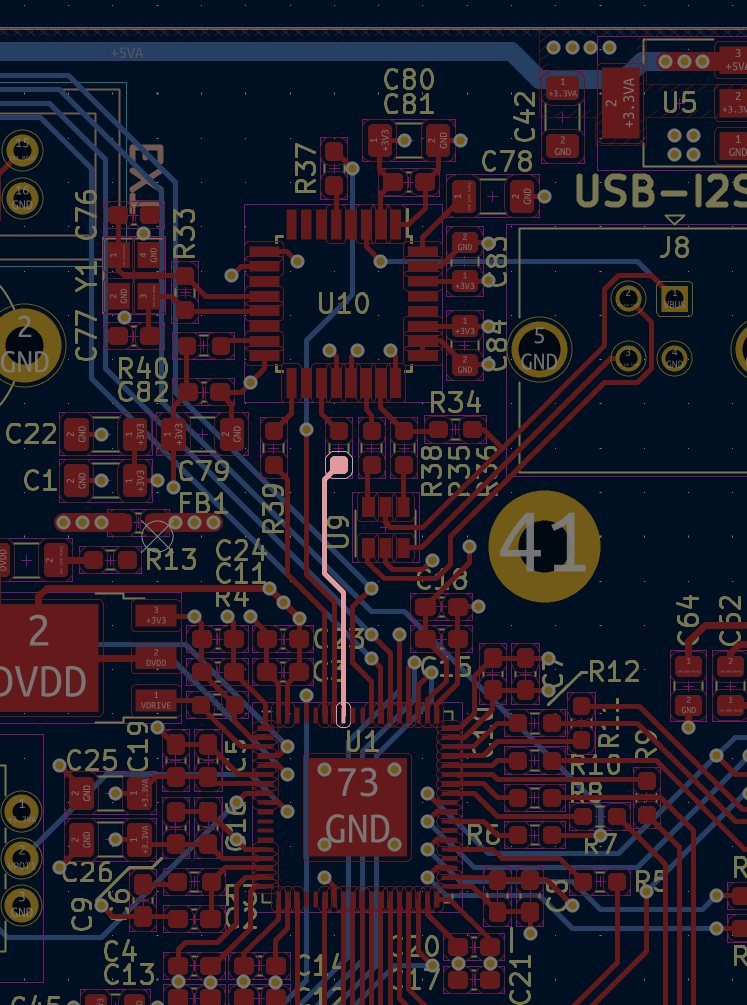
In the following shot, you can see the signal routing from the USB->I2S bridge to the DSP (very short traces). One such trace is highlighted:
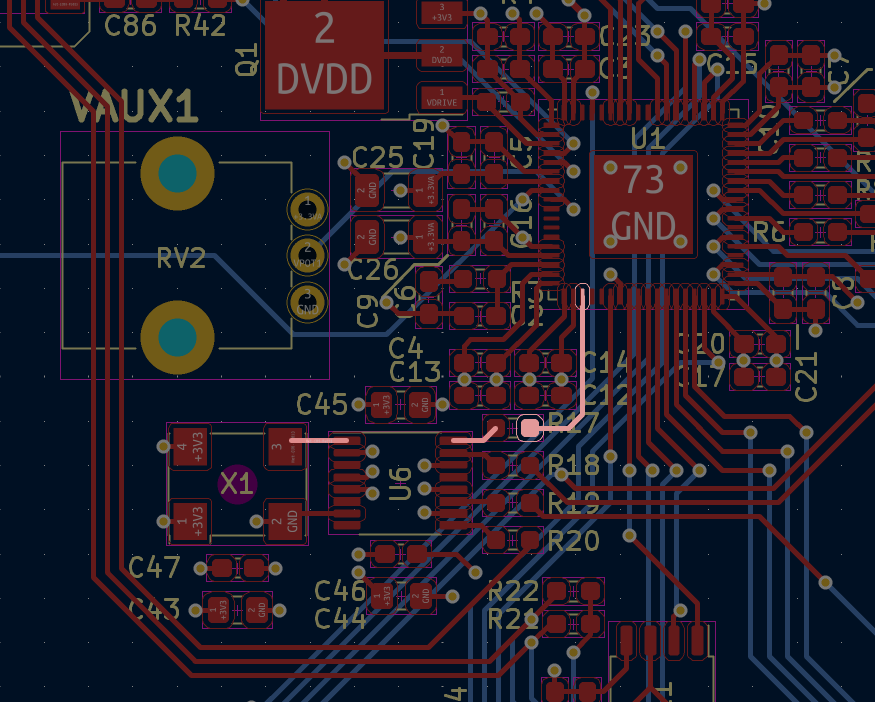
Finally, here is the routing of the reference clock signal. It comes from a 24.576 MHz oscillator and passes through a clock buffer. This ensures that some chips on my board use the same refence clock (digital amplifiers and the DSP). The full clock path from oscillator to DSP is highlighted.
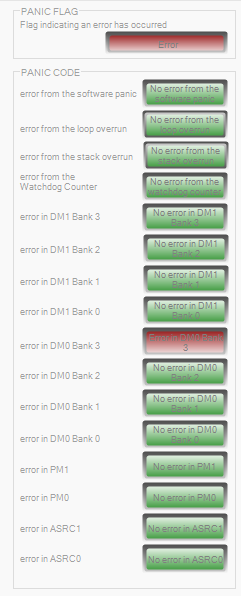
By the way, does this error in SigmaStudio mean something important? I have no idea what it means.
Best regards,
Adrian
Hello Adrian,
Sorry I missed your reply until now.
What is your situation now? Did you work out the problem?
The errors with the panic code registers are not a problem at all. It is common and does not mean any problem. It is a longer discussion on how to use these panic code registers.
Dave T
DaveThib said:
What is your situation now? Did you work out the problem?
Unfortunately not. I still have the same issue, where only a soft or a hard-reset ensures a successful lock on the ASRC in question. What also helps is disconnecting and reconnecting the S/PDIF cable that supplies a converter that connects to the ASRC (DIR9001), probably forcing a re-lock.
Please log in to reply.