Cannot find the ADAU1462-150 in the part library list
Hi Dave,
I used the default settings for adau1462-150 but it didn't work. I can only see the MCLK output but nothing else happened. I just dragged adau1462 from the processor list and put the input/output on the schematics. Is there a product named adau1462-150 or just use adau1462?
Edit Notes
Spilt off the post from another thread and renamed. 2/8/2022
[edited by: DaveThib at 4:39 PM (GMT -5) on 8 Feb 2022]
Audio Signal Processors
SigmaDSP Audio Processors
adau1462
Hello Rickshuju,
The code and register settings will be the same if you use any of these DLLs. ADAU1462, 63, 66, 67 or the ADAU1452, 51,50.
What is different is the reporting of the percent of memory used and MIPS used. Use the ADAU1462 but keep in mind that you will only have 50% of the MIPS available. So in the compiler output reports you cannot go over 50% of MIPS usage. The compiler will not warn you about this since it will think it is a 1462 running at 300MHz instead of 150MHz.
So the issue you are experiencing is not related to the DLL you are using.
What hardware are you using?
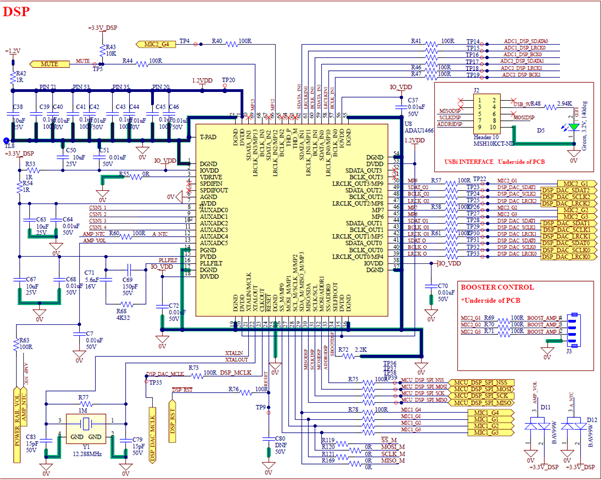
If it is your own hardware then I would like to see the schematic and the clock frequencies you are using.
Send over your SigmaStudio project.
Dave T
Hi Dave,
Thanks for your kindly reply. I ever used ADAU1466 and it always worked until the projects grew and was over the size restrictions. I started to test ADAU1462-150 in a tiny project recently and it couldn't work everytime when I downloaded the project to the chip through USBi dongle. The sigmastudio I am using is 4.5 Build 0, rev 1779, date 10/27/2019. I attached two projects. File 'A' is good for every download but after I added a volume control in File 'B', it couldn't work properly. I tested several times and it could work after 4~5 times of downloading.
adau1462-150A.dspproj
adau1462-150B.dspproj
BTW, I didn't find the MIPS records anywhere. Can you just tell where to get it?
Thanks.
Hello Rickshuju,
Both of your projects are working fine in the Eval-board.I guess there might be some issues in your hardware as you are using your own.
Dave will guide you in the schematic part of your hardware design which he asked for.
The relationship between the system clock and number of instructions per sample can be found in page.no 30 of datasheet ADAU1462/66 here.
Regards,
Harish
Hi Harish,
Thanks for your kindly reply. How do I know the actual MIPS used in my project after I compile it?
Hello Richshuju,
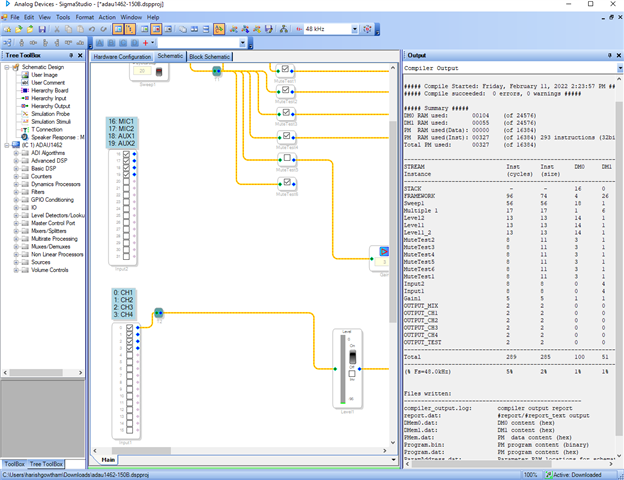
You can easily see it in the output window after compiling your project.If the window is not visible, then please go to >> views (on the left top of the taskbar) then >>output Or simply press Ctrl + 4.
kindly refer the attached screenshot.
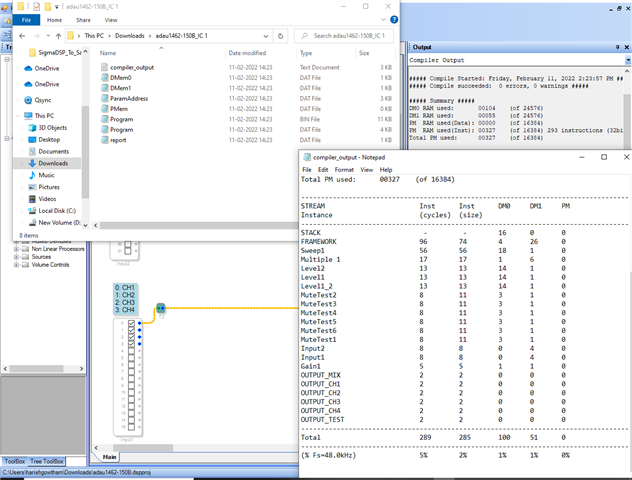
You can also verify it by the "compiler_output.txt " file that is generated after the Link-Compile-Download or Link-Compile-Connect functions are executed. The "compiler_output.txt " file can be found in a subfolder where the project file is stored on the hard drive. Kindly refer the screenshot that is given below.
If you have further questions, Kindly revert us.
Regards,
Harish
Hi Harish,
Thanks a lot. I still have a question about MIPS. On page 34 of the datasheet, it says "and the maximum of 294 MIPS signifies that the DSP core is at full utilization". How can I get it after compile? I didn't see the relationship between the items listed in the output window and MIPS.
Hello Richshuju,
So your output window shows 289 total instructions were used in your project(as per the screenshot I attached).
Your system clock is 147.456 and the sample rate is 48000.So it will give you 3072 instructions per sample (as per the calculation in the datasheet page.no 30).
So the percentage of MIPS that comes out of your compiler for your project is
289/3072 = 0.094= 9.4% .approximately 10% (rounded off).
But in the screenshot output it only shows 5% (because of 294MHz system clock), for that please refer the first reply of Dave above.
DaveThib said:
Use the ADAU1462 but keep in mind that you will only have 50% of the MIPS available. So in the compiler output reports you cannot go over 50% of MIPS usage. The compiler will not warn you about this since it will think it is a 1462 running at 300MHz instead of 150MHz.
for this ,
Rickshuju said:
On page 34 of the datasheet, it says "and the maximum of 294 MIPS signifies that the DSP core is at full utilization". How can I get it after compile?
The thing you implied above that is for the graph shown in the datasheet. It depends on the length of your project/program.
Regards,
Harish
Hello Rickshuju,
Thanks Harish for explaining how to get the compiler output information. I wanted to show that so thanks for taking care of that part.
I think I need to show you how to get the exact MIPS usage in your project and to see if your program is exceeding the available MIPS. A couple of years ago the programmers did a great job of implementing my idea of capturing the actual MIPS usage and if there has been any overflows. The only downside is it does use some MIPS to do this.
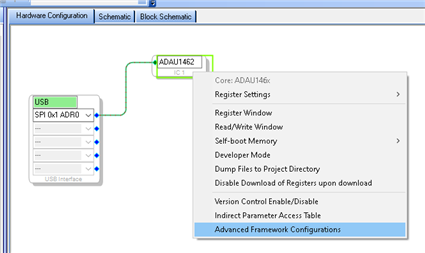
To use this feature you have to first enable it in the Advanced Framework Configurations.
You get to that by right-clicking on the DSP GUI in the Hardware Config window:
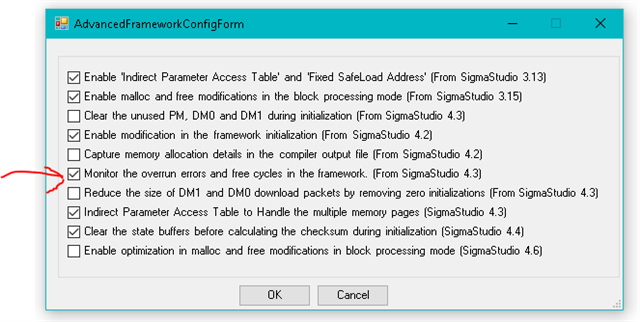
When you select it you get this menu:
Click on the box to place the checkmark on the "Monitor the overrun errors and free cycles remaining"
Then you must recompile the program.
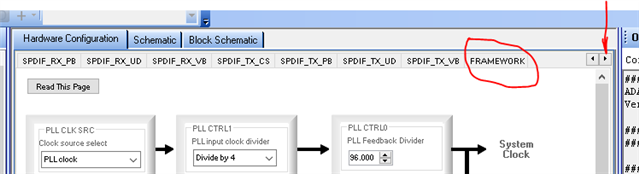
The change is not evident but what it did was added a new tab in the register settings.
So go to the Hardware Register Settings. The new tab is at the end of the list and will not be visible so click on the small arrow to scroll the register tabs and at the end of the list you will see "Framework". I drew a red arrow to show you the small arrow to click on.
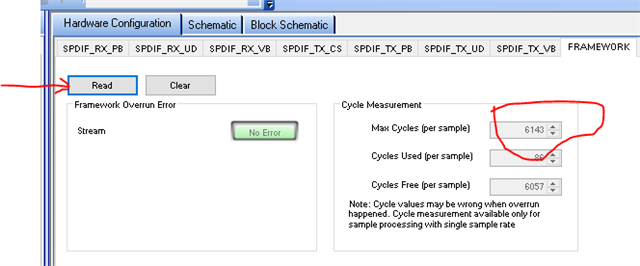
So on the Framework tab you will see the statistics.
These are real numbers that come from counters. There is also a flag that must be reset at the end of the code run every sample period, if it is not reset then that means there was an overrun. Overruns can be only for one sample period every once in a while if the code is very close to the max and there is a loop that is not run every sampler period. So this is a good way to catch those errors.
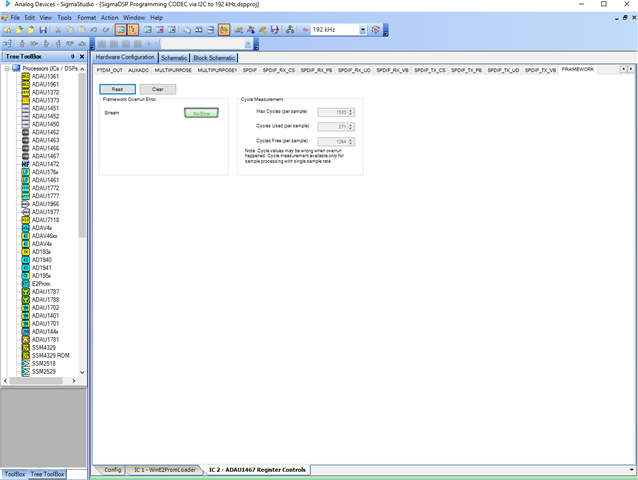
This is what you will see:
At first the cycles used and free cycles will read zero. Click on the "Read" button and those fields will be populated. If there are any errors you can click on the "Clear" button to clear it and then read it again to see if it keeps coming back.
One thing to note. Again, this part DLL is for a 300 MHz part so the max cycles is not correct, it should be half that amount so 3071 is what it should say. So the free cycle count will be wrong, you will need to do that math but now you will have the exact number of cycles being used and you will see if the program is overruning because the program is too long. Those two numbers are being measured in real time.
(correction:) I think the max cycles are also counted. I do not have a 150MHz part handy to test this but when you check this see if it says 3072 or 3071, then I will stand corrected that the number is correct and so the free cycle count will be correct.
This should help you.
Thanks,
Dave T
Hi Dave,
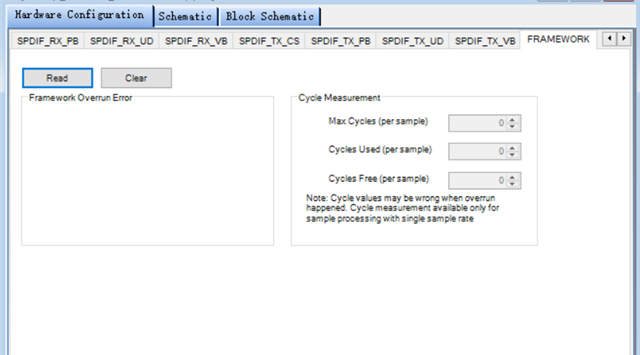
Thank you and Harish very much on helping figure out my questions. I tried to tick the option "Monitor the overrun........" and I did see the tag "Framework". However, the display is a little different.
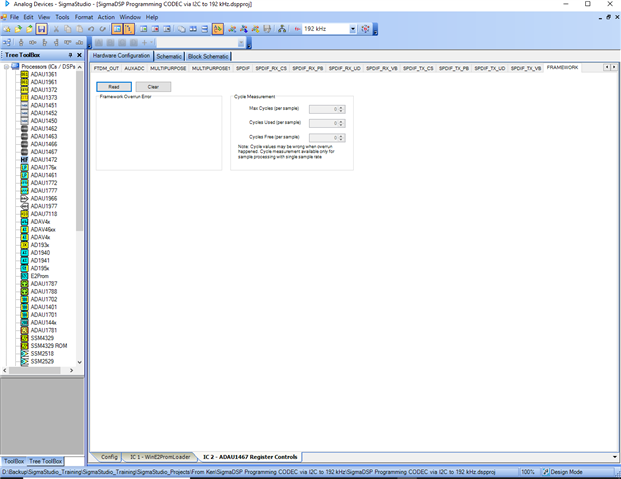
I didn't see anything in the left box and nothing happened after I clicked "Read" button. Do you have any idea about it?
Thanks,
Hello Rickshuju,
Have you compiled your project and powered up your board?
I also got the same result as you ,when I didn't compile.
Here I have attached a screenshot of before and after the changes.
Could you please verify it and try it?
Kindly revert us if you are still facing an issue in this.
Regards,
Harish
Hi Harish,
I tried to compile and download several times and I still couldn't get any data when I clicked the "Read" button. If this was caused by the same problem that I posted here first. The chip couldn't work ererytime after I dowloaded. I thought that there should be some points we didn't find yet.
I did some test in my firmware. I found that PLL enable register needed a longer delay after it was sent to DSP from MCU. When I add a 800ms delay there, DSP could work properly and I could use firmware to modify and tuning. I really wonder why. Although it can work now but 800ms is too long for the project we are working on. Please help me sort it out.
Thanks!
Hello Rickshuju,
Let's investigate a few things here related to talking to the part and also related to the PLL and internal clock settings. Thanks for the schematics you posted earlier. I was able to answer a few questions by looking at it.
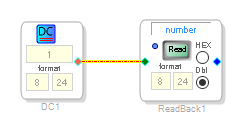
So you are using SPI. So there is no handshaking so you have no idea if anything you are sending to the part is actually getting there. One test I put in all my projects is a DC cell connected to a Readback. Like this:
After you load in the program, the value in the DC cell is located in the DSP program. Every sample period it is being sent to the memory location of the ReadBack cell. So when you click on the Read button, SigmaStudio has to read the data in that location from the DSP. So in this case you should read a "1". This tests the ability to read data. Then you can click in the DC cell value and change the number, like to "2". Then read it again. You should now read a "2". If you are getting junk or zeros or "7FFFF" then you have a problem communicating with the DSP.
So let me know the results of this test. In your case this should not be a problem but for others who might be using Selfboot. If you power up and it selfboots then you try to read this you will get garbage for the first three reads. This is because you have to send three dummy SPI messages to switch the comms port from I2C over to SPI. If you have meters turned on or other continuous reads enabled then it would happen very fast but if you do not then you will get bad data on the first three tries. Believe me, it has thrown me a couple of times over the years.
Next topic, the clocks.
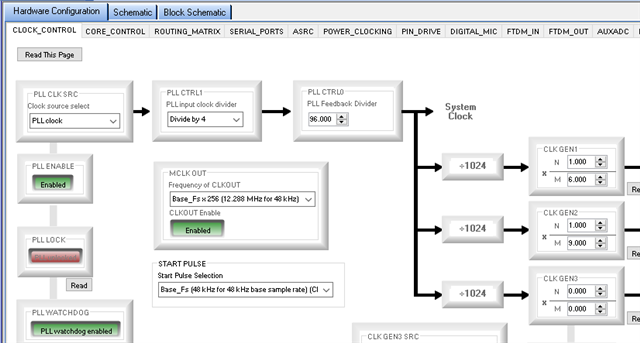
Since you are using a 12.288MHz crystal, your clock settings should be exactly like this.
Don't worry that the system clock shows a divider of 1024 when the ADAU1462-150 actually divides by 512, it is all compensated for internally so that the part will function properly with a slower system clock. You must setup the PLL in exactly the same way, for a 294.912MHz output of the PLL. This will be divided by two then sent to the rest of the part. Then the subsystems will change their dividers from 1024 to 512 so all the sample rate settings remain the same and the clock generator settings remain the same. You can run your code on a 300MHz processor with zero changes and a program written for a 300MHz part will run fine with no changes as long as there are not too many instructions.
Now, regarding your PLL enable. The enable should not be delayed that long. It will not try to lock to anything until it is enabled. So you need to enable it then wait for the PLL to lock. When it locks it will automatically switch to the PLL output.
Perhaps there is an issue with the SPI speed. What speed are you running the SPI comms port? Here is why I ask. Before the PLL is locked, the system clock is the signal on the MCLK pin. In this case it is 12.288MHz. So if you are running the SPI at a speed higher than 12MHz then it will not pick up the transmission correctly until the PLL is locked. Then it switches over to the 150MHz output when you have a 150MHz part. So I would keep your SPI speed well below 12MHz until the PLL is locked. Then you can bump the speed up. You can read the PLL lock bit to monitor when it is locked and then switch to high speed and finish programming the part.
So check these things and get back to us.
Dave T
Please log in to reply.