ADAU1462-150, Downsampling and Compiler Report
Related to my questions in
[ADAU145x] Downsampling to arbitrary value and the comments regarding usable MIPS here Cannot find the ADAU1462-150 in the part library list
... I'd like to get some more clarity on the compiler report of a project containing some successive downsampling operations.
Operating at 150 MHz instead of 300MHz, the compiler 'underestimates' MIPS by 50%, so we have half the capacity. That makes sense. We're starting to approach that capacity,
so I'd like to try to understand what the compiler is telling me more clearly.
The compiler produces a 'summary' at the top. Ours looks like this:
... It shows we're using 2689 instructions. Datashseet table 21, pg. 30, shows we've got 3072 inst/sample at 48kHz and 147.456 MHz Sys Clk. So, thats 87.5%
Each Fs 'stream' is reported to have it's own usage stats. In My case:
2394 Inst @ 48kHz
130 Inst @ 3.0 kHz
130 Inst @ 0.5 kHz
162 Inst @ 0.125 kHz
These instruction counts add up to 2816 Inst, not the 2689 given in the summary. That would be 91.67 % capacity.
Likewise, there are discrepancies between the summed values for DM0, DM1, and PM usage across all Fs streams relative to the totals in the summary at the top.
Which one should I trust?

Hello PeterTheRed,
I would have to see the detailed compiler output to see if these numbers are correct or not. I suspect there may be an error on how they are computed due to the fact that you have a lot of multirate threads that are nested. So it may be causing a problem on how to estimate the usage. So I suggest you get the actual real numbers.
In one of the posts you linked to above, I did go into a discussion on how to enable the monitor for cycle overruns and MIPS usage. For multirate threads it does give the usage for each thread.
I would say to go read it there but that post is getting long and so I will just paste the same reply here so you do not have to go looking for it.
Here it is:
I think I need to show you how to get the exact MIPS usage in your project and to see if your program is exceeding the available MIPS. A couple of years ago the programmers did a great job of implementing my idea of capturing the actual MIPS usage and if there has been any overflows. The only downside is it does use some MIPS to do this.
To use this feature you have to first enable it in the Advanced Framework Configurations.
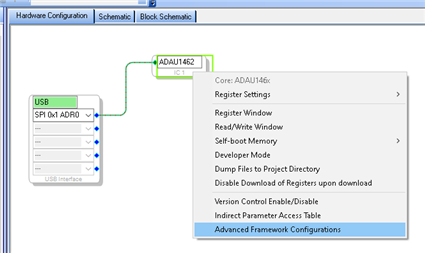
You get to that by right-clicking on the DSP GUI in the Hardware Config window:
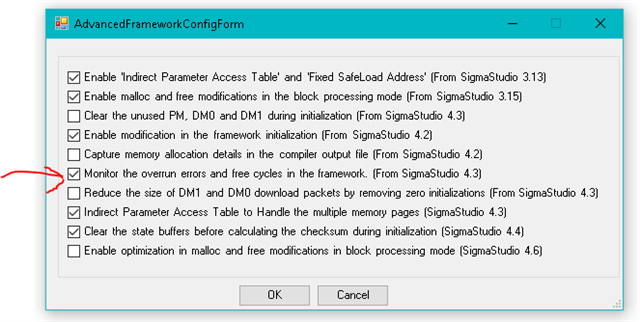
When you select it you get this menu:
Click on the box to place the checkmark on the "Monitor the overrun errors and free cycles remaining"
Then you must recompile the program.
The change is not evident but what it did was added a new tab in the register settings.
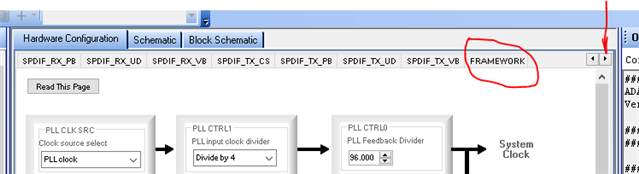
So go to the Hardware Register Settings. The new tab is at the end of the list and will not be visible so click on the small arrow to scroll the register tabs and at the end of the list you will see "Framework". I drew a red arrow to show you the small arrow to click on.
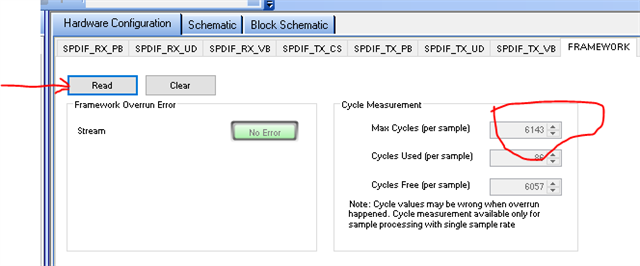
So on the Framework tab you will see the statistics.
These are real numbers that come from counters. There is also a flag that must be reset at the end of the code run every sample period, if it is not reset then that means there was an overrun. Overruns can be only for one sample period every once in a while if the code is very close to the max and there is a loop that is not run every sampler period. So this is a good way to catch those errors.
This is what you will see:
At first the cycles used and free cycles will read zero. Click on the "Read" button and those fields will be populated. If there are any errors you can click on the "Clear" button to clear it and then read it again to see if it keeps coming back.
One thing to note. Again, this part DLL is for a 300 MHz part so the max cycles is not correct, it should be half that amount so 3071 is what it should say. So the free cycle count will be wrong, you will need to do that math but now you will have the exact number of cycles being used and you will see if the program is overruning because the program is too long. Those two numbers are being measured in real time.
(correction:) I think the max cycles are also counted. I do not have a 150MHz part handy to test this but when you check this see if it says 3072 or 3071, then I will stand corrected that the number is correct and so the free cycle count will be correct.
This should help you.
Thanks,
Dave T
Please log in to reply.