Verifying ADAU1701 input and output levels?
Hi all,
I've been using the ADAU1701 chip in a speaker project and for the most part things are working as expected however the audio seems to get attenuated on the output ( only able to confirm this by listening to audio with the dsp connected to a speaker and without). I would like to verify whether this (supposed) attenuation is as a result of my hardware implementation or somehow related to my SigmaDSP program.
My hardware setup is as follows:
18k ohm resistors on ADC0 & ADC1 in order to achieve a full scale RMS input signal voltage of 2V as per figure 17 of the datasheet
A single-pole low pass filter on the DACs as per figure 18 of the datasheet (using the exact same values)
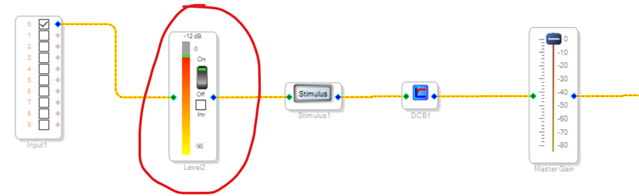
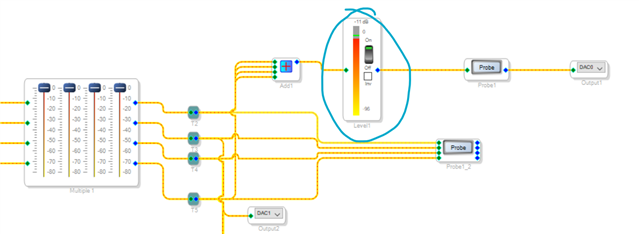
So far, I've attempted to use the level detectors within SigmaDSP (please see attached images) however I'm confused as to why the input & output level is reading around -12dB as opposed to 0dB? What should I expect to see on these indicators, am I even using the correct ones?
As well as this, I've also tried to measure the peak to peak output voltage from the DAC when inputting a 1k Sine wave and I dont seem to get near 2.5V p-p as suggested in the datasheet. What are the best ways to verify my input and output levels of the DSP and is there anything in my setup that could lead to audible signal attenuation?
Thanks in advance
RWS_DSP_v3 - Copy.dspproj
Audio Signal Processors
SigmaDSP Audio Processors
adau1701 adc
adau1701 sigmastudio
adau1701
Hello,
Inside the ADAU1701, audio can go from about -16 to +16, to allow extra room for calculations. Yet the DACs, the ADCs, and the I2S ports all work only from -1 to +1. Thus, an audio signal that peaks at -1 and +1 is considered full-scale, or 0 dB. As you stated, the ADCs reach full-scale at 2V RMS input with the 18K series resistors. The DACs FS output is only 0,9V RMS, so there's a built-in attenuation from input to output. If you need a more sensitive ADC input, you're free to pick a lower value for the ADC input resistors, as described in Table 13 on page 20 of the data sheet.
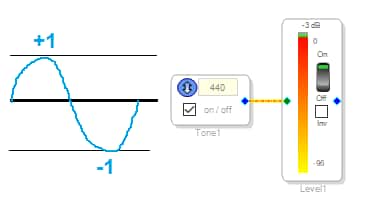
SigmaStudio includes some tools for your project to test itself -- you're already familiar with the level meters. A useful way to establish a known level signal is to place a sine wave oscillator in your project. Its output swings from -1 to +1, thus a full-scale (0dB) level. Note that the level meter reads not zero, but -3 dB -- that's because it's calibrated in RMS while 0 dB is defined as peak-to-peak. This means that an audio signal which goes beyond -3 dB on the level meter is already suffering from clipping.
If you wish to run a higher sample rate like 96K, be sure to set both the software sample rate atop the schematic window, and the HW sample rate (Program Length) in the HW Register Control window. See this FAQ for instructions.
Best regards.
Bob
Hi Bob,
Thank you for your response. I'm quite new to the field and I was wondering if you could further clarify the relationship between ADC input sensitivity and output gain. From your answer I'm guessing that they're inversely proportional but could you elaborate on how they're related or point me in the right direction for more resources?
Thanks once again
Hi,
I assume that by "inversely proportional," you mean that if you have more ADC gain, you'll need less DAC gain. That's true up to the ceiling imposed by the 0 dB reference level (-1 -- +1 in linear numbers) under which the digital portions of both converters operate. We're also limited by the noise floor imposed especially by the ADCs.
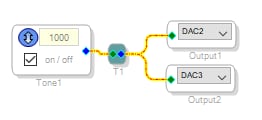
With the circuit below, I measure 0.927 VRMS at a DAC output, which works out to 2.6 V p-p. This is as much as we can get from the DAC without clipping. This tells us that if a signal coming through an ADC doesn't reach this level, we can do any of the following to increase it:
Increase the source signal to the ADC
Reduce the value of the ADC series resistor
Add some gain within the project
The last suggestion is least desirable since it also increases the noise floor from ADC noise.
You'll find several useful resources as you explore what SigmaStudio and the ADAU1701 can do:
The SigmaStudio Wiki is the first place to look for info on how the various blocks work.'
Searching this forum can often answer questions.
Of course, when all else fails read the ADAU1701 data sheet.
Where to go after this depends upon your goals & interests.
Best regards,
Bob
Please log in to reply.