ADAU1467 - Suppression of Mechanical Noise and use of two microphones
Hi all,
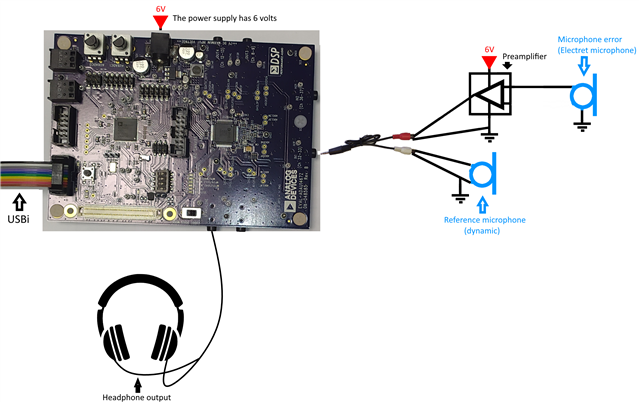
I want to achieve the effect of active noise cancellation (ANC) for the recognition of the human voice with mechanical noise from machine tools and engines (according to the design of the post attached at the bottom). I use two microphones for the device where the 1st mic is dynamic (main microphone) and the 2nd mic is electret with preamplifier (reference microphone).
Application:
- voice transmission;
- suppression of noise received by the main microphone.
I conducted an experiment on EVAL-ADAU1467Z with the provided project and achieved probably some minimal result. Some effect was present but the noise in the vocal range was not suppressed, so the person's voice could not be heard clearly. What can you recommend to solve this situation?
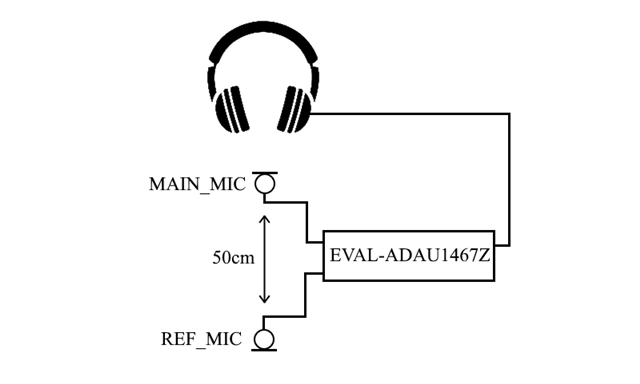
The reference microphone is placed at a distance of 50 cm from the main microphone. Type of noise - mechanical (machine tools, engines, etc.).
Figure1 - Block diagram
Figure 2 - Approximate representation of the complete structure
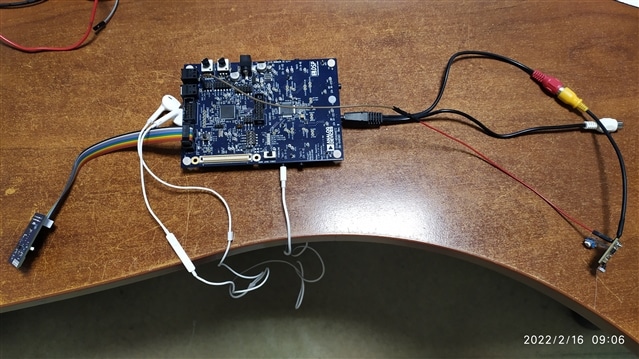
Figure 3 - Photo (complete design unfortunately does not fit in the photo)
NLMS filter-DT-Edits.dspproj
Regards,
Artem (Fox108).
Audio Signal Processors
sigma studio
anc
adau1467
noise
SigmaDSP Audio Processors
evaluationboard
Show More
Hello,
I looked at your project, you are using an adaptive line enhancer (ALE) method, which works well for suppressing stationary narrowband interference (i.e. tones) from a broadband signal (i.e. speech). If the interference has a broadband component in the same range as the speech it will not be suppressed. You can observe this in the attached modified project, unwanted tones are suppressed but noise is not suppressed.
NLMS filter-DT-Edits_modified.dspproj
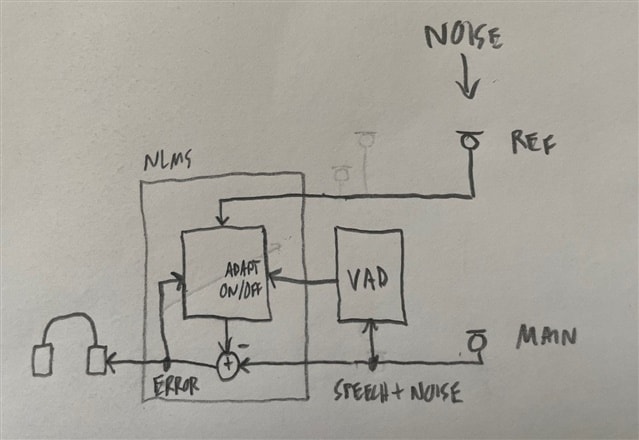
I think a possible solution is shown in the attached figure. The noise is present at both the ref mic and main mic and will be removed from the main mic by the NLMS. Note when speech is present you need a voice activity detector (VAD) to freeze the NLMS. VAD can be very tricky, but in this case perhaps when energy level at main mic is above a threshold assume speech is present and freeze the NLMS. Also, this assumes the ref mic does not pick up the speech.
I aslo want to acheive ANC using 1467, I have two PDM mics, i want to ask how should I connect to eval kit, is it any GPIO or using 3.5 mm jack to INput
If with gpio please suggest me which pins should i use for 2 PDM mics
Hello Rajbir,
There won't be any jack here for a digital signal, well SPDIF is there but that's for an optical signal. For PDM mics you can use GPIO pins to bring the signal into the DSP. You can connect four PDM mics.
Up to four PDM microphones can be connected as audio inputs. Each pair of microphones can share a single data line; therefore, using four PDM microphones requires two GPIO pins. Any multipurpose pin can be used as a microphone data input, with up to two microphones connected to each pin. This configuration is set up using the corresponding MPx_MODE and DMIC_CTRLx registers. A bit clock pin from one of the serial input clock domains (BCLK_INx) or one of the serial output clock domains (BCLK_ OUTx) must be a master clock source, and its output signal must be connected to the PDM microphones to provide them with a clock.
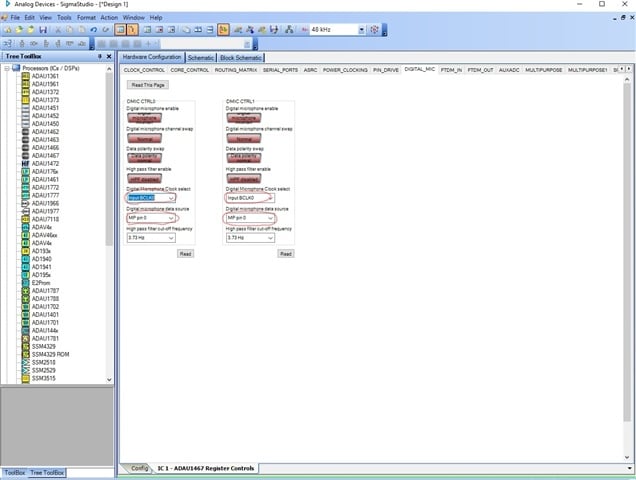
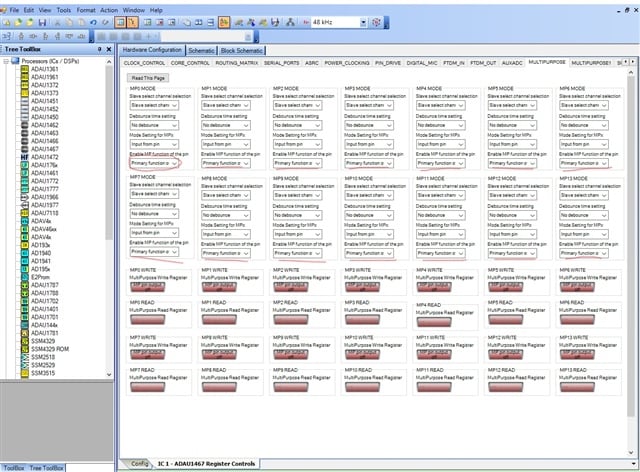
For MPx and DMIC registers , Please refer the attached screenshots.
In this SS , You can choose any two GPIO's for four mic (one GPIO for two mic data) and you can choose the master CLK from any of the serial input or output BCLKs .
In this SS , Please enable the respective GPIO pins as a multipurpose by clicking the drop down menu that I circled .
For more info, kindly refer page no 77 from the datasheet.
Kindly reply if you need any clarification.
Regards,
Harish
Thank yo so much to the help, but I have the new board and the datasheet is bit old for that, i can't able to find all the pins.
Could you please send me the updated datasheet
I am not able to open the product page of ADAU1467
Showing this message
Access Denied
You don't have permission to access "">www.analog.com/.../adau1467.html" on this server.
Reference #18.295b2d17.1648535398.25b38aab
Hello Rajbir,
The file you mentioned is not a datasheet, It's an evaluation manual that is a user guide for ADAU1467Z Eval board. All information regarding the Eval-board and board schematics, connections,etc will be there in the user guide.
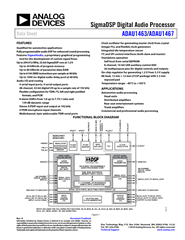
I have attached the datasheet here. Kindly refer this.
Regards,
Harish
Hello Rajbir,
There are no restrictions for this page and no permission required in general to visit the website. I think you have to check with your organization's security connections.
Regards,
Harish
Thank you, but I am also looking for user guide where I can find the pins, because in board its not clear
ok, I will check that
I have to delete the cache,after that it start working
Could you please tell me all the MPx pins and BCLKx pins, I am not able locate which one is MP0, MP1 and so on, same goes for BCLKx pins
Hello Rajbir,
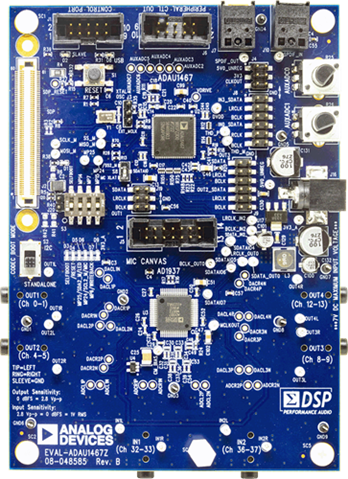
Please try to locate J8 and J9 in the Eval-board. Which are present next to the AUXADC and the power connector respectively. Kindly refer the attached pictures.
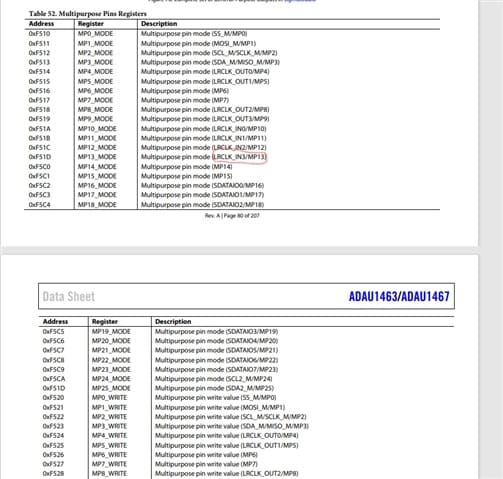
The first picture is the MPx section of the datasheet. Here you can see how and which pins are multiplexed. For example ,In the picture I circled MP13 which is multiplexed with LRCLK_IN3 .Which means it is normally functioning as a LRCLK_IN3. When you configure that pin as Multipurpose in the MP register section, Then it will act as MP13. Like wise all MP pins work.
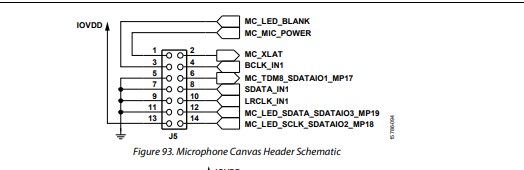
These pictures are from the user guide of ADAU1467Z Eval board. Here you can see that what are all the pins available in the board.
For example , You can see pins from J8 and J9 ,then you can refer the datasheet to find out the respective MP pins.
The BCLKs are just below the LRCLKs in the J8 and J9 port. You can look at the board and figure out the pins.
Kindly reply if you need anything.
Regards,
Harish

Thank you so much for your response,
but look at this picture i thinks pins are mismatched,because the user guide given in analog devices website is for REV 0 and i am having REV B and headers are different in both versions.
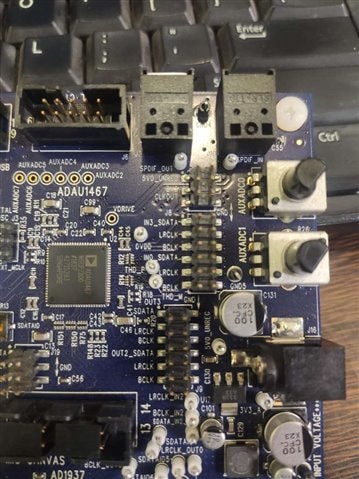
These are the headers for REV 0 which are different, because these are 16 pins and in REV B pins header is 12 pins and also pins are mismatched.
If you have the latest document for REV B, kindly share that one
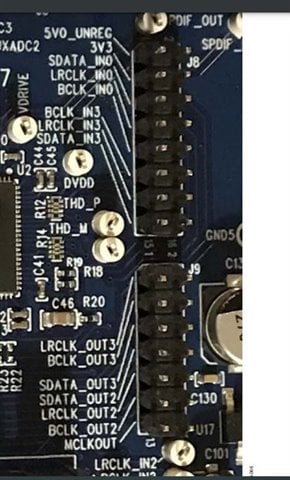
Harishgowtham said:
you can refer the datasheet to find out the respective MP pins.
And one more thing, so these MPx pins are not present with headers, so why eval board is made like this, if we have to find the pins one by one.
Hello Rajbir,
I think the revision doesn't matter now as you have the board. whatever revision it is as you just want two MP pins for PDM mic, Just try to locate the pins in the board and identify it by the name written next to it. Then refer the datasheet for the respective MPx pins and then use it.
For example, In your first picture, if you Choose LRCLK_IN3 and LRCLK_IN0 and their respective MP pins are MP10 and MP13.
The second with different revision also has the same pins LRCLK_IN3 and LRCLK_IN0 OR LRCLK_OUT3 and LRCLK_OUT2. Choose any of these.
And the BCLK is present next to it . Choose any BCLK_INx or BCLK_OUTx as a master. You have BCLK_IN0 and BCLK_IN3 Or BCLK_OUT2 and BCLK_OUT3. Choose any one of these for each MP pin.
Regards,
Harish
There is a draft User Guide that cover the Rev B version of the board here:
RE: EVAL-ADAU1467Z Documentation mismatch. Documentation available Rev.A, Product received Rev.B
Quite a lot of the pins of the DSP come out to headers. Most of the MPx pins are multiplexed and may appear under other names.
Ken
Alright thank you for your support
I appriciate you help, thank you
I have tihis MEMS PDM MIC and I am interfacing this with ADAU1467
clk -> BCLK_IN0
Dat -> Please suggest this pin
3V -> 3V3(Max rating is 3.6 V)
GND- GND
SEL -> GND
Not Able to find all MPx pins in the board
Hi Rajbir,
You don't need all the MPx pins. You just need one MPx pin for two mic inputs.If you want to use all four Digital_Mic then you will need two MPx pins. As I mentioned above " If you Choose LRCLK_IN3 and LRCLK_IN0 in the Eval board then their respective MP pins are MP10 and MP13". You can choose any one of this for two PDM Mic inputs. Choose the MPx pin and make it as a multipurpose pin in the hardware register settings and select the same MPx pin and the BCLK_IN0 as you mentioned above in the Digital_Mic register settings. For these registers settings, I attached a screenshot above. please refer that.
Regards,
Harish
yes, I tried yesterday and got it working
I used the below setting
clk -> BCLK_IN3
Dat -> MP9
3V -> 3V3(Max rating is 3.6 V)
GND- GND
SEL -> GND
Now i was working Noise reduction example, but I am not able to hear any sound,
Please suggest how to use that example properly.
Hello Rajbir,
SigmaStudio is a great tool for troubleshooting. Seems like you have successfully setup the PDM microphones to get a signal into the DSP core. I assume you used some meters in SigmaStudio to confirm that a signal is getting into the core?
So now you need to check the output from the core to make sure your serial ports and codec are functioning and setup properly.
To do that use an oscillator, send that to a volume control ( because the oscillator will be 0dBFS which is full volume ) Then take the output of the volume control and send it out of the core directly. Not going through any of the project for noise reduction. If you do not hear it then it is a serial port or codec setup issue or something like that.
Once you get sound then you can setup your SigmaStudio project to take audio from different parts of the schematic flow and send it to the outputs. Or you can place meters into several places in the signal flow to see where the signal is getting lost.
If you get nowhere with this then attach your project to the post.
Thanks,
Dave T
NLMS filter-Edited.dspproj
Here is my project, its getting the sound supressed but I am not sure about ANC
Please log in to reply.