ADAU1452 devkit and Raspberry as I2S Master
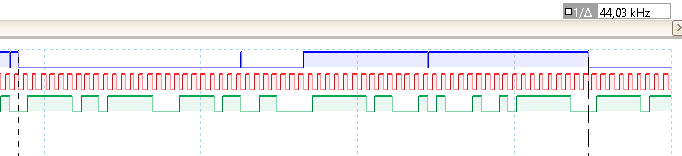
I have added my project. The frist challenge ist to route the signal from SIN3 to SOUT0. The signals of SIN3 are in the screenshot and are driven by the Raspberry. SOUT is connected to a DAC of DevKit. The MCLK pin is connected to BCLK of SIN3 (Raspberry generates master clock). The quarz is disconnected.
I have tested many clock configurations, but there is no sound. What did I do wrong?
Screenshot of RPI signal:
sound_test.dspproj
Audio Signal Processors
adau1452
SigmaDSP Audio Processors
Hello bjoern,
Can you please set your BCLK and LRCLK source of SDATA_IN3 as slave from clock domain 3. It was previously set as slave from clock domain 0 in your project. Can you do that change and try it.
Kindly refer the attached screenshot.
Kindly do that changes and revert us if you are still facing any issues.
Regards,
Harish

8640.sound_test.dspprojSorry, but still not working.
Hello bjoern,
Have you changed your clock out in the clock control? In your previous project it was set as 12.288MHz. The project you attached now is set as 3.072MHz as Clock out frequency.
Could you please change it to old settings(12.288MHz) with our above mentioned serial port changes.The clock control is the usual things that must be taken care of. Kindly do the changes and Please do link compile download once you changed the clock out register. Please try this and get back to us.
Regards,
Harish
I have to use the lower frequency because the Raspberry is the master clock for audio. And if I remeber right, the system clock of DSP has to be synchronized with the I2S clock. My 1st idea was to use ASRC, but it won't work, because I have got a 32 bit datastream. Or are there other possibiilities to connect an unsynchronized I2S stream to the DSP?
Hello Bjoern,
First a few details on your PLL setup.
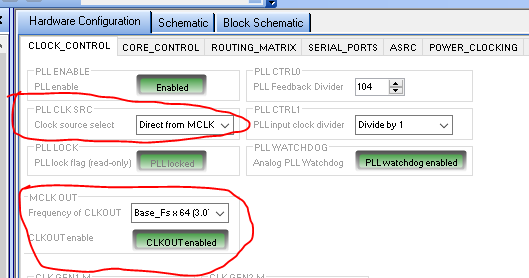
I have two things circled in the screenshot. First the upper one:
You have the PLL CLK Source set to "direct From MCLK" This register is very poorly named. This is NOT the PLL source it is the System Clock source for the DSP internal clock and so direct from MCLK pin means you are running the internal system clock at 2.8MHz instead of 294MHz. HUGE difference. Set this to the "PLL Clock " setting which is the output of the PLL. You have correctly setup the PLL for this very low input frequency by setting the divider to 104 and the input divider to 1.
The second register I circled is the MCLK OUT that Harish already mentioned. Set that for the Base_fsx256 so it will produce a 12.288MHz clock. Actually, you are running at 44.1kHz so any of the settings that say 48kHz will actually be 44.1kHz so the output will not be exactly 12.288MHz, it will be 44.1 x 256 which is 11.2896MHz. But this is all fine and will work out.
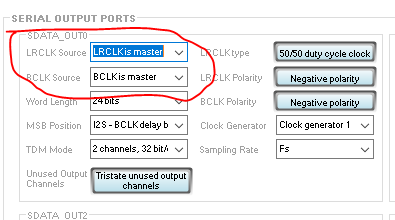
You did not say which exact eval board you are using but almost all of our eval boards have the AD1938 codec which is setup to be a slave. You need to run the clocks as a master to get output. On the eval board I just happen to have setup here I only need to set Serial Output Port 0 to be a master for bit clock and LRclk. So set those up.
I also changed your project to have an oscillator and a switch so you can test only the DACs and then work on the serial input. It helps to take these one at a time. It also shows the power of SigmaStudio for troubleshooting.
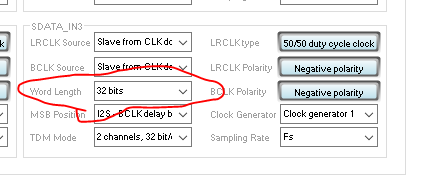
Now you did setup the word length to be 32 bits but you have to do more to actually get 32 bits into the core.
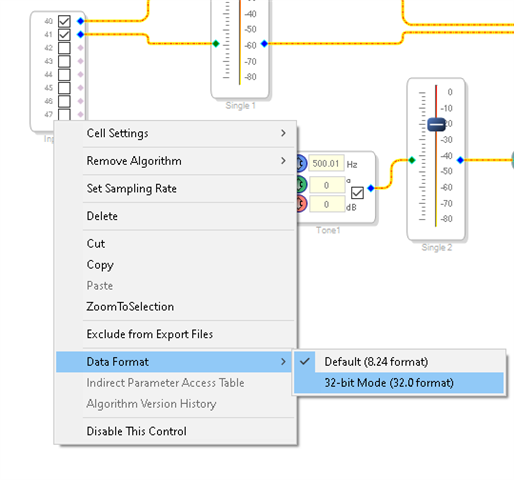
So after setting the serial port to 32 bits, you have to disable the truncators that take the serial port data and send it into the core as 24 bit data. This is done on the schematic page. Right click on the input block and set the data format to 32 bit.
Here is what it looks like:
This will bring in the data as 32 bits.
You will have to lower the level most likely before you send it out to the DAC. The DAC is still set to 24 bits because it is a 24 bit DAC. So put in meters in your project and you will be able to see what the levels are in the core before you send it out.
I also added some meters to your project so you can see what is going in inside the DSP.
8640.sound_test-DT_Edits.dspproj
I attached my edited project. I think this will work but I cannot fully test it because I cannot easily replicate your setup.
Dave T
Please log in to reply.