Adau1701 equalizer selector
I am new to adau1701. I want to design a dsp amplifier with Bluetooth(BT) and microphone inputs. Also for singing karaoke. It should be 3 presets for the equalizer: Flat, music and vocal. Which can be selected through rotary switch. And the mono mic input should have reverb for vocal. It could be a bass enhancements before output too. Any helpful tips will be appreciated.
Cheers
Audio Signal Processors
Adau1701 equalizer
SigmaDSP Audio Processors
adau1701
Hello Xtal,
The ADAU1701 can easily do the EQ you have described. Use its Index Selectable Filters and various GPIO options. I (and likely others here) would be happy to help with implementing this feature. It's the other stuff you mentioned which makes me wonder if the -1701 is the best choice for your project. Here's why:
Microphone mixing -- The -1701's ADCs are primarily designed for line-level inputs, so you'll need to design hardware mic preamplification and mixing before them.
Bluetooth -- The -1701 lacks the Asynchronous Sample Rate Converters (ASRCs) needed to properly implement an external digital input. You'll find several 1701 - BT discussions on this forum, including some workarounds. IMHO, the easiest way is to use a BT module with an analog output -- in effect, a rudimentary ASRC.
Reverb -- the -1701's SigmaStudio toolbox doesn't include a Reverb function for good reason -- Its 42 mS delay memory is too short for a proper reverb. A workaround which reuses the delay memory 4 to 5 times over works well with guitar -- it has not been tested with vocals.
Key Changer -- Don't try using the stock Pitch Modification Block for this, it sounds terrible.
Best regards,
Bob
Thank you Bob
I have to inform you that I will use the Wondom Jab4 board. Which has BT integrated. And for mics will use a preamplifier mic before the analog input of the Wondom. I saw your delay block and maybe I will try it for mics. Since it will be used for karaoke like you mentioned, the reverb effect isn't professional but karaoke alike.
Yes I would be happy if you can give a sample block which can be an initial starting point for me to select at least 3 equalization through selector switch. Also beside through equalization (parametric or graphics), to enhance bass/low frequency, is the bass enhancement good choice? How about the loudness feature?
Thanks in advance
Cliff
Hello Cliff,
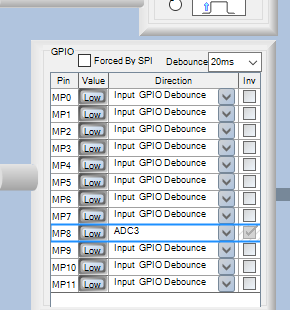
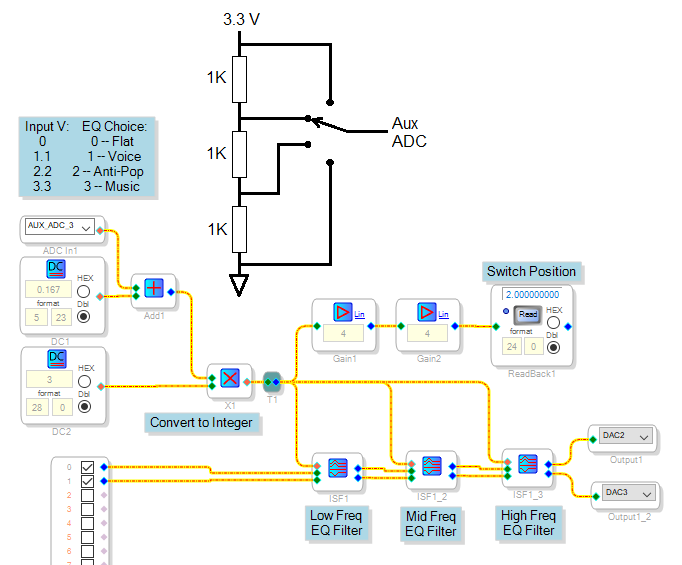
I'm afraid I'm not familiar with the Wondom board, however here's an example of an EQ setup with four choices. Download the project and click on the center icon of each Index filter to see its choices -- you're free to modify these as desired. In operation, the filters are selected by presenting a voltage from zero to 3.3V to the Aux ADC input. I used Aux ADC 3 since it's wired via MP8 to a pot in my ADAU1701MINIZ eval board, you'll need to see what MP pins are already used in your Wondom board and which ones are available. Then set up that MP pin in the Register Control tab (under Hardware Configuration) for the Aux ADC you end up using. Also change the audio inputs and outputs as needed.
You don't need the Gains and Readback to run this, but it's handy for troubleshooting.
To understand the math which converts the Aux ADC output (0-1.0 decimal) to the 0-3 integer needed by the index filter inputs, first look at the number formats of SigmaDSP. In general, the more you play with the many blocks in the Toolbox and try out simple projects to test them, the more you'll enjoy working with SigmaDSP.
Best regards,
Bob
4-choice-EQ.zip
Thank you very much Bob.
You are right, the more we play the more we enjoy the SigmaDSP. I always need help for further enjoyable developing projects. I will include the 4-choice-eq and the delay projects and will back to let you know how it works.
Best regards
Cliff
I was trying to implement this, and I have few questions.
1. Is DC-3 linked with number of ISF? e.g If I add one more ISF, should I change the value to 4?
2. Assuming we have 3 ISF, can we have only 1 filter in 1st ISF and then 5 for 2nd and 2 or 4 for 3rd?
3. Filter present in 1st ISF must also exist in 2nd 3rd ISF?
4. Can filter 1 on ISF be a picking and then same filter in next ISF be something else (tone for example)
Reason i am asking this is, I created a same schema with reference to your diagram. Changed the DC values accordingly (0.167/5.23 - 3/28/0) and then added 3 ISFs. Randomly changed the values of filters in each ISF and the when I was running the program, while I switched from 1 to 2 ISF from changing the potentiometer value, it worked, but when I switch to 3 from 2nd, I get big pop up sound and sound stops. Everything works fine when I copy paste this from your project.
Best
-Mayuresh
Hello Mayuresh,
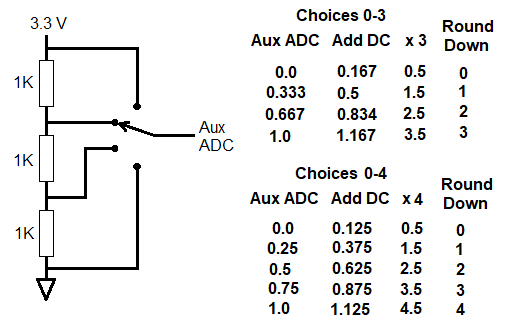
The original circuit as shown had four switch positions with curve 0 being flat plus curves 1-3. Each Filter block includes four curves labeled 0-3, corresponding to Index input integers 0-3. When using any index-selectable blocks in SigmaStudio, always think of zero to (N-1) instead of 1 to N -- this fixes many errors. Thus the resistor string, rotary switch, Aux ADC and math must reliably produce an integer from 0-3, according to the switch position. The table below shows how the math works:
Integer multiply always rounds down, which is why source DC1 is added. It moves the input to the multiplier squarely within the middle of the round-down range so that the thing works even if the Aux ADC readings aren't perfect. In the general case, for N choices, the proper value for DC1 is 1 / 2(N-1), and for DC2 it equals (N-1) where N is the total number of choices including Choice 0. Thus if you add another curve, N becomes 5, DC1 is 0.125, and DC2 is 4. Note that N refers to the number of curves in the filters, not the number of filter blocks. You can add more Index Selectable Filters, each with four curves (0-3), without changing the DC sources. For any given index, you can take a filter out of the path simply by setting the appropriate curve to flat. This allows you to have a variable number of effective filters in the path.
When troubleshooting circuits of this kind, you can substitute a plain integer (28.0) DC source directly driving the filter index pins just to see if the filters are working as desired. If you're using a USBi to directly connect to SigmaStudio, you can also include the Readback -- the two x4 multipliers preform a four-bit shift needed because the ADAU1701's Readback register truncates the lowest four bits. When you experienced a pop and no sound, it's likely that the integer index to one or more of the Filter blocks exceeded its limit according to its highest labeled curve.
As for your remaining questions concerning more complex filtering arrangements, explore the other kinds of index filters available to see if any provide a suitable solution. You can also select among filters with MUXs, although this burns instructions since the DSP executes your whole schematic including deselected paths.
Best regards,
Bob
Hello Bob,
Thank you for the detailed response. I have understood the concept of DC and round down, and it will help me a lot in coming day.
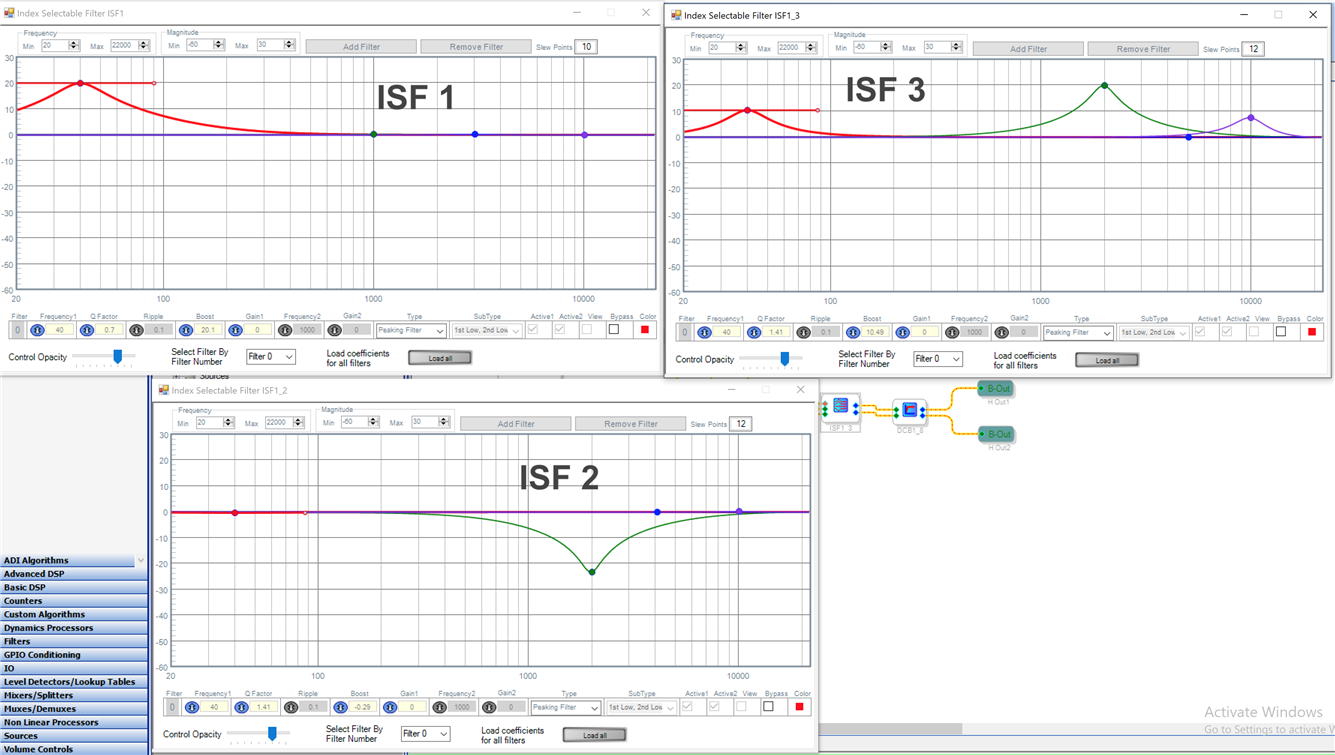
Sticking with the same example, (see image) I get moderate bass response (40hz) at 0 (potentiometer at 0),moderate at 1, neutral at 2. But when I try and increate the BASS at 3 (potentiometer at extreme right), it doesn't work. Since we have 4 curves & 3 ISFs my earlier understanding was for each Round Down value, system will switch to the next ISF. But it seem my understanding is wrong, as Round Down values are linked with the Curves and not ISFs. I am little confused on how this logic works. If you could help me understand this it would be helpful.
Thanks
-Mayuresh
Hello Mayuresh,
If I read your graphs correctly, it appears that ISF3 has more curves than the other two. Thus, if you increase the integer index to access ISF3's highest-numbered curve, the other ISF(s) may go out of range. To fix this, make all your ISFs with a full set of curves. If you don't want a ISF to filter at a given pot setting, make that curve a dummy curve (flat). If all else fails, simplify your schematic to just one ISF and get it to work as desired before adding more ISFs.
You can get quite creative with the way you arrange your ISF(s) and the index math. For an example of a ISF with a crazy number of curves selected by several pots with lookup table logic, see this post.
Best regards,
Bob
Hi Bob.
Thats exactly where my confusion is. As you can see, I have 3 bands
40hz
4000hz
10000hz
As you have earlier explained. potentiometer is linked with these 3 and not with ISFs. So if I have to boost 40hz at ISF1, and then lower it down at ISF2 and then increase it again in ISF3, then do I need to have 2 40hzs in ISF1 and 2? First at 20(boost) and other at 0 (bypass)? So my total number or bands will increate from 3 to 4 and hence also the DC value from 0.167-5/23 to 0.125-5/23 and so on?
Thanks
-Mayuresh
Hi Bob,
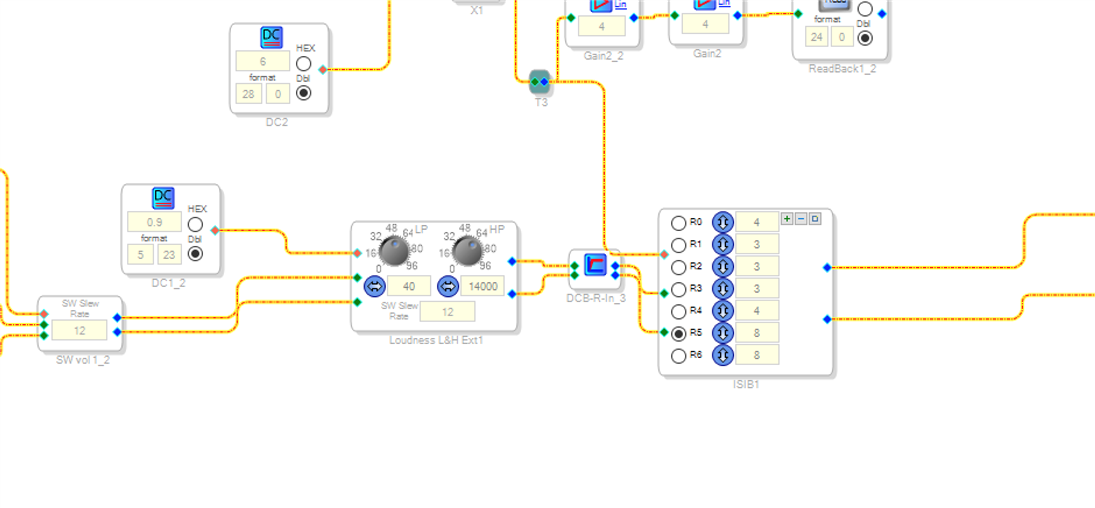
Instead of earlier ISFs i am now using following ones. These are little better for me to understand. With these I can identify potentiometer value change by R1 R2 etc and add multiple curves for each R1 R2 and so on. I hope I am correct. Thank you for your help so far.
Thanks
-Mayuresh
Please log in to reply.