Cannot connect symbols like phase inverter or level indicator
Hi
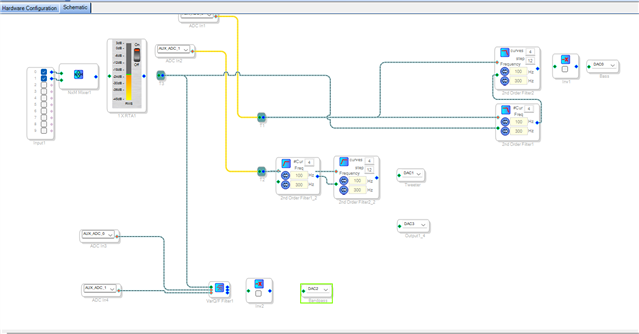
I don't know what I am doing wrong. I would like to connect a phase inverter between the filter and the dac, but I can't. Same problem with the level indicator. Any help/hint would be highly appreciated.
Regards, Christoph
Xover.dspproj
Hello Christoph,
You have two physical DSPs in your project and I assume on your PCB. I am going to add a few details here that you know but others reading this might not know about.
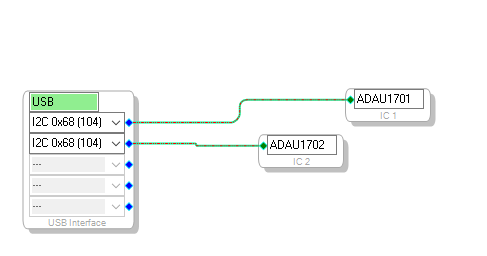
Here is a screenshot of your config page:
You have the two DSPs connected here which is fine. SigmaStudio is designed to be able to do this. I did notice that you have both DSPs set to the same exact address. This will not work correctly. SigmaStudio will think it is programing one of them but will really be programming both of them. Then it will try to program the other one and again, it will program both of them. Then you also will not be able to individually read from the parts so meters and readbacks will not function correctly.
So you MUST set these to different addresses and then you MUST set the address pins on the actual parts correctly.
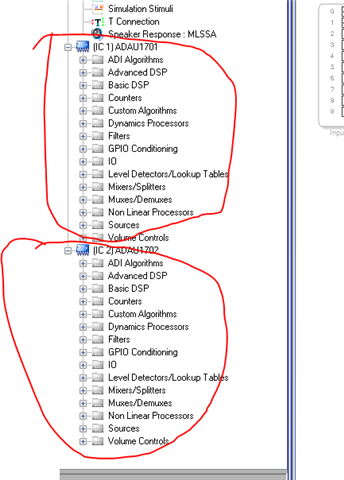
Then in the Tree Toolbox you will see the two different parts shown in the toolbox.
You must pull the blocks out of the correct DSP for the intended signal processing to be done by that DSP.
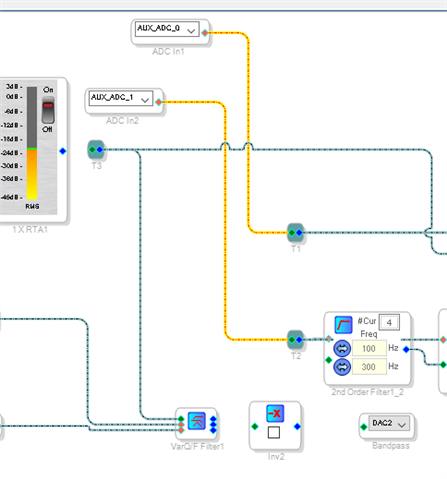
Note in your schematic you can see different colored wires:
This feature was to differentiate between the different signal paths in the different DSPs. However, there are some bugs in the implementation so you cannot always go by the color. Note that the color of the wires changed once it went through the "T" connection.
The input and output blocks are always associated with the DSP that it was pulled from in the Tree Toolbox. You cannot change it. However, you can change it for the other blocks. Assuming they are for DSPs in the same family of DSPs.
Let me show you.
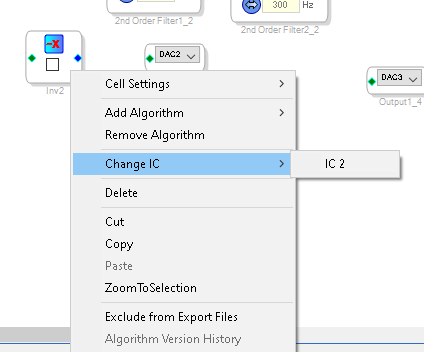
I right-clicked on he signal invert block and this menu came up. You have a choice to switch IC
Look at the screenshot. You will see that it says IC2, this means that it is currently set to IC1 and you can change it to IC2 if you like.
The output block that is set to DAC3 must have come from IC2 in the library. Because you cannot make the connection.
If you change the IC of the signal invert to IC2 then you will be able to connect them.
You can ONLY connect signals to and from the same IC, you cannot magically ship a signal from one DSP to another through the ether. These are two different physical DSP parts. If you want to send signals back and forth between them you have to connect the serial ports between the two parts and route the signal to and from the digital serial ports.
SigmaStudio allows you to program a system of DSP parts all in one project and will program them all at one time but they all have to have different addresses and all have to be connected to the same I2C bus.
I may have missed some details to explain so ask more questions if you need.
Dave T
Please log in to reply.