Read LevelRTA over I2C?
Hello Again,
as in my former post, we want to read over I2C again. This time it is a 11 Band Level Detector RTA with outputs.
As we need the RMS Levels of each Band for our graphic EQ display, we want to read this information via I2C to our MCU.
Where can we find the correct register to read the values of this outputs?
Thanks and
Best regards

Hello Stomper85,
It would be helpful if you include your project in your post. It saves me from guessing which block you are exactly using and the time it takes for me to build up the project. Then I can point you to the exact location of the data.
You did not mention which processor you are using, they are mostly the same but there are some exceptions.
There are some posts which cover this information already on the forum. There is one post here which is about the compressor but it does talk about how to read the level meters. Go to the link on my response. Then in that post at the bottom is a link to a document that also talks about reading meters. There are other details in these posts that might prove handy which is why I am having you link through them.
(+) How to read the level in compressor? - Q&A - SigmaDSP Processors and SigmaStudio Development Tool - EngineerZone (analog.com)
This next post goes into more detail. It is for the ADAU1452.
(+) Reading meters with a controller on the ADAU1452 - Q&A - SigmaDSP Processors and SigmaStudio Development Tool - EngineerZone (analog.com)
So let me see your project so I can see what processor you are using and which exact blocks.
Dave T
Hello Dave,
thank you very much for your quick reply. Sorry for my late reply, we struggled because of corona... but we are now back to business.
We are using ADAU1701 as DSP Processor.
I attached you the SigmaStudio Project files.
Would be nice if you can give us a hint.
Best regards
MonkeyCabV1.dspproj
Hello Stomper85,
Thanks for the file. I was helpful.
The issue was with the decay value in the level designer window. You had it set to 0dB/s. That is really a non valid setting. 0dB decay means the level will not change ever. So set these to a value that reflects how you want the display to look and also how often you will be reading the values. If you set it too fast it will miss some peaks.
Your question on how to use the block and read the values.
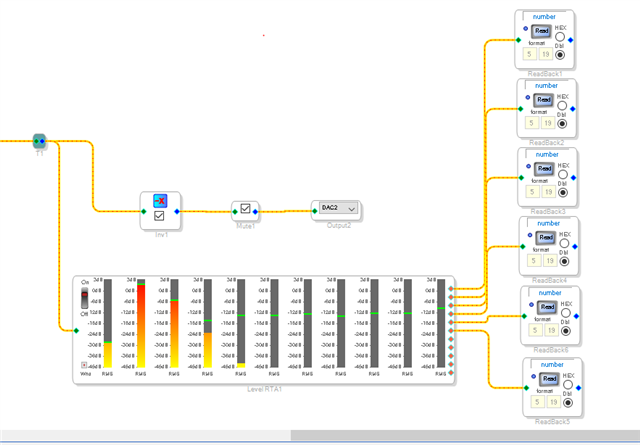
The orange/red output pins are the output of each filter that is rectified and the RMS value obtained based on the time constants settings. So you need to place a bunch of readback cells to read the level of each band.
Like this:
Then to actually read the data in the readback cell is another issue. This was one of our really early SigmaDSPs so the mechanism for the readback is a bit clunky and we improved it with all of the newer DSPs.
Here is a post that explains it:
(+) ADAU1701 how to use the data capture registers - Q&A - SigmaDSP Processors and SigmaStudio Development Tool - EngineerZone (analog.com)
Dave T
Hello Dave,
I finaly wanted to implement the display with the graphic EQ but it looks like that there is a bug in the Level Detector Block with RMS Outputs. I put only one single RMS output in the block to ease it a little bit.
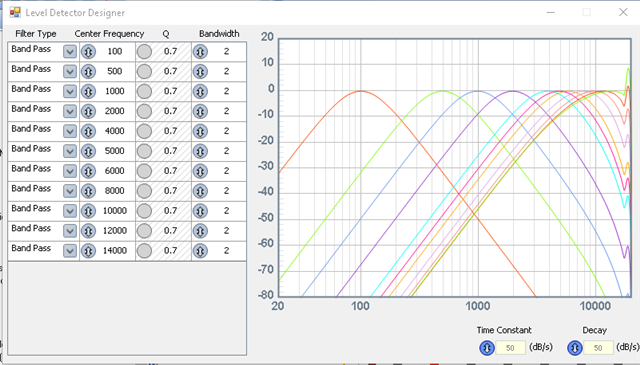
As you can see I set center frequency of my band pass to 500 Hz.
Expectation: Doing a frequency sweep over full band, the output value of the level detector block must be max at given center frequency. So I should see level of this value rising on rising frequency. Reaching the center frequency has max value and after that falls back down slowly.
Now I write the output to a writeregister block and read that value with my MCU from the writeregister address.
Without knowing the exact format of the values I read from DSP there should be one of the bytes growing up until center frequency and than fall back down.
Doing so shows that center frequency must be 1000 Hz, not the setup 500 Hz. Watch this youtube video where I demonstrated the behaviour.
You can see the code snipped in the video too, but reading 4 bytes of data (Byte0 - Byte3) and output it to the console shows that indeed the Byte1 and Byte2 behave nearly as expected, but the max value is at 1000 Hz. Not 500 as setup.
First thought was that I have to init the cell separately so I wrote the b0, b1, b2, a1, a2 again (no Safeload but normal, but should be no difference).
But same problem.
Is it a bug or am I doing something wrong?

Hello Stomper85,
I think you have the sampling rate set wrong somewhere. Either in the top of SigmaStudio,
Or in a register or the PLL pins are not set properly or the frequency of the master clock is not correct. all of those things need to be setup properly to get the sample rate to be what you are expecting.
Dave T
Please log in to reply.