Sigma Studio ignores SPI Clock setting for ADAU1452 SPI boot EEPROM causing programming check and code execution fails
updating to include the cause: Sigma Studio ignores SPI Clock setting for ADAU1452 SPI boot EEPROM.
-------------------------------------------------------------------------------
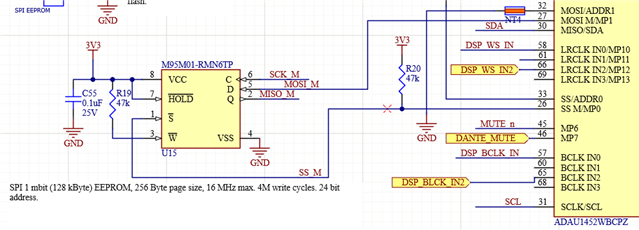
Have a strange problem with self boot. This worked fine on Rev 1 PCB but is failing on Rev 2 board. Here's the schematic section:
The DSP is clocked by a 24.576 MHz oscillator.
steps:
change jumper to self boot low
download program (it flashes a LED on the board so I can tell it's running)
use the Write Latest Compilation Through DSP option
use the Check Latest Compilation Through DSP option
get index 57 expected FF read FE (Rev 2 board, Rev 1 board no error)
change jumper to self boot high
power cycle
program doesn't run (Rev 2 board, Rev 1 board runs)
Registers ->CORE_CONTROL shows software panic.
If I dump the capture window from the programming step and the check step the contents being written and read match.
Assuming index 57 is a decimal count of bytes starting from 1. Here's the contents of bytes 51-60 I'm getting with the Check (assuming it's actually reading the EEPROM):
0x00,0x00,0x00,0x00,0x07,0xFF,0xFF,0xFF,0xFF,0xFF,
I've looked at the the SPI signal on the scope and they look fine. I added a parallel termination to the clock just to see if it made any difference. I've set the SPI clock speed to 4 MHz.
The Rev 2 board uses a different supply design for 3.3V but I've checked that and it's fine in terms of voltage and noise.
Applications loaded to the DSP via the USBi over the I2C port work fine, no funnies noticed with the DSP.
Signal routing for Rev 2 for the SPI EEPROM was unchanged from Rev 1. It's been tried on three Rev 2 boards and all behave the same.
Is the check command displaying in the capture widows what the EEPROM contents that it's reading vs. the contents it expects?
My next step is hook up a Beagle and capture the entire programming and comparison sequence and see exactly what's going on. Before I do that I was wondering if there's some explanation and/or other things to check?
Edit Notes
added cause of symptom, but can not find a way to fix.
[edited by: Brewster at 5:10 PM (GMT -4) on 13 Apr 2022]
Audio Signal Processors
adau1452
flash
spi
booting
SigmaDSP Audio Processors
Show More
Hello Brewster,
What is different with these two revisions of the PCB?
Are you using the most current revision of SigmaStudio and tested both revisions of the PCB with the same project and the same revision of SigmaStudio?
Dave T
Hi Dave,
Using SS 4.6, and yes on the "same everything" between Rev 1 and Rev 2. Another bit of information: The board I have designed is 8 channels. The DSP program is a basic in to out pass through of the I2S data; no processing other than a cross bar router.
Another engineer took that 8 channel design and cut it down to 4 channels. Both boards were assembled at the same time by the same assembly house. The 4 channel one works fine in terms of self-boot. It is a different layout due to form factor issues, though both are 6 layer PCBs.
On the 8 channel Rev 2 PCB the placement and routing is pretty much the same; there was a design rule change to increase clearance to flooded planes. The 4 channel version didn't flood ground. I did look for a place where the flooded ground change might have left something disconnected but DRC passes and my manual check doesn't find anything. The DSP, when booted over I2C via USBi, works fine.
Here's what the area around the flash and DSP look like; the SPI header is normally a DNP item.
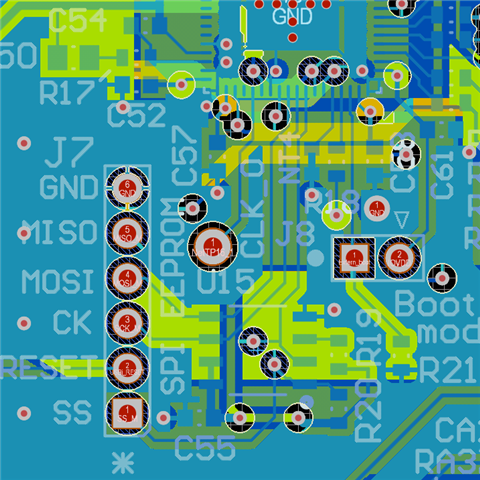
and the corresponding layout
You will see an oops that I missed - the thermal pad for the DSP ended up with thermal reliefs to the ground on the top layer. But the ground plane is layer 2 and everything is tied to that.
The changes in Rev 1 to Rev 2 were in the supplies with this design now using the power supply design originally done on the 4 channel version. There was a buffer added for the ADC's I2S. The I2 address was changed from 0x70 to0x 72 (but I strapped it back to 0x70 as a test). That should pretty much sum up the changes between Rev 1 and Rev 2.
There's obviously some other unintentional change but it's proving illusive.
When running the flash check, where is the compare being done? Is the capture window showing the actual contents? Is the index a decimal number of bytes starting from 1? Assuming those assumptions are right I can't reconcile the mismatch message with what the readback shows.
My next step is trying to figure out if the contents in the flash are wrong (i.e. the failure is on writing) or in the readback by sticking a Beagle on the SPI bus.
I figured before I took that step I would post here in case someone had previously seen something like this and had ideas about where I should look.
Thanks in advance for any ideas you have about where to look.
Brewster

I know the cause now, but not how to fix it...
Previously when I had looked at the SPI signals on the scope I thought they were OK. I failed to notice the scope's timebase. It seems like no matter what setting I used for the SPI clock it runs at 16.8 MHz, which exceeds the flash part's 10 MHz limit with 3.3V supply.
Here's the measurement across 8 cycles.
the settings should be 1 usec clock
Looking at the ADAU1452 datasheet I don't see the register(s) that control the SPI Master clock speed?


Went back through everything again and I can't see where I've done something that explains the incorrect SPI clock. Nor can I find a register setting on the '1452. I must have overlooked something obvious...
A plate of fried anchovies for the answer
Thanks.
Hello Brewster,
Sorry for the long delay. Smelts are my favorite fried fish.
You have run into a "bug" or more accurately, something that was overlooked for a long time. The speed setting in the properties window that is called "Write Speed" is really the speed at which the DSP will READ the EEPROM when it boots up. The actual Write speed when the EEPROM/FLASH is being programmed has been a fixed speed of around 14.7MHz. This is also the speed it uses when "Checking the EEPROM Through the DSP" to verify the programming.
We saw this about a year ago and fixed it. It is now going to use the speed in the configuration window for ALL transactions with the EEPROM. Much better! However, we have not released an update for a long time. We are due to release a new revision in days. It was supposed to be last month but I think they ran into issues with testing the release.
There is a way for you to fix this by using the sequencer and manually changing the speed. It is a little tricky and you will not be able to verify the contents because that code cannot be captured in the capture window. What you do is capture the write to the EEPROM and move it to the sequencer window. Then find where the speed is set and change it. Then use the sequencer to download the program at a slower speed. You will need more details but this gives you an idea of how it is done.
Dave T
Hi Dave,
At the moment the SPI EEPROM is just being used to hold a production test program, and for other reasons turns out we need something controlling the board over I2C so probably going to not use flash.
I was more bothered that something that worked in an earlier rev and on a different board with the same design was failing - was wondering what else might be wrong. I'll chalk it up to luck that the other boards worked.
Given that change of plans on our end I'll wait for the updated release; if it becomes an issue I'll look in to what you suggest further.
Thanks,
Brewster
Hello Brewster,
I did not see this reply from last month. Sorry about that. Send me a direct email if this is still an issue.
Thanks,
Dave T
Please log in to reply.