Problem initializing ADAU1466 by software
Hi,
I have a hardware design with an ADAU1466, connected to a dsPIC Microcontroller through an SPI port. I generate the files for the C language directly with SigmaStudio (I am using the latest version, 4.7) and incorporate them into my Microcontroller project.
I have generated a simple DSP program where I have gains and equalizations. Everything works perfectly. I load the program in the DSP through the SPI of the microcontroller, I change the parameters of the DSP in real time... All correct.
I have generated the same program adding a Delay block to it with just a few samples and everything still works perfectly, but... if I significantly increase the size of the Delay until SigmaStudio needs to use the DM0 and DM1 memory blocks the program does not work correctly . The DSP does not process data.
I don't know what I could be doing wrong. Do you have any information about this problem?
On the other hand, is it possible for SigmaStudio to export the C code without needing it to export all memory? The data arrays take up a lot of space to have a 0 in most of the memory locations. It would be more optimized if the size of the arrays were adjusted to the size of the data needed, optimizing the use of memory in a microcontroller for example. When using delay blocks with a lot of capacity, for example 20K samples we have an 80Kbyte data matrix all of 0s.
Greetings
Carlos
Hi Carlos,
Sorry for the delay.
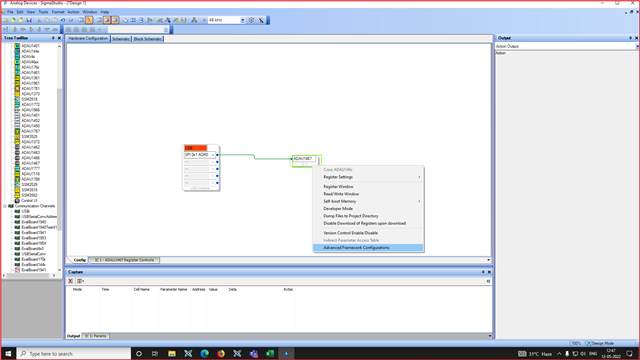
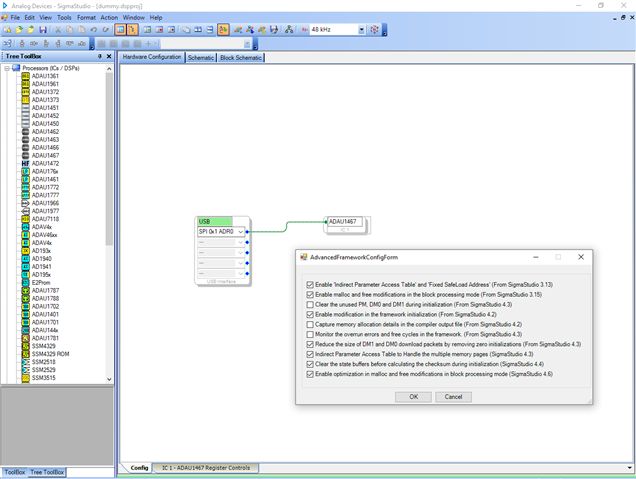
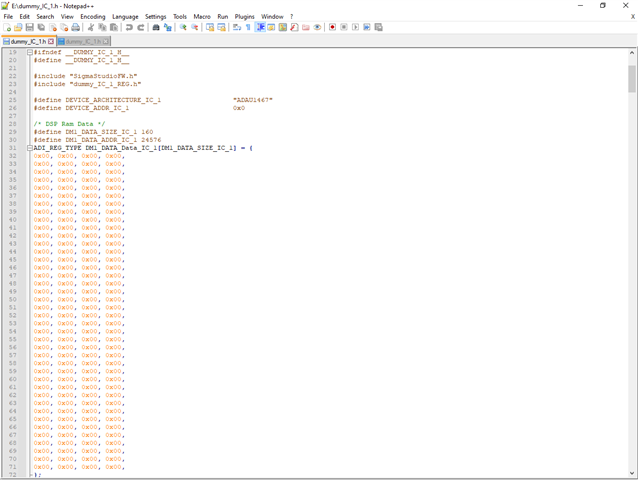
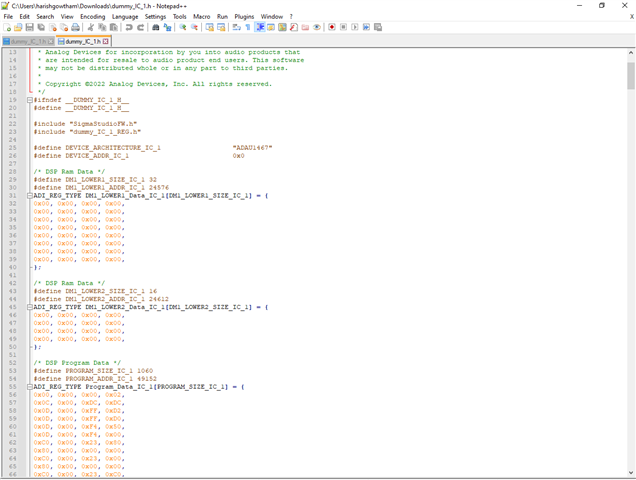
For the data optimization , Please follow below attached screenshots. There are some features in SigmaStudio under "Advanced framework configuration" where you can optimize few things.
Check the box at Reduce the size of DM1 and DM0.. (fourth one from the bottom). And see difference in the exported file after and before checking the box.
I hope It would make sense.
Regarding the delay blocks, If possible Could you please send your project file?
Regards,
Harish
Hi Harish,
thanks for your answer. It has been very good for me.
Regarding the problem that the process did not work for me, I have already solved it. Turns out I wasn't getting an address from a Mono Switch Nx1 block in the correct order. The exported sigma studio file places the directions in the wrong order in some cases, although the positions are correct.... This had never happened to me....
I have already solved it in my code
regards
Carlos
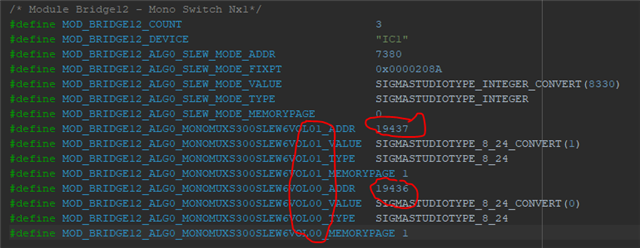
Hello Carlos,
I think the change in the order doesn't make any difference and it doesn't matter. The order of #define in the header file shouldn't make any difference. We have the object name and address correct. We are not sure in which way you used this and about your use case. May be could you please tell us what is the problem here and how did you solve this and what is the issue caused by these change in order, it could help us to understand your issue on this.
Regards,
Harish
Hi Harish,
I do not directly use the #defines generated by Sigma studio. I create an array of constants for each block ordered by channels, this way I can access the different parameters through a loop more efficiently.
I attach an example.
ipROUTEXLRIN[INPUT][MEMORYPAGE or ADDRESS][OPTION]
ipROUTEXLRIN[0][0][0] -> Input 0 | MemoryPage | Analog A
ipROUTEXLRIN[0][1][0] -> Input 0 | Address | Analog A
Now I can change the parameter with a more efficient function.
// In, (MemoryPage | Address), InputType
const unsigned int ipROUTEXLRIN[2][2][7]= {
{
{
// MemoryPage
MOD_ROUTEIN1_ALG0_MONOMUXS300SLEW1VOL00_MEMORYPAGE, // Analog A
MOD_ROUTEIN1_ALG0_MONOMUXS300SLEW1VOL01_MEMORYPAGE, // AES 1
MOD_ROUTEIN1_ALG0_MONOMUXS300SLEW1VOL02_MEMORYPAGE, // AES 2
MOD_ROUTEIN1_ALG0_MONOMUXS300SLEW1VOL03_MEMORYPAGE, // DANTE 1
MOD_ROUTEIN1_ALG0_MONOMUXS300SLEW1VOL04_MEMORYPAGE, // DANTE 2
MOD_ROUTEIN1_ALG0_MONOMUXS300SLEW1VOL05_MEMORYPAGE, // DANTE 3
MOD_ROUTEIN1_ALG0_MONOMUXS300SLEW1VOL06_MEMORYPAGE, // DANTE 4
},
{
// Address
MOD_ROUTEIN1_ALG0_MONOMUXS300SLEW1VOL00_ADDR, // Analog A
MOD_ROUTEIN1_ALG0_MONOMUXS300SLEW1VOL01_ADDR, // AES 1
MOD_ROUTEIN1_ALG0_MONOMUXS300SLEW1VOL02_ADDR, // AES 2
MOD_ROUTEIN1_ALG0_MONOMUXS300SLEW1VOL03_ADDR, // DANTE 1
MOD_ROUTEIN1_ALG0_MONOMUXS300SLEW1VOL04_ADDR, // DANTE 2
MOD_ROUTEIN1_ALG0_MONOMUXS300SLEW1VOL05_ADDR, // DANTE 3
MOD_ROUTEIN1_ALG0_MONOMUXS300SLEW1VOL06_ADDR, // DANTE 4
},
},
{
{
// MemoryPage
MOD_ROUTEIN2_ALG0_MONOMUXS300SLEW2VOL00_MEMORYPAGE, // Analog A
MOD_ROUTEIN2_ALG0_MONOMUXS300SLEW2VOL01_MEMORYPAGE, // AES 1
MOD_ROUTEIN2_ALG0_MONOMUXS300SLEW2VOL02_MEMORYPAGE, // AES 2
MOD_ROUTEIN2_ALG0_MONOMUXS300SLEW2VOL03_MEMORYPAGE, // DANTE 1
MOD_ROUTEIN2_ALG0_MONOMUXS300SLEW2VOL04_MEMORYPAGE, // DANTE 2
MOD_ROUTEIN2_ALG0_MONOMUXS300SLEW2VOL05_MEMORYPAGE, // DANTE 3
MOD_ROUTEIN2_ALG0_MONOMUXS300SLEW2VOL06_MEMORYPAGE, // DANTE 4
},
{
// Address
MOD_ROUTEIN2_ALG0_MONOMUXS300SLEW2VOL00_ADDR, // Analog B
MOD_ROUTEIN2_ALG0_MONOMUXS300SLEW2VOL01_ADDR, // AES 1
MOD_ROUTEIN2_ALG0_MONOMUXS300SLEW2VOL02_ADDR, // AES 2
MOD_ROUTEIN2_ALG0_MONOMUXS300SLEW2VOL03_ADDR, // DANTE 1
MOD_ROUTEIN2_ALG0_MONOMUXS300SLEW2VOL04_ADDR, // DANTE 2
MOD_ROUTEIN2_ALG0_MONOMUXS300SLEW2VOL05_ADDR, // DANTE 3
MOD_ROUTEIN2_ALG0_MONOMUXS300SLEW2VOL06_ADDR, // DANTE 4
},
},
};
It is a very easy way to access more efficiently in my program. I have all the parameter information.
when transferring this information manually, it had written the memory addresses in an incorrect order and it did not send the correct data to some parameters.
Regards
Carlos
Please log in to reply.