Clock Setting
Hi,
I am working on ADAU1467. i don't know ADAU1467 kit is running at full speed. how to do clock setting in sigma studio.
Thank you
Hello harishsharma,
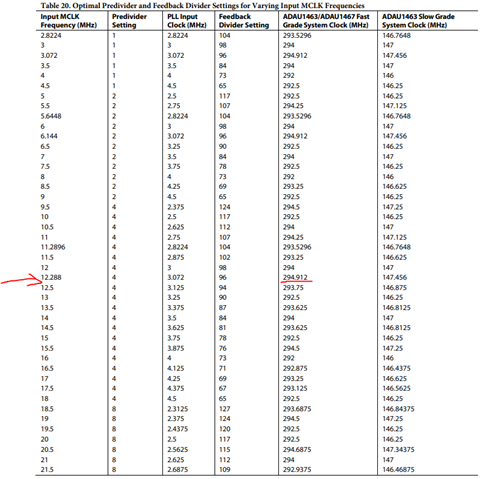
There are several clocks exist in the Hardware register configuration. It all together makes the system.The MCLK frequencies and the corresponding PLL settings that allow the highest number of program instructions to be executed for each audio frame. The settings provide the highest possible system clock without exceeding the 294.912 MHz upper limit The system clock from PLL out this can be up to 294.912MHZ. This can be changed by PLL register settings.(marked as red in the screenshot). You can refer the different combination of settings and their final outputs in the datasheet.
The CGs i.e Three clock generators(CG) are available to generate audio clocks for the serial ports, DSP, ASRCs, and other audio related functional blocks in the system.
The core in this processor can run up to 192KHz Fs. This can be set up in the clock generation registers in the clock control page of register settings. You need to change the N/M values. 1/6 is default for CG1 which produces 48KHZ. If you change that to 2/3 that is N=2, M=3 then it will produce 192KHZ. (Marked as blue in the screen shot).
The change in the system clock (up to 294.912MHz) or the core sample rate(up to 192KHz) will affect the Maximum instructions per sample. The default is 294.912MHz and 48KHz those will give you 6144 instructions per sample. If you either reduce the system clock or increase the Fs then the instructions per sample will be reduced.
For more info you can refer the datasheet from page no : 30. This will give you a clear picture.
And there is a start pulse which is basically an interrupt pulse that tells the DSP when to start processing the next audio sample.(Marked as black).
You have Converter rates (actual fs) which can be configured in the that IC registers. If you are using ADAU1467Z Eval board then the converter is AD193x.
And we do have software Fs , serial port rates and so on. There are a lot of posts available in this forum on that. May be I will link you to one of the posts.
RE: Different sample rates
I hope I have answered your questions. If you still need clarifications then kindly do reply.
Regards,
Harish

Hello Harishgowtham,
i have a doubt that how we are calculating clock frequency.
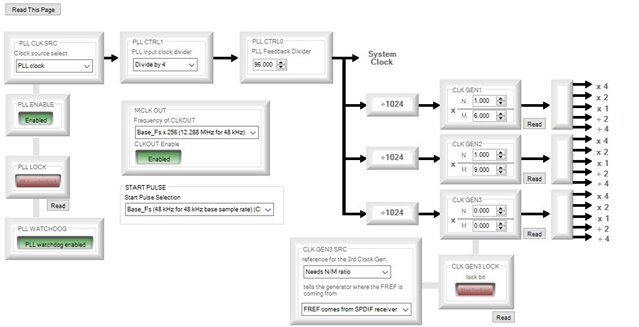
this is screen shot of my system. system clock is first divided by 1024 and then it is multiplied by 1 and divided by 6. For example if Fs is 48 KHz then it will ((48KHz / 1024) * 1) / 6. am i right. i have a doubt that what will be system clock. is it 48KHz or it is Fs * 256.
Thank you
Hi harishsharma,
The screenshot you have attached is a default setting. Which has the system clock 294.912MHZ and core Fs 48KHZ.
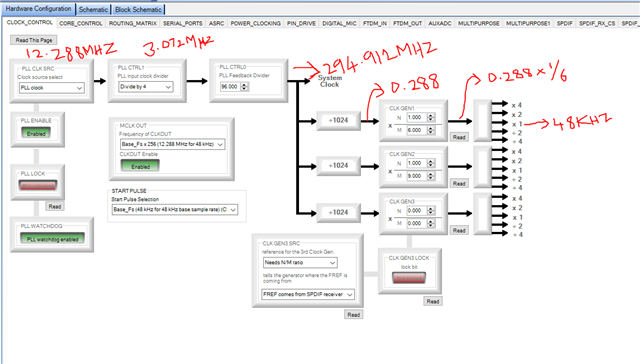
Please look at the picture that I have attached. The 12.288MHZ is the master clock which can either come from an external clock source to our XTALIN/MCLK pin in the board or you can use the internal clock oscillator to drive an external crystal.
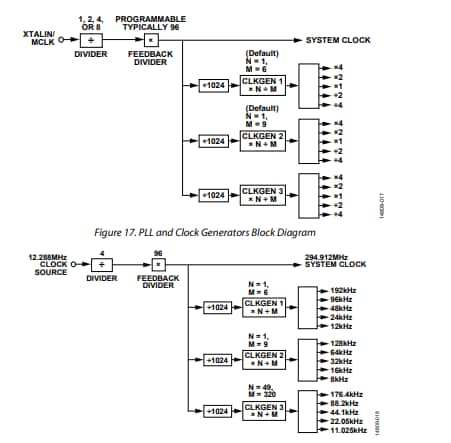
Then the master clock goes through the PLL section. Divided by 4 . which gives you 12.288MHZ/4 = 3.072MHZ. Then multiply by 96. Which gives you 3.072MHZ x 96 = 294.912MHZ. The divider and multiplier sections are configurable as you can see those registers. The various combinations are also shown as a table in the datasheet.
Then the 294.912 system clock is divided by 1024 for CG section. Here you get 0.288.
0.288 x (1/6) = 0.048 which is 48KHZ as CG output. This is the core Fs. If you alter the N and M value you will get higher or lower rates, for ex. 0.288 x (2/3) = 0.192 = 192KHZ.
This 48kHZ default is the rate of audio clocks for the serial ports, DSP, ASRCs, and other audio related functional blocks in the system. You can change this 48KHZ default up to 192KHZ.
The things I explained are already given in the datasheet. As you see the attached SS. The relation between the system clock and the core sample rate in order to calculate the Maximum instructions per sample is also shown as a table in the datasheet. Please refer from page no 30.
I hope I have covered what you asked.
Regards,
Harish
Please log in to reply.