ADAU1467 input selector toggle switch
Hi All,
I'm on ADAU1467 and like to make an input selector using a momentary normaly open switch.
On the board, I use "MP14" pin for the switch input and GND.
3 stereo inputs are availables.
There is the link to get the SigmaStudio file I've made:
https://drive.google.com/drive/folders/19UtvNYmSORkVImngldLIv2LSFQgXZbfe?usp=sharing
I can't make it work...
I'm sure the problem come from the "Pin_Drive" or "Multipurpose" settings in "Hardware Configuration".
But sill not enough skills...
May you please have a look and help me to learn ?
Thanks !
Audio Signal Processors
input
software
input_selector
sigmaStudio 4.7
adau1467
normaly open
momentary
SigmaDSP Audio Processors
switch
selector
Show More
Edit:
I get it "working", I mean, the switch "rotate" on two inputs but not on the three.
Any idea ?
Latest version on my Drive.
Thanks..
Hello JFK,
Sorry for the delay.
You were trying to control the index selectable mux using the GPIO (input from a push button) with the toggle block?
For your three stereo inputs , it just selects first and second but you can't select the third stereo input?
If that is the case then, please note that the toggle block only toggles between two output values. Normally between 0 and 1. Or any other values between 0 and 2,4,..(Based on the bit selected on the drop down menu. If the bit is set as 1 then it outputs 2 ,if bit is 2 then it's 4 and so on).The number format is also a concern., this is for 32.0 format. By this you can either select stereo inputs 1 and 2 (toggles between 0 and 1) or stereo inputs 1 and 3 (toggles between 0 and 2. if you select bit 1).
If you want to control all the three stereo inputs using pushbutton then use a toggle counter block. It increments the value by one every time it finds a rising edge. It keeps incrementing until the value given in the box is reached and then it goes back to zero. For example if the value is set as 3(min). Initially this block outputs a zero which will select the first stereo input. If GPIO outputs 1 (rising edge) to the block, the block outputs 1. which will select the second stereo input. If the GPIO goes low and high again (another rising edge), the block outputs 2, which will select the third stereo input. If another rising edge is detected then the block outputs a zero (because max count three is reached). Please refer the attached model schematics. The readback reads 0,1,2,0,1,2 ... every time when it finds a rising edge (switch turns on from off condition). That would allow choosing all the three stereo inputs based on the control pin.
Note that the input to the block must be a switch (0/1) or a pulse. A sine wave kind of signal will give a undesired output.
I hope this would answer your question. If not, then kindly ask your question with more info.
Regards,
Harish
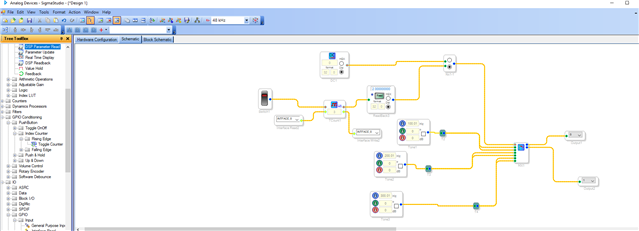
Edit: crossed replys...
Hi,
Thank you, toggle counter was the key.
I now face another issue.
It works when it's in "active: downloaded" mode.
But the switch doesn't work in stand alone via selfboot mode...
Any idea ?
Hello JFK,
Were you saying it doesn't work when you selfboot from an E2prom?
Are you using your own hardware or an Eval board? If you are using your own board then issue may be with data transfer between the chips. If you are using a custom board then you have to take care of every little thing.
If you are using an Eval board then it may be with the selfboot process. please switch off the selfboot switch (S3) before writing to the E2prom. please refer the user guide for the complete selfboot process.
I tried with your setup. It works fine for me. So let us know where you are with this.
Regards,
Harish
Hi Harish,
I'm using a board from MediaWorx (see photos in my Drive).
I selected this board because it reach my technical needs, the form factor is perfectly adapted and it's easy to supply.
It's my first work on this board, that's why my questions are related to my personal Home amplifier.
I need to take it in hands.
The final goal is to use this board for my professional new project of headphone based on electrostatic drivers.
So I guess, this board is correctly designed and it should work.
To flash the firmware, I have followed the ADAU1467 official guide.
Other changes are working, as adding a filter for exemple, it work after a self boot.
The problem occur only on this source selector switch, after a selfboot.
It work when the board is connected via USBi to SigmaStudio when "active: downloaded" mode is enabled.
Thanks a lot for your help.
Hi Harish,
Well, I still don't understand the root of the problem.
The couple TCount/Multiplexer work only when it's connected to Sigmastudio.
But once flashed and "selfbooted", All work except the input toggle.
At a reset of the board (USB unplugged), it automatically switch to "input 0", and the physical switch do nothing.
For the switch I followed AN-951 page 3, I added a 10K pull-up resistor.
I added detailed photos of the setup in my Drive.
3 inputs:
In0: USB1
In1: RasPi
In2: USB2
(All input individually checked and working.)
Hi Harishgowtham Harish,
May you please confirm that my SigmaStudio file/settings, work at your side?
Thanks.
Hello JFK,
Sorry for the delay in response.
Few things to do here.
1) Erase the external memory. If it's a EEPROM , erase it via DSP and confirm there is nothing in the memory. Set the registers properly and link compile download then program the E2prom freshly.
2) Confirm the MP14 pin is selected as multipurpose and as input in hardware register then compile it and then program the memory. That register might not set properly in e2prom. So that it works when connected to usbi and doesn't work from selfboot.
3)To verify the above case ,After selfboot , go to sigmastudio and just do link compile connect and read every register in SigmaStudio and check what the MP pin is set for.
4) Another way is, after the selfboot, just flip the MP pin (that 1 bit) and see if it works. if flipping the MP pin does work then previously it was not getting it. So that you didn't get it working. you can check by this way as well.
Note that initially the slave port is in I2C mode. You have to toggle the CS(chip/slave select) pin three times to put that port in SPI mode. For that just use a read back three times or just use a readback and put it in continuous mode. After that check that register. Read the register.
Note : Before reading every register just save the project and then read the register and see and then close the project and open it again. (Don't save the project after you read, if there is any communication issue then reading every register gets messed up with their original register value.)
To conclude , there is something that goes wrong with selfboot from external memory. Mostly the MP register is not properly set. just do the above steps to confirm that.
Regards,
Harish
Please log in to reply.