Can't communicate via i2c with my ADAU1701 design
I'm using a custom PCB to have Particle Boron (an MCU that works similar to a Arduino) communicate with a ADAU1701 DSP via it's i2c port. I've gotten my firmware to run and communicate between a Boron and a development board version of a ADAU1701, but now that I've built my own PCB, the Boron get's nothing but a passive NACK while trying to ping the ADAU1701. I followed the application circuit from the docs and have double checked but can't find anything obvious. Are there troubleshooting tips you'd suggest or common problems people encounter with my particular setup? I know it's a big ask, but any info might be help. I'd be happy to provide code/designs in order to help.
Thanks,
RK
Audio Signal Processors
hardware
i2c
SigmaDSP Audio Processors
dsp&processors
adau1701
Show More
Hello RK,
Thanks for sending along your schematic to our central Apps support team. They forwarded it over to me. You had posted this in in a space where I usually do not check, you were close but I will move it over. Sorry for the delay.
I do not see where you are actually programming the DSP? Or, are you just not getting that far at this point? Your schematic has no EEPROM so therefore you need to program it with the controller.
Rk4321 said:
Boron get's nothing but a passive NACK
So do you mean that you are not getting an acknowledge from the DSP? That would be a NACK but the word "passive" has me wondering what you mean.
So you need to pull out a scope and look at what is actually being sent to the DSP. You are correct in your code that you are using the address of 0x68 but I am questioning your code? I may be missing something here so but this is what I see in your code:
// DSP_I2C_ADDRESS is: (0x68 >> 1) & 0xFE
SigmaDSP dsp(Wire, DSP_I2C_ADDRESS, 48000.00f, dspResetPin);
First of all, the first line is commented out. So I do not see where DSP_I2C_ADDRESS is being initialized?
Then if it were not commented out, why are you ANDing it with 0xFE after it is shifted? You would not have to shift it at all, just OR it with the Read/Write bit. That is probably being handled by other code and perhaps that code needs to have the address be the 7-bit number? Then just shifting it would be all that is needed.
You are using address 00 for the address pins so you are correct in using the 0x68.
So I suggest you pull out a scope and capture this first message. Verify that you are not getting an ACK and verify that the address is correct.
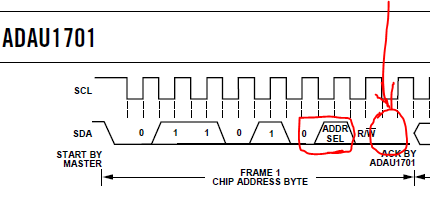
This is what you should see:
The two address bits I circled, they should be zero. Then the ACK I circled and drew the arrow. See it that stays high or goes low as it should. You should see a tiny spike where the data line starts going up but then the DSP pulls it down.
So let's get this part working then move on.
Dave T
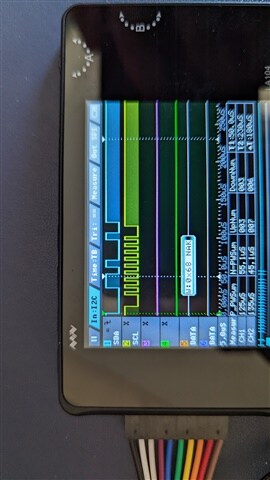
I've attached a picture of my logic analyzer picking up the attempts to ping the ADAU1701. In regard to your other questions:
There is no EEPROM being used, the microcontroller will be programming the DSP, this may have been removed from the code I sent for brevity because we haven't gotten that far yet.
FYI, we used a dayton audio eval board and this code works with that, the code uses a ported version of the Arduino compatible SigmaDSP found here: https://github.com/MCUdude/SigmaDSP
In regard to NACK, ignore the 'passive' wording
In regard to the i2c address, I can confirm this boils down to 0x68 after the library processes it, I'm not sure exactly why it does the bit twiddling. I included the comment line because that's what's provided in the library.
Hello RK,
Thanks for the info and for the screenshot. I also decoded the screenshot and I got 0x68 as well. This confirms that the software is doing what you expect it to do. So it should be giving you an ACK but it is not responding. There are not too many reasons why this is happening so not a lot to check.
1) First, I will ask a question that I found is a reason for a NACK when I am setting up boards on my desk,... Is there power to the part?
2) is the part set to the correct address? Since you are using 0x68, this means that pin 7 and pin 20 both need to be sitting low. Are they? If they are not low then you either change the address to match or change the voltage on the pin.
2) Check the voltage on the DSP. It should be 3.3V on the IOVDD pin. If you are using the USBi then make sure it is set to 3.3V. There is a tiny switch on the bottom of the board.
Not much else could stop it from giving you an ACK.
Dave T
1.) Yea we have 3.3v power on all the VDD pins except DVDD which got 1.8v from the regular
2.) Our schematic has it at 0x68 with 7/20 low.
3.) Same as 1, we seem to have power on everything that needs it.
Hello Rk4321
Rk4321 said:
2.) Our schematic has it at 0x68 with 7/20 low.
Do not assume the pins are actually at that voltage. Are the actual pins both at the ground voltage level? There could be shorts on the PCB either from soldering or from PCB manufacture. The pins could be ungrounded and sitting high because the solder did not flow correctly.
Is power actually on every pin it is supposed to be? Is ground on every ground pin? I know it is a little difficult to test this sometimes but checking on the actual pin is the best way. Do not make ANY assumptions. Assumptions like "I have the signal on the via nearby".
You have verified with the logic analyzer that the controller is sending out the correct address. The only way the part will not respond with an ACK is if it is not actually getting the SCL or SDA signals ( back to bad solder joints) or the address is set wrong or there is no power to the part or no master clock. I am guessing that one of these "signals" is missing. I put "signals" in quotes because I am lumping power and ground in as signals.
Since you have the DVDD regulator output then you probably have AVDD correctly connected. But, are the PVDD or IOVDD pins correct?
There is not much that can stop the I2C state machine from sending an ACK so it has to be one of these details that is missing.
Dave T
I've verified the address and power/ground lines and all seemed to be at the intended levels. The oscillator circuit is tough to verify, does it need to be working to respond to i2c pings?
Hello Rk4321
Yes, it does need the master clock for the serial port to function.
You can always look at the OSCO pin to see if there is a signal there.
The PLL_LF is someplace to look but you need a low capacitance probe. If it is stuck low or high then it is not locking to a signal.
Look at the CM pin and the FILTA and FILTD pins to see if they are up around 1.5V.
That is a test to make sure the part has power to at least some of the part.
If it still does not respond then it is back to either a soldering problem or a bad part. The part does not fail like this often so it is unlikely the part is bad but there always is a chance.
Dave T
Please log in to reply.