PDSP - Link compile download error
Compiler error. Please contact ADI. System.SystemException: RAM
Address exceeds:2048
at Sigma100_Comp.OpcodeValidate.Address_SaturateRAM(Int32ramadr)
at Sigma100_comp.assemblyprocess100.dataram_list(ArrayList Cd_Arr)....
Getting this when trying to link compile download with Dayton KPX and a Dayton KABD4100.
Audio Signal Processors
software
SigmaStudio 3.9 64-bit OS
SigmaDSP Audio Processors
adau1701
Hello
Sorry I missed your post until now.
I think you have a program that is too large.
Check the compiler output file. For the Sigma100 the compiler output window does not function. We added that feature for later SigmaDSPs. Instead, it is in a file. Here is where you find it.
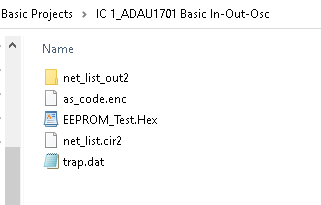
In the folder where the project resides you will see that SigmaSudio created a folder for IC1
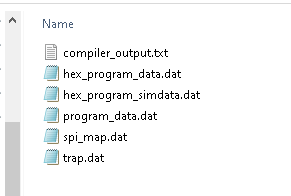
Open up that folder and you will see these files:
Open up the net_list_out2 folder and you will see this:
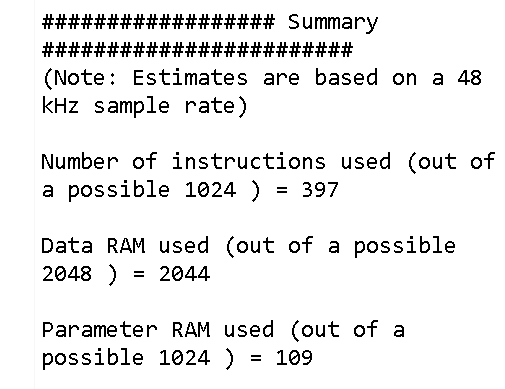
Open up the compiler_output.txt file and you will see the statistics of program and data RAM usage.
I also noticed that you are using a very old revision of SigmaStudio. Have you tried to change to the most recent version?
As I think more about the issue you ran into. You might have run into a bug so moving to a new revision may be a good idea. The other detail is that the project might have become corrupted. I have seen this and backtracking by deleting things you have recently added and then putting them back in from the library might help. Going back to an earlier revision and adding in the changes you made might fix this.
Dave T

I am getting this error on SigmaStudio 4.7 just building the sample program from Dayton Audio (Basic Stereo 2-way Speaker Crossover and EQ Project). The project seems to be straight forward. I haven't changed anything in their sample. The compiler_output.txt file is not generated in teh net_list_out2 folder you mentioned. How do I troubleshoot this?
Hello ShanTheMan,
They have so many different example projects. I am not certain which one it is. The one I just tried compiles fine on my machine. Attach the project into the post.
What board of theirs do you have?
Dave T.
Basic Stereo 2-way Speaker Crossover and EQ Project.dspproj
File is attached. I am using their KABD-430 amp which is a 4 x 30w amp. The other ones seem to compile fine for me too, but I was interested in the crossover and EQ in this project.
Hello ShanTheMan,
I have one of these boards at home as well. It is a great board and sounds good!
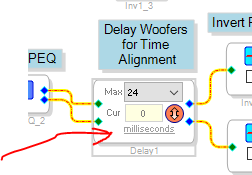
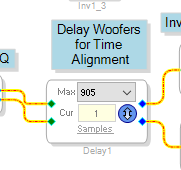
I see the problem. The delay for the woofer is set to milliseconds. I think it was around 24 milliseconds is what it was set for? That is a large number of samples. You do not have a delay pool of memory that large. 2028 words is what this processor has and this delay line is stereo so it doubles the setting.
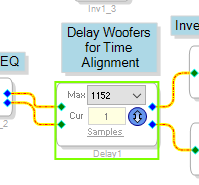
If you click on the word "milliseconds" then it will change to Samples.
When you click it does the translation for you and you see the number is large
1152*2 is greater than 2048. There are other cells that use some parameters as well so it cannot all be for delays. There was around 330 words used by the program. I was able to set it to 905 samples and it uses
2044 words.
Keep in mind that the Woofer delay is set to 1. so you might want to allow some memory for this delay cell as well.
A couple of things I want to make note of.
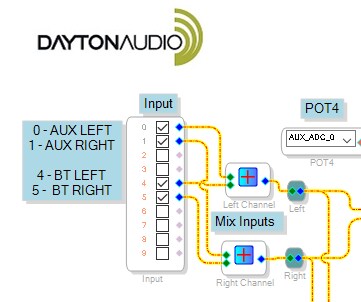
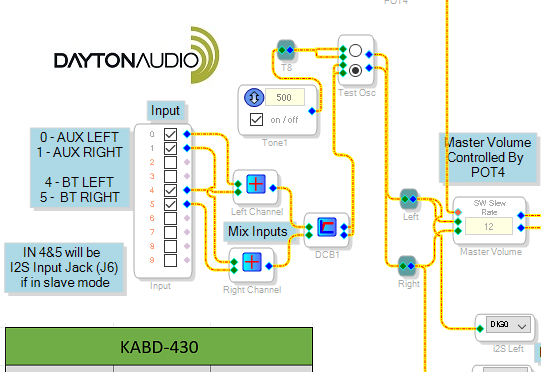
The first is the input to this DSP program from the ADC converters need to have a DC block to get rid of the DC offset from the ADC converters.
Then the other thing I noticed is that usually the tweeter is mounted forward of the acoustic center of the woofer meaning that you need to delay the tweeter not the woofer to time align the drivers.
So with my experimenting with this system I modified their program a lot and I was able to time align the drivers of the BR-1 speakers. I modified the kit to bi-amp it and not use the passive crossover.
I would drop in the program but it is not polished up and I had the external pots for an EQ and also made a loudness control and battery monitoring to turn down the bass if the battery gets weak.
So it is rather complicated. But here is what I did on the input with a DC block:
Note I also put in a test oscillator but be careful, The oscillator is full scale 0dBFS!! for a 1.23 signal.
Dave T

Please log in to reply.