SigmaDSP "Interface Write" from several source modules
Hello, I would like to ask you for help with the following "problem":
I have 2 buttons to control audio volume (volume UP and volume DOWN). I also have a rotary encoder to control the very same audio volume.
As I know, I need to store the value to "Interface" using "Interface Write". But how to do so when I have 2 source modules (pushVol and rotaryVol)? How to send them to the Interface Write module?
Thank you
software
4.7
SigmaDSP

And related question - how to "merge" the other two signals to be used co control the volume?
Hello EDMOQ,
You did not mention which processor you are using... but in this case it will not make too much of a difference.
Here is a post where I explain how they work and there is an example project to demonstrate it.
(+) SigmaStudio v4.6 ADAU1452 Interface Read cell & Interface Write cell - Q&A - SigmaDSP Processors and SigmaStudio Development Tool - EngineerZone (analog.com)
As far as combining the two? I do not see how you would make this work? One has to take precedence over the other? If you think about it more, I think you will see that it has to be one or the other. If you have a microcontroller involved then perhaps you can make a smarter system but it still would be difficult.
It would really come down to which one is active right now and that one would change the setting to both of them? With a sample based processor that is a little tricky. The button pushes and rotary encoder is so slow compared to the sample rate that I just do not see this happening easily. Basically, if one of them changed, then use that new number. You have setup the tables to the same size which is very important. Let me think about this...
OK, So I took on the challenge and stayed late... I have one solution. There may be others but this is one way.
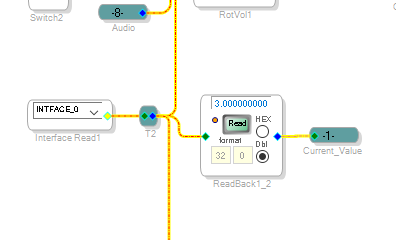
Take the interface read and send it to several places using an Alias
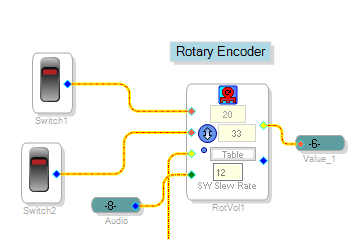
Then I put in a rotary encoder and Up/Down blocks and gave them the alias Value_1 and Value_2
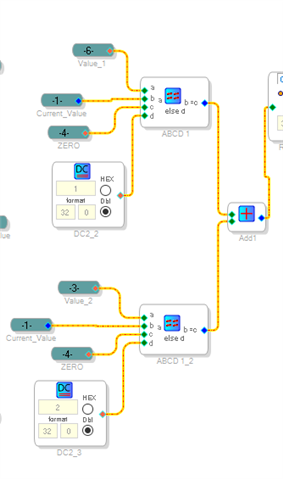
Then I compared each one with the Current Value of the volume.
Then if they are the same I output a zero. If they are different I output a number. For one of them I output a 1 and the other a 2.
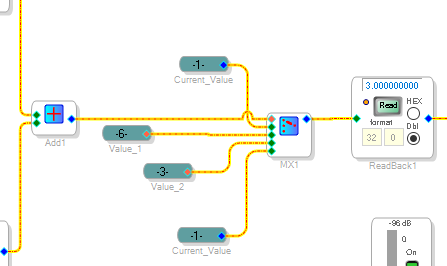
Then I add up the two results. Then I send that to a MUX.
If the MUX is zero then it passes on the Current_Value since it has not changed.
If it is a 1 then send out the changed value. If it is a 2 then send out the other changed value.
If by some strange reason BOTH have changed, then send out the current value. So if you try to do both then nothing will happen but both would have to change during the EXACT same sample period which actually would be difficult to do!
Why it is there is to protect the index from going out of range if that unusual event should ever happen.
Here is the project.
ADAU1452 Rotary AND Up-Down merged together.dspproj
See if this works for you.
Dave T
First of all, thank you so much for your effort and time.
I would maybe be a little more precise in describing my situation and why I do this as I can see your solution is pretty complex and I think it wouldn't be necessary.
What I would like to make - a speaker (using ADAU1701 based DSP amp) whose volume will be controlled by a knob (rotary encoder) placed right on the speaker and also by remote control (UP and DOWN buttons) influencing GPIOs on the input of the ADAU. In case I change the volume by the knob, I need to store the value somewhere so when I consequently change the volume by the remote control, it will continue to increase/decrease the volume right on the number I ended up with the knob.
Additionally, if I can store the value so it will be remembered after resetting the system, it would be great...
Hello EDMOQ,
From what you detailed here, my solution is still correct and is what you would need.
For the subject of remembering the setting after reset, you will have to setup the hardware correctly. So it is a bit of a complicated issue. Look at these posts to get an idea of what is needed. This post has links to other posts.
(+) How to save volume / treble / bass into EEProm on self-boot mode of ADAU1701? - Q&A - SigmaDSP Processors and SigmaStudio Development Tool - EngineerZone (analog.com)
I think there are other options that are not quite as complicated. This person used the WB pin to trigger multiple writebacks so he must have used a controller to toggle the pin periodically so it would trigger a write to the EEPROM.
(+) Where to write in EEPROM "set multiple writeback" ? - Q&A - SigmaDSP Processors and SigmaStudio Development Tool - EngineerZone (analog.com)
Dave T
Please log in to reply.