HDMI -> Multichannel Input I2S ADAU1452
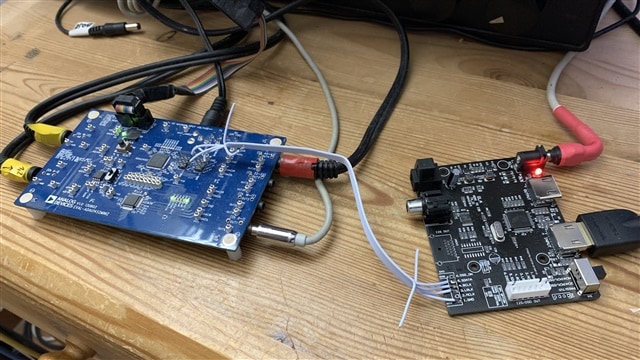
I'm using the I2S (Input_2) of the ADAU1452 to connect to this HDMI board:
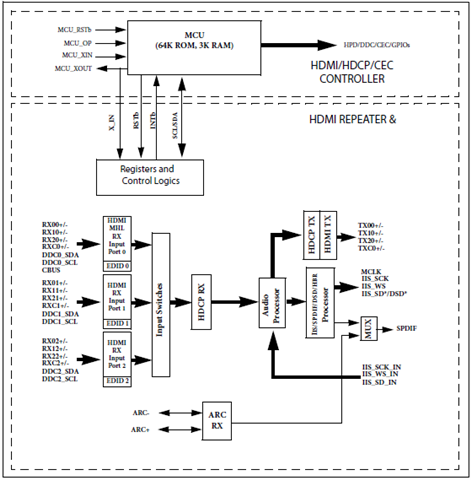
HDMI/MHL dual mode separation to extract audio I2S/DSD/ fiber / coaxial (HDMI to I2S/IIS)
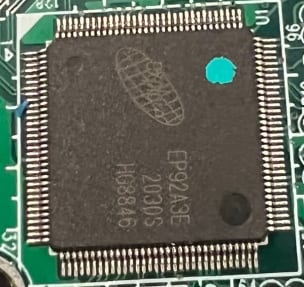
The board has HDMI extractor Chip EP92A3E . It allows to recover the digital audio stream of a digital HDMI source (including MHL)
towards a digital coax port / optical or HDMI (I2S via HDMI).
Setting the board to two Channel PCM it works fine.
But setting the board to Multichannel ( LPCM ) I only get noise on the outputs.
EP92A3E
IC1 Register Controls
Project
Audio Signal Processors
adau1452
hardware
sigmaStudio 4.7
LPCM
noise
SigmaDSP Audio Processors
EP92A3E
hdmi
Show More
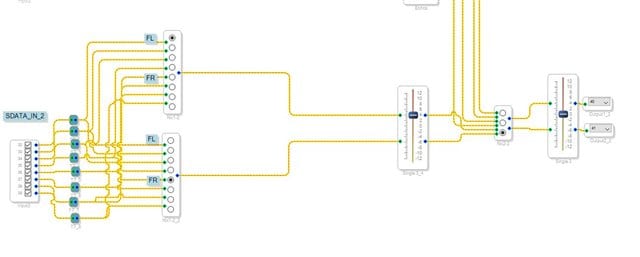
Hello stmoeller60,
You will have to use a scope and see what format the HDMI extractor is putting out. Then setup the DSP serial ports to match it.
They just are not giving you any details of the signal format.
Take three scope screenshots and post them. Look at this post I wrote to see how to take the screenshots and what they should look like. Just be sure to NOT use a single sweep but just take a screenshot when it is running so all the data transitions can be seen.
(+) How to Take Meaningful Screenshots of I2S Audio Signals - Q&A - Audio - EngineerZone (analog.com)
Dave T
Hi Dave,
which Audio Signal should be running ?
Should all Audio Channels have the same Audio-Signal ( 8 Channels ) ?
Hello stmoeller60,
I am not sure I understand your question? If you set it to the LPCM mode it should use some sort of TDM data stream. But it will depend on the audio that is on the HDMI stream. I am not an HDMI expert but I would think that it will depend on the video source. So until you look at the actual stream on a scope you will not know exactly what is there.
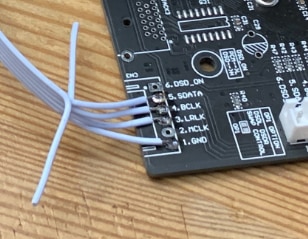
I looked at your picture and took a small screenshot of the connections.
These are the signals you need to look at on a scope. I did notice a couple of things.
1) You are not using the MCLK. This means that you will HAVE to run all the audio through the sample rate converters. If you do not want to do that then you will have to send over the MCLK over to the MCLK_IN pin of the eval board. However, the eval board you have is not setup to easily take in an external master clock. I would have to look at the schematic to see how to do it. So I suggest you use the sample rate converters.
2) if you plan to use higher sample rates, I would make these connections a little differently. What you did looks good and is clean looking but it would be best to run a ground wire on the ribbon connector in between each clock signal. So you would use six wires.
1=GND
2=LRCLK
3=GND
4=BCLK
5=GND
6=SDATA
There are enough ground pins on the eval board header. On the HDMI board side you would just twist them all together and tie to the ground pins.
This will help keep the signal integrity a little better. So you should be able to get to 96kHz but 192kHz may still be difficult.
Dave T
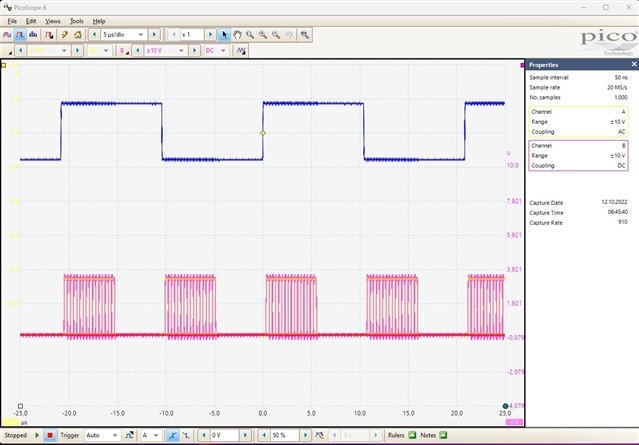
LRCLK ( Blue ) + SDATA (red )
BCLK ( Blue )+ SDATA (red )
I'm using Pico-Scope , which has only 2 Channels.
I played a movie on Apple TV and send it via HDMI cable to the HDMI-PCB.
The Apple TV Audio Format is set to "Auto" , which means that the Audio is decoded and send as uncompressed multichannel audio.
I don't intend to use higher sample rates ( only 48khz )
There is no input at the 1452 for the MCLK of the HDMI-PCB. Do I have to setup the 1452 for using the samplerate converters ?
My impression is that the signal quality via the short cable is good , or ?
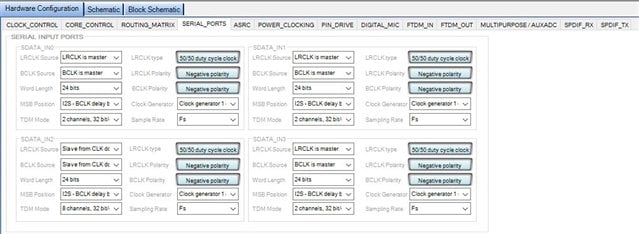
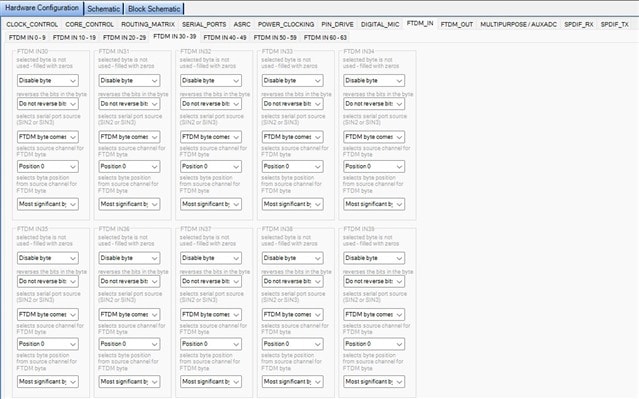
Does the FTDM-Setting anything important ? I have changed nothing so far.
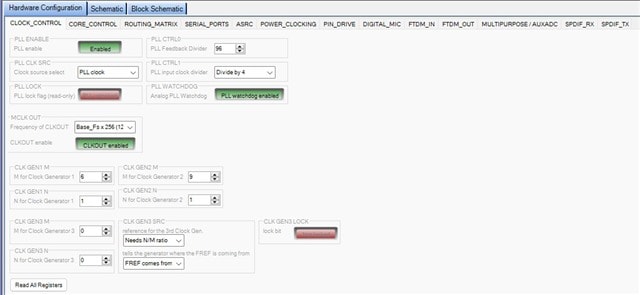
Also the Clock Control is unchanged yet.

Hello stmoeller60,
Thanks for the info and the screenshots.
To answer some of your questions first:
Yes, you should use the sample rate converters since you are not using the same master clock as the source of the audio. This will usually not cause the audio to be just noise but instead it would be clicks and pops and possibly some distortion. So I do not think this is the root of your problem.
The signal quality looks good and at 48kHz I do not think you are having issues with signal integrity. Especially since the audio is fine if it is not multi-channel audio.
FTDM does not need to be used.
Clocking page all looks good and you would not need to change anything there.
I would like to discuss the format of the data so I took some screenshots and marked them up to show a few details.
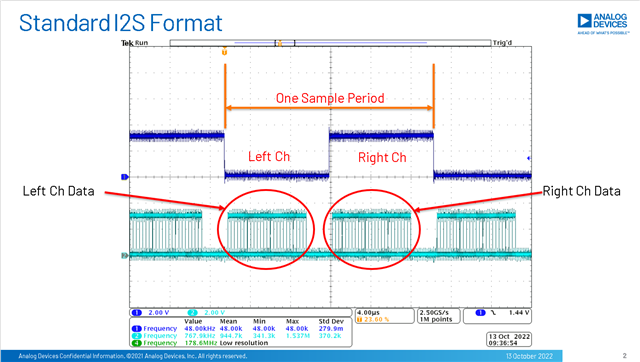
This first screenshot is standard I2S format. This format is a stereo format and is a standard. The channel slot is 32 bits for the 24 bit data will not fill the entire slot making it easy to see the data for each channel.
Your screenshot looks the same as mine. So it is standard I2S Stereo audio format.
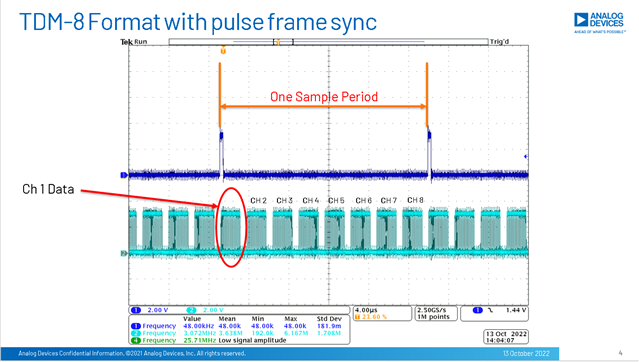
The next screenshot below is a common TDM-8 format for eight channels of audio and it is using a pulse format for the frame sync. TDM formats are not as standard as I2S but this one is common.
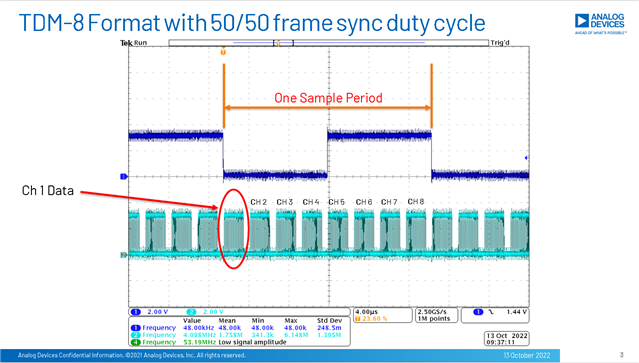
This next one is a TDM-8 format but with a 50/50 duty cycle format for the frame sync.
So with this background, if your screenshot was taken when you had the Apple TV set to decode multichannel audio then there are two things possibly going on.
1) The HDMI board is not sending you all the channels, it is only sending two channels of data.
2) The two channels of data is multi-channel audio encoded into two channels and hence you would hear just noise.
Since you can hear standard stereo audio just fine, then the DSP is picking up the multi-channel data correctly but it needs to be decoded. If the HDMI board was sending out multi-channel audio fully decoded you would see something like TDM-8 with several channels of audio.
This is my impression of what is going on.
Dave T
Thank you , Dave.
Unfortunatly the supplier of this board has no spec / documentation on this board.
Here's a pcb from France which looks similar. I send them now a question of the spec regarding if it's TDM or encoded audio.
Stephan
Hello, I am currently working on a similar setup and purchased the same extractor from AliExpress. I wonder if you've ever heard back from AudioPhonics and, in case they did, if you are willing to share what they told you about that board.
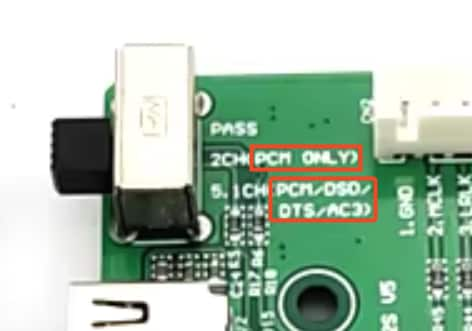
From the information I gathered online, this setup would require that the HDMI extractor also incorporate an EDID emulator instructing the Apple TV to send LPCM audio. Essentially, the EDID emulator tells the Apple TV that the receiving device is not capable of decoding the AC3/DTS stream. So, the Apple TV sends the decoded LPCM audio instead.
Unfortunately, the labels on the PCB of that extractor seem to suggest that LPCM is enforced only when the switch is set to "2CH", while the "5.1CH" position allows the audio to be transmitted in whatever format the Apple TV deems appropriate for the receiving device.
A possible solution would be to insert an EDID emulator between the Apple TV and the HDMI extractor. That would instruct the Apple TV to transmit LPCM audio for the HDMI extractor to transmit it via I2S.
Please log in to reply.