Could anyone explain Voltage Controlled Pulse problem on Duty control?
I am using the cell of this and Fs is 96k.
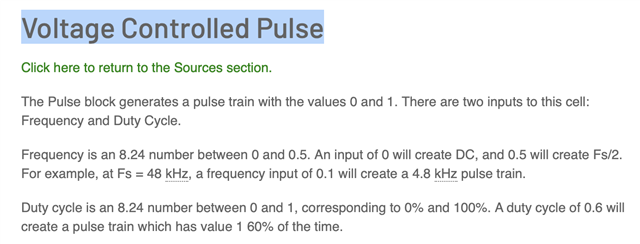
According to wiki of analog, the frequency can set Fs/2. However, I set frequency under Fs/2 but Duty Cycle is set and changed which is need above 10%.
What is the problem on my problem? I assume the Duty can be set 0, 0.01, ......99.99, 100.0.
However, I have set 0.01 until 0.09 but no change on actual waveform. It needs set to 0.1, 0.2, 0.3.....and 0.9.
Can anyone explain this? I need frequency above 20kHz and under Fs/2 and Duty can be 1% per step changing.
Audio Signal Processors
adau1452
software
sigmaStudio 4.7
SigmaDSP Audio Processors
Hello jason,
Yes, there are some issues I see with this block. It seems very limited but part of the problem is you cannot possible do what you want to do using counters that count the sample rate.
To produce a 50/50 duty cycle you need to count the same number of samples for the output to be high and the same number of samples for the output to be low.
So if you have 100 sample periods high and 100 low, you have a 50/50 duty cycle. If you have 99 high and 101 low you have a 0.495% high duty cycle. The overall period is 200 samples. To find the frequency you need to know the sample rate and calculate the period of one sample then multiply it by 200.
The issue is to get a frequency of fs/2 you need to be high for one sample period and low for one sample period and that is all you can do. You can only get a 50/50 duty cycle. You cannot count less than one sample period. If you want to have a granularity of 1/100th of the period then you need at least 100 samples to count. 100 samples at 96kHz fs is fs/100 which is 960Hz at 96kHz fs. Therefore, you cannot go above 960Hz with an fs = 96kHz and get a resolution of 1% of the frequency.
It looks to me that this block does not produce much variance at all. I think this will need to be done with counters. However, there is a block that works much better.
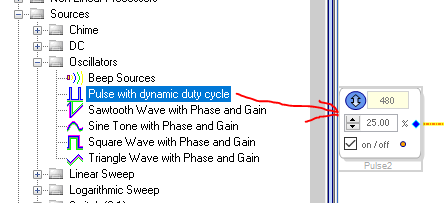
You will see the GUI only allows you to enter certain values. It will change the values to one that works. I do not know exactly how it calculates it. I would need to study this further but this cell functions better than the other one you were trying to use. I can see small changes in the duty cycle. You will notice that once you get to the Nyquist frequency it only allows 50% duty cycle.
How do you need to control this? It seems you want to use a signal of some sort? Not knowing anything about your application makes this difficult. You might be able to use a table to generate correct values to then write to the parameter of this pulse block.
Dave T
Actually, I wanna use input signal to adjust Duty. Hence, I need Voltage controlled feature to generate PWM signal.
especially, I need percentage can be 0.01 resolution at least. Is there any way to solve this?
Hello Jason,
Keep reading down to the end of this post. I had some ideas while writing it.
For that kind of resolution using a 20kHz PWM frequency you will need a 2MHz sampling rate. 20kHz x 100 so you will have 100 samples to work with. So if you have 99 samples high and one sample low it will be 1/100 of the 20kHz period of time.
This does not seem to be possible in a DSP for this level of resolution. I think you would have to go to an external solution using a PWM generator. I wonder if some of the high frequency switching regulators would be able to do this? That is not my expertise so I do not have any suggestions. I think this will be difficult even with an analog solution.
Thanks for the great question. It is an interesting challenge and made me think. You need something that can generate a minimum of 2MHz signal to get that many samples high or low. So it made me think, what can go that high with lots of bits,... The answer, a TDM serial data stream! This part is capable of producing a 24.576MHz bit clock rate which is well above 2MHz. So then the stream will need at least 100 bits in it at 2MHz. That we can do!!
This will be somewhat tricky and creative. The serial port can be set to output the entire 32 bit word from the core. The TDM stream can be set to a 32 bit wide slot. So then we need at least 100 bits for each sample period. That is easy, TDM-4 would be 128 bits.
You would not even have to be running at 96kHz, at 48kHz you could produce a 24kHz PWM.
Give me a day to work on this. I have a lot going on but I think this might be possible. It is too much for me to try to explain it. Best to just do it.
Dave T
Hello Jason,
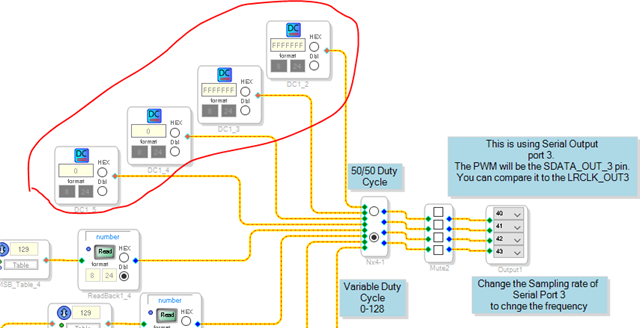
Thanks for the challenge. I was able to do it. I am using Serial Output port 3 to do it. In this example project I have a test 50/50% duty cycle setting. Here is what it looks like:
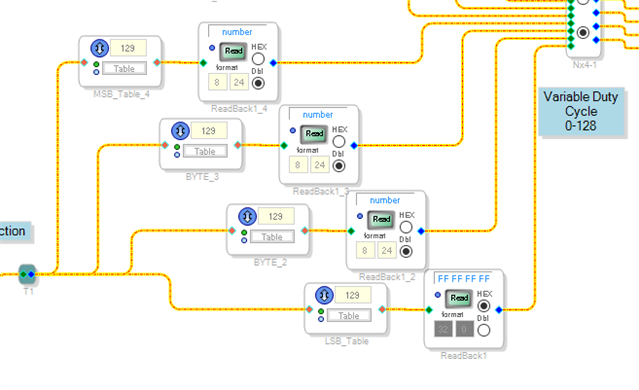
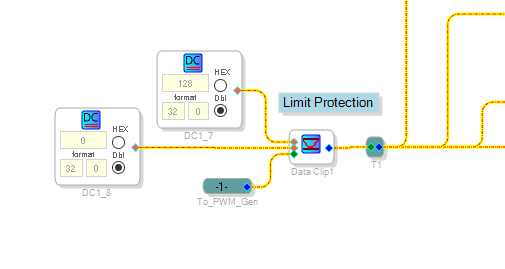
You can see I am taking four 32 bit words, two of the DC cells are zeros and two are all 1's. I am sending this out of serial port 3. The serial port is set to TDM4 with 32 bit wide slots with 32 bit data and left justified. Then I set the data format of the serial output of the core to be 32 bit so the data is not truncated to 24 bits. So when the data is all 1's the output is all high. When one of those bits are a zero then it outputs a waveform that is low for 1/128th of the sample period. So this all runs at the sampling rate set for the serial port. This does NOT have to be the same rate as the core. So you can dial this down to 24kHz or another rate if you use a different clock generator in the chip. Very flexible for you.
Next, I used some spreadsheets to calculate the values to create tables. The tables have 129 different values. Starting with zero and ending with 128 which will be all the bits high.
There are four of these tables with the values skewed to output the overall 128 bit word out to the serial port.
Here are the look up tables:
Then I limited the input to the tables to be from 0 to 128 to keep the pointers from accessing memory it should not be picking up.
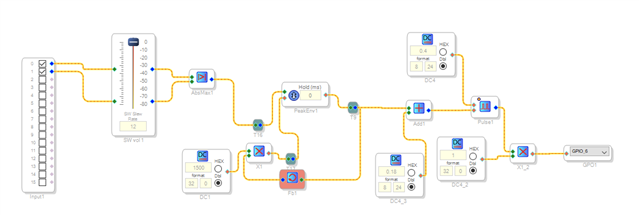
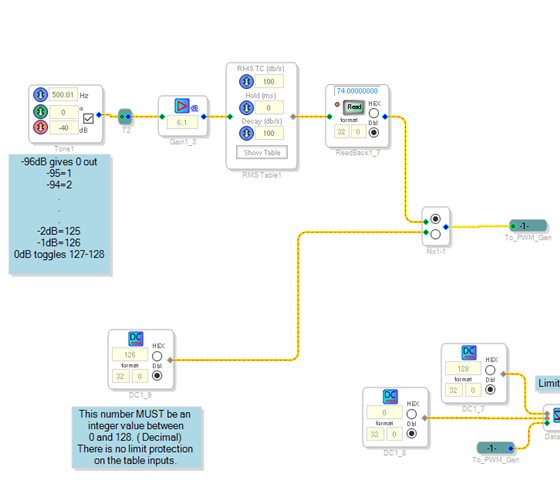
Then the last bit of the program is to take the audio input level, sense the level and then have it drive the PWM generator with a number from 0-128 that reflects the level of the audio.
To do that I used an RMS Table. I created another table of values to directly give me the correct number out for each level. This table will interpolate between the 33 values in the table. I gained up the input so it matched the level of audio that would be coming into the serial input port. It is working quite well. It goes from -96dB to 0dB with a reasonable granularity. You can certainly play around with the table values. My spreadsheets might be handy.
I zipped up all the files including the SigmaStudio project.
I hope you have one of the serial output ports available for this.
PWM Generator.zip
Enjoy it. This was a good challenge to do.
Dave T
This is a super clever hack. So what's the final PWM rate and bit resolution? I wonder if it's good enough for a class D subwoofer.
Hello joe42,
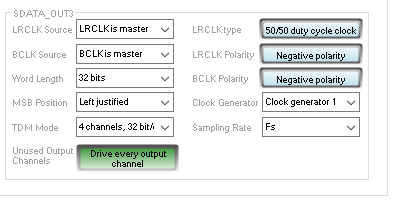
The PWM rate is whatever you sampling rate you set the serial port up to be. Here are the register settings:
You can see I set it up for TMD4 and 32 bit wide slots. Then I used Left Justified although delay by one will still work but on the scope I was comparing it to the LRCLK out for this serial port. Made it easier to see that the LSB and MSB was correct.
The word length was set to 32 bits.
For the rate, it is set to fs. I have the PLL and clock generators all set to the defaults so this is a 48kHz rate. If you use the 50/50 setting in my project you will see the SDATA output is exactly the same as the 50/50 LRCLK output. So you can easily change the sampling rate register setting. You can setup clockgen2 for different rates. You can also use clockgen3 to get other rates. The only issue will be when using these other clock generators that are not exactly dividable from the system clock rate, it will have one frame every once in a while that is slightly longer or shorter to make up for not being evenly divided. So that might mess with a class-D amp PWM input. But if you stick with the fs settings of fs/4, fs/2, fs,. fs*2, fs*4 it will work.
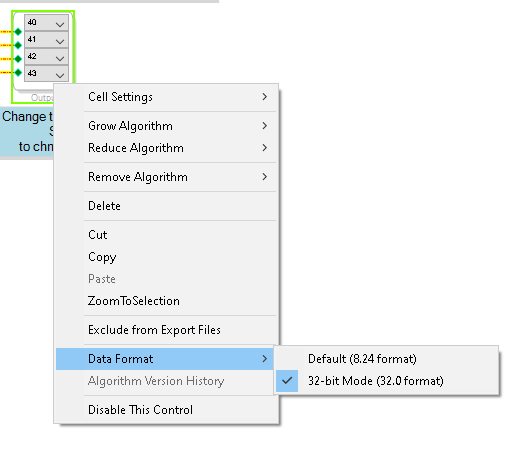
Let me add here a detail I just glossed over in my post. You have to set the data format to 32 bits so the core does not truncate the data to 24 bits. This is done in the schematic by right clicking on the output block:
Back to the sample rate discussion...
Keep in mind the speed of the data that is driving the selection of the tables. If it is using an envelope follower with slow settings you could get away with running at a lower rate. But if you are actually sending audio in to select the pulse width, then you will have to run at 48kHz or faster. Faster is fine because the selected pulse width will just be repeated if the core is setup to run at 48kHz so no issues there. It is not a DAC so no aliasing when going up in sample rate on the serial port. It is difficult because the sampling rate of the serial port is not really a sampling rate, it is the PDM carrier frequency.
Resolution?
In this example one period is divided up into 128 different pulse lengths. 129 it you count zero. Table index of zero is no signal at all, the output is a flat line zero. Table index 128 is all high, a flat line at 3.3V. So setting of 1 will have one bit high, a setting of 127 is only one bit low.
The serial output ports have limited TDM settings. So you can do I2S and have 64 bits so 64 divisions. You can go up to TDM8 and have 256 divisions.
If you get a chance to try this on a Class-D subwoofer let us know if it works and how it sounds. I am wondering if I can use this to drive analog meters?
Dave T
It's very cool. I'd imagine that an analog meter would be better driven by the built-in DAC of course. But this is fast enough for sure.
I'll test it with a homebrew class D if I have time (ha!) So 7 bits, maybe 8, but oversampled if it's for the sub channel. Probably workable, I'd imagine THD and quantization noise is more tolerable for a sub. It could also be used to modulate the voltage rail for a Class G or similar. That actually seems conceivably practical/useful.
Hello David,
I have verified and try it as I2S Data out and control output data.
It works perfectly. Thank you.
Please log in to reply.