ADAU1452 TDM IN/OUT as slave input and output with asynchronous clocks
I encounter an audio quality problem on an ADAU1452 DSP configured with a serial subordinate port on the input, and a serial subordinate port on the output.
The clocks supplied as inputs and as outputs (from masters devices) are completely asynchronous with respect to each other.
I used an SRC as input.
The audio provided in input and output is TDM8 24b 48Khz. The DSP is 48Khz. Masterclocks all masters not connected.
I am attaching a zip file, the sigma studio file and a recording of the output signal.
Thank you in advance for your help.
.ADAU1452 problem.zip
Audio Signal Processors
adau1452
software
Sigma Studio 4.6
SigmaDSP Audio Processors
Hello Loic,
Your project doesn't have any schematic. All you have done is routing the signal from ASRC to serial output port by bypassing the core. So far you have not done any processing. Could you please tell us what you want to do and what is your application?
Loic said:
I encounter an audio quality problem on an ADAU1452 DSP configured with a serial subordinate port on the input, and a serial subordinate port on the output.
This seems very general. Could you please tell us a bit more info about your problem?
Loic said:
The clocks supplied as inputs and as outputs (from masters devices)
I hope you have given proper ground connections between signals. Are you using our eval board?
Regards,
Harish
Hello Harish,
We are looking to connect two TDM main devices together without any processing (we have hardware requirements).
We want to use the ADAU 1452, to make the gateway (subordinate TDM in / subordinate TDM out).
The clocks of the two masters are not synchronous.
For audio quality, there is a wav file attached in zip with output signal recording.
Best regards
Loic
Hello Loic,
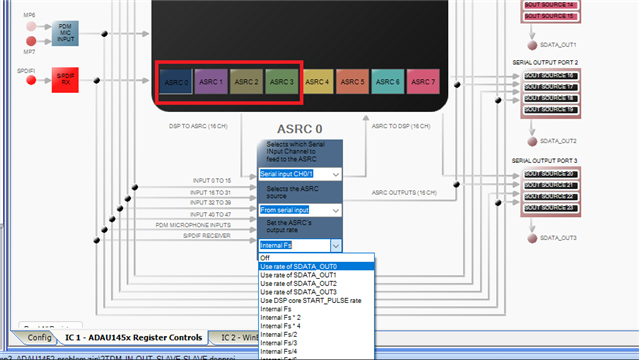
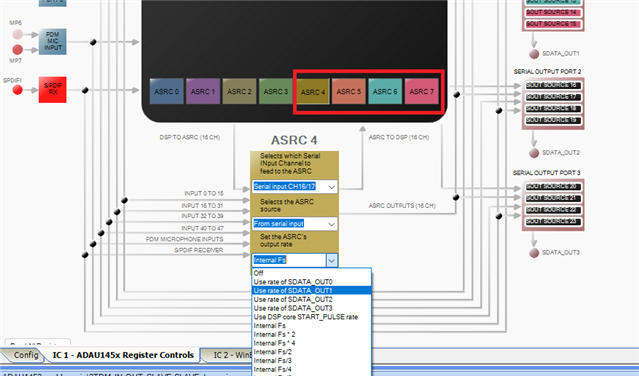
All you have to do is, instead of syncing to the core rate you just have to sync it to the serial output rate.
For first four ADRCs you have to use rate of SDATA_OUT0.
For last four ADRCs you have to use rate of SDATA_OUT1.
Just try this and let us know about your results.
Regards,
Harish
Hello Harish,
I have already tried this in the past.
I just took the test again. The sound at the dsp output always sizzles slightly.
I attached a zip file with a record of dsp output. Please, listen to it with a good headphone.
Best regards
Loïc
record 1.zip
Hello Loic,
Sorry for the delay in response.
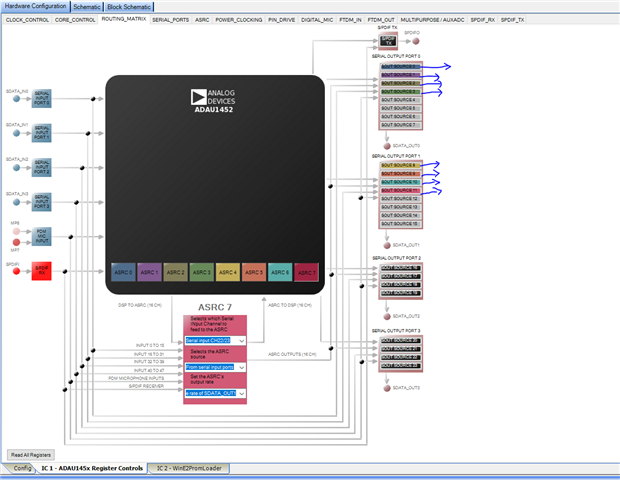
In the attached picture, each of these marked parts are stereo not a single channel. For ex SOUT SOURCE0 has channel 0-1 and so on. So, selecting four means eight channel. First four is a TDM8 with serial output port0 and serial output port1 has four setups for TDM8. Please check in this way.
If you still hear noises, then it has something to do with the clocking part.
So just try the attached project and get back to us. if you still hear noises then we will proceed further.
2TDM IN OUT SLAVE SLAVE.dspproj
Regards,
Harish
Hello Harris,
I tried the attached Sigma Studio file and the result is not better.
Meanwhile, I found another solution by using a tranceiver in input which agrees to be subordinate in output.
So the DSP is configured main input and subordinate output and it works.
Thanks for your help.
Best regards
Loïc
Please log in to reply.