ADAU1777 SigmaStudio v4.6 xml output register 78 flaw
Hello,
When I select a samplerate of 384kHz in Sigma Studio (v4.6 of v4.7) for the ADAU1777, the xml outputfile contains the wrong settings for register 78 (0x4E). It contains value 0x00, indicating a samplerate setting of 768kHz. A simple DSP application containing a notch filter with center frequency 500Hz, results in a filter having a center frequency of 1000Hz :-) When I change the value in the xml file for register 78 to 0x05, what it should be (384kHz according to the datasheet), the filter gets the correct center frequency of 500Hz.
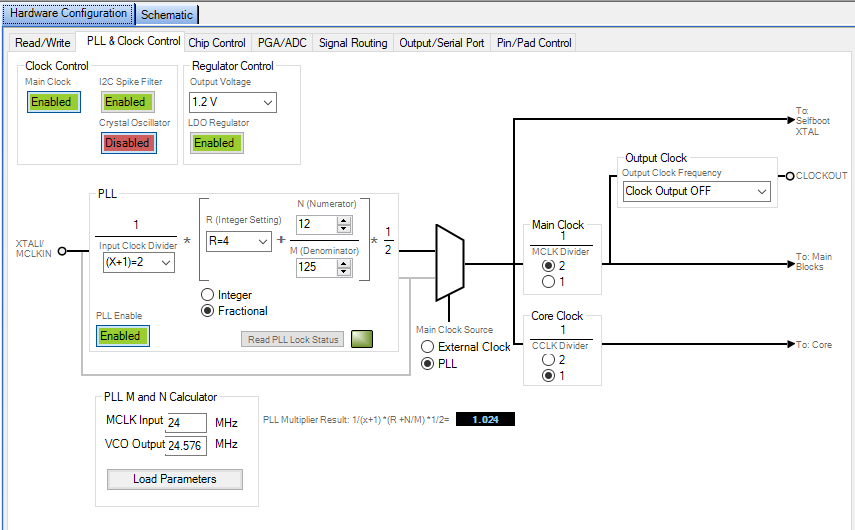
Does anyone have this same issue? It looks like the .xml output file has an error setting register 78 (0x4E). The PLL settings are:
With kind regards,
Reini
software
4.6/4.7
Integrated/Special Purpose A/D Converters
SigmaStudio 4.6
adau1777
Audio CODECs
Show More
Hi,
I found that the xml output can be set right by manually changing the fast rate register at the Hardware Configuration tab 'Chip control'. I did not see that. Apperently you need to set both the samplerate and the fast rate control register. So, for now my issue is fixed :-) But it is strange that you have to set two parameters in SigmaStudio to get the 384kHz samplerate.
With kind regards,
Reini

Please log in to reply.