Set Up DAC (PCM51002) in Sigma Studio on Adau1467
Hello, I am a german so please excuse my bad english.
Im a noob with using DACs. I alread connected my DAC to a Adau 1701 but i cant bring it to life with my 1467. The hardware is connected but i cant find the right settings in Sigma Studio. Can someone help me?
This is the data sheet for my DAC: https://www.ti.com/lit/ds/symlink/pcm5101.pdf?ts=1669315296214&ref_url=https%253A%252F%252Fwww.startpage.com%252F
THANK YOU VERY MUCH!
Hello Nikn,
Do you want to know how to configure the serial output port with your DAC?
Please find the attached picture. That is an example of serial output port putting out I2S signal. Connect the respective pins to the DAC.
The pin FMT in your DAC has to be configured as LOW for receiving I2S signal and HIGH for right justified.
Please check the master clock and PLL part in your DAC.
Here the DSP is the master and Pin 27 of the DSP is CLKOUT that is putting out 12.288MHz. You can change this frequency if you want. please refer the below picture.
So please refer your DAC's datasheet and PLL sections for configuring your DAC.
Kindly do reply if you have any queries and please give us more info on that.
Regards,
Harish
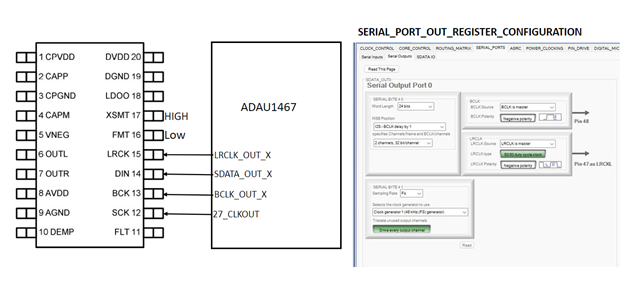
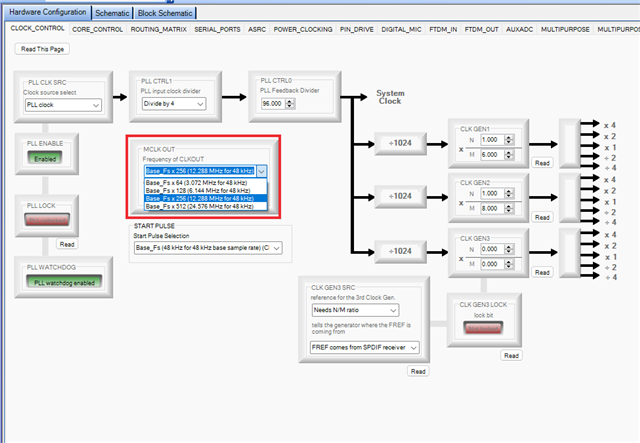
Sigma Studio FileThank you for your help!
Unfortunately, it still does not work. It seems that my wiring and the settings for the DAC are OK but maybe the connection between the programmer (i use a Cypress Board which already worked for me with the 1701 board) and the 1467 core board or the settings for that are not right?
At the moment this is my wiring:
CYPRESS PROGRAMMER=DSP :
GND=GND
GND=MOSI
GND=SS
SDA=MISO
SCL=SCL
VCC=5V
DAC=DSP :
GND=GND
VIN= to VCC on Cypress
GND=to GND on Cypress
LCK=LRCKo0
DIN =SDATo0
BCK= BCKo0
The DAC is able to generate a SCK from BCK and LRCK, that’s why SCK is not connected but I already had connected it for some test...
And this is a test file (configuration in Sigma Studio) I try to use at the moment:
drive.google.com/.../view
Hello NiKn,
In your project, you set SPI as an interfacing protocol between your processor and USBi. However, it seems like you are connecting with the I2C pins of the processor. Are you using I2C or SPI? Can you please check and verify it? If it is I2C then you need to take care of this I2C addressing.
In the 1701, when you drag and drop this processor and connect it to the USBi by default it connects with I2C. This may be the reason it worked before.
So please give us the info asked above then we will proceed further.
Regards,
Harish
Hi Harish,
please excuse my late reply and thank you for your hints. I found a nice german guy that is helping me very much! Together with him, I tested a lot and managed to set up a proper connection via SPI, and finally we got a stereo DAC (PCM5102) and a stereo ADC (PCM1802) working.
But I need 16 in and out that means i need to use the SDATAIO0 pins as well. We tried to connect the ADC to SDATAIO0 and the DAC to SDATAIO4, but unfortunately it does not work. Probably we did not set it up right in Sigma Studio. I uploaded a file with the tested settings.
Could you help me again please?
2023-01-14 Design.dspproj
Please log in to reply.