2 way mono speaker setup
Hi I am new to using SigmaStudio and have been trying to learn about it as much as i can, but feel i have hit a brick wall with as much as i can learn online, without asking.
I have built a 2 way mono speaker (Tweeter & Woofer) and would just like confirmation and/or pointers on if i have set up my SigmaStudio setup correctly to a good standard and lowering noise as much as possible, also if there is anything worthwhile adding to it, and where abouts to add it in the chain.
I am currently waiting on something to arrive to be able to test it out properly, so just trying to avoid problems and have it ready beforehand.
SigmaStudio Setup:
Thanks
Edit Notes
Wording
[edited by: Jack1991 at 10:05 PM (GMT -5) on 8 Dec 2022]
software

In a single enclosure mono unit, you hear only L+R and completely lose all the L-R content and trust me its a huge loss.
My suggestion is that you change your set up to single enclosure consisting of one woofer for bass common to Lt and Rt and two full-range speakers producing L and R.
I hope his helps.
Hello Jack1991,
You are off to a good start. One huge problem I see is that you are not using the Signal_Detect blocks properly. The output of those blocks are a logic output not audio. The purpose of those blocks is to activate a mute when there is no audio for a certain period of time. Might be a handy feature for you but not in the way you are using it.
I agree with KKSL that you should choose left or right channels unless you really want just mono.
I will attach a few projects I have done through the years to give you some ideas of what you can do. There are so many ways to do this.
I do not have a good complete design for the ADAU1701 with a lot of features I would have if I were designing a product. I will attach an ADAU1452 project that is probably a few too many features but it will give you an idea.
ADAU1701 Crossover 2-way with 2-band Limiting.dspproj
ADAU1452 Basic Crossover with EQ and Limiting.dspproj
Next I will discuss the Bluetooth.
The digital serial port on this part is rather primitive and not super flexible. If you apply clocks from the Bluetooth module that are not synchronous (divided down from) the master clock input to the DSP, then the DSP will mute the audio in the DSP. So you will have to use a master clock from the Bluetooth module when using Bluetooth and shut off the clocks when you are not. You will have to somehow switch to a different master clock at that point. An external controller will be needed unless you use a manual switch. I am guessing that the Bluetooth module cannot operate as a clock slave.
The ADAU1452 solves all these problems due to a very flexible clocking system and sample rate converters.
Dave T
Ah ok cool thanks both of you for the replys. I had a feeling i was using the signal detection incorrectly, and yes i read others say they are good for muting unused inputs. Although im still not sure how to use them correctly? I cant find any example photos or info online.
Here is the speaker ive built in the photo, I am using a Sure Wondom Jab5 4x100w Amplifier board which has dsp and bluetooth/aux. As its just tweeter and woofer it can only be mono right? Is there not a way i can mix the stereo signals to mono like in my Sigma Studio setup photo or does it not work like that?
I was thinking to bridge 2 channels of the amplifier for the woofer, and the other 2 channels for the tweeter and then lower the gain on the tweeter loads as the tweeter is only 20w rms 8Ω. The amplifier wiring says mono output if wired that way too.
Thanks for sharing your SigmaStudio project files too, that is very handy for me to see.

Ah ok, so the Signal_Detect I just need to add a mute after it?
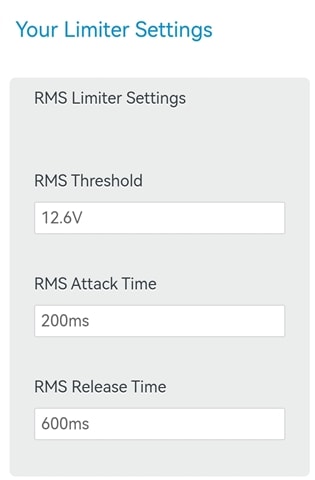
I also need to set a rms limiter for the tweeter as the tweeter is only 20w rms 8Ω. However, the rms limiter on sigma studio the threshold is in dB. Where as on rms limiter calculators the Threshold is always in Volts. I cant find any answers how to work out what it is in dB??

Please log in to reply.