How to read parameters using SigmaStudio
Hi
I am using SigmaStudio to tuning ADAU1452 Eval-Board. I have a simple question.
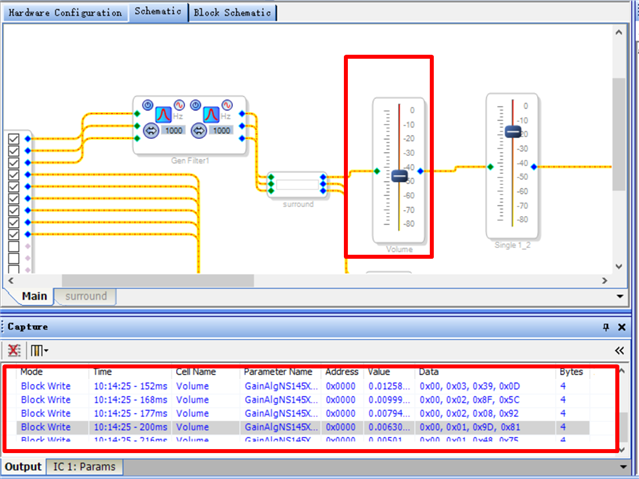
I can write Volume value to Sigma DSP easily by using SigmaStudio tool as above picture.
But how can I read the Volume value from Sigma DSP and display the value in the Volume block GUI? Does SigmaStudio tool provide the feature?
Thanks,
Tingting.
Audio Signal Processors
adau1452
software
SigmaDSP Audio Processors
Hello Tingting,
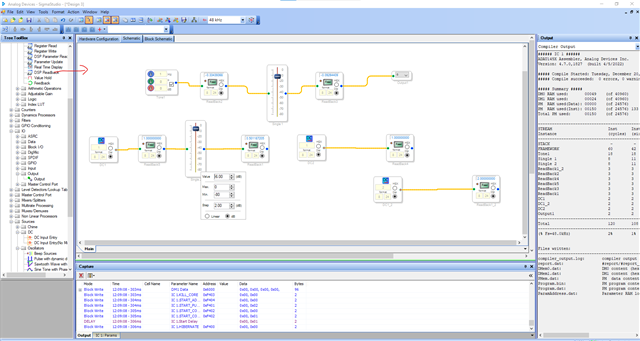
You can certainly read the value that is currently running in the DSP. This is mainly used as a debug tool. Here is the screenshot that you can refer. You can place this block before and after any audio processing algorithm or any block. For example, a volume control and see how the volume control block controls the audio output.
In the below example, you can see the DC value 1 in 8.24 format is going into the volume control block. You can read 1 in the readback cell before the volume control block. I have set the volume control block to give -6dB gain. So, the output will be half the value, that is 0.50.
So, you can use this block anywhere in your schematic and read the value at any point of your signal flow.
When you initially drag and drop the block there will be a blue dot (a button). That is normal readback which means you have to click the read button on the block every time to read the updated value. When you click the blue dot, it will change to orange color like in the below picture. That is continuous mode. It updates and runs continuously.
You can read the value in 8.24 as well as 32.0 formats.
Kindly do reply if you have any queries.
Regards,
Harish
Hi Harish,
Thanks for the reply.
Yes. The DSP Readback cell is good for reading signal values at any point of my signal flow.
But what I ask is how to read tuning parameters of algorith cells like Volume.
For example, user tunes Volume -6dB to the target. After some time, he wants to read the Volume value from target. He should click somewhere (maybe one read button) of Volume cell and triggers SigmaStudio to read Volume tuning parameter from the target.
Actually it belongs to Tuning Write and Tuning Read scope. SigmaStudio seems to realize Tuning Write feature but not to realize Tuning Read feature.
Thanks,
Tingting.
Hello Tingting,
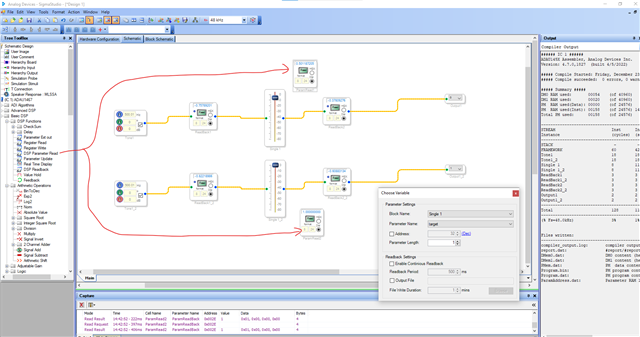
You can read any parameter that was set to a module. For example, if my input sine wave was applied with -6dB of gain from the volume control block. You can see the signal value in the readback cell before and after it.
But in the block that I mentioned here will read the parameter value from the volume control block.
In this context, I have used two volume control blocks; one is set to -6dB gain and another is set to 0dB gain. So, you will get decimal values as 0.5 and 1.0 respectively. you can read what gain values you write to the target. You actually can read any parameter values from any module.
You have to compile the project and right click the DSP parameter read block >>> configure >> you will see this popup window >> then choose the block and parameters. You can read the vale periodically and you can also write to any output files. Refer the wiki for detailed info.
Is that what you are expecting?
Regards,
Harish
Hi Harish,
Perfect. That is what I am looking for.
Thanks so much.
Tingting.
Please log in to reply.