Eeprom fail using EVAL-ADAU1452REVBZ
Hello, I’m working on a project using EVAL-ADAU1452REVBZ.
The selfboot operation It’s working only sometimes and for few time.
After few time checking the eeprom it result ok, after some minutes it gives errors, in different addresses every time.
its seems that the data in eeprom is lost/missed after some minutes (can be 5minutes or 30) no matter if the board is powered or not.
With the first board I used during the Write compilation trough DSP the switch selfboot was always on, and I thought I damaged the eeprom for that.
With the second board buy I always switch off the selfboot switch before Write to eeprom, but after some days working properly I have the same problem.
When I compile and download the project always work fine, so the dsp seems ok.
I’m actually using mp5-8-9-11-12-13 to turn some leds and analog inputs 0-5 as switch.
Can someone help me? Thanks
hardware
sigma studio 4.7
EVAL-ADAU1452REVBZ
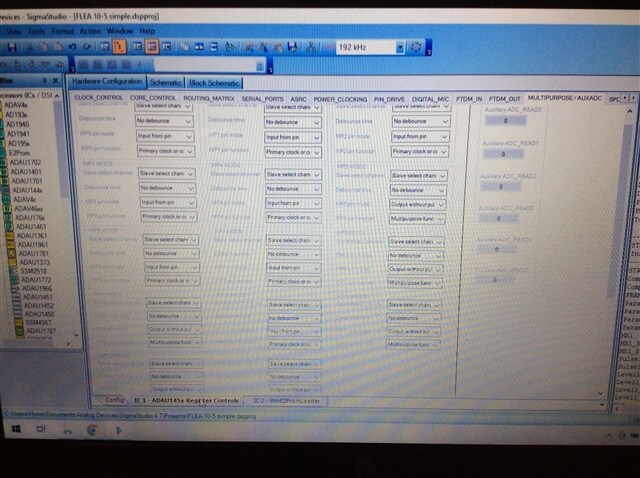
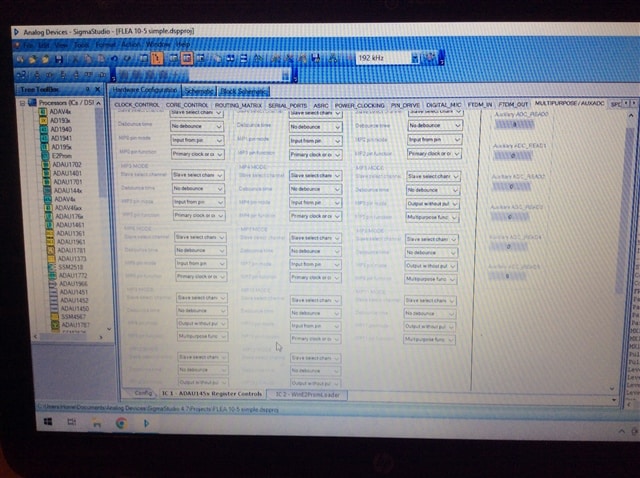
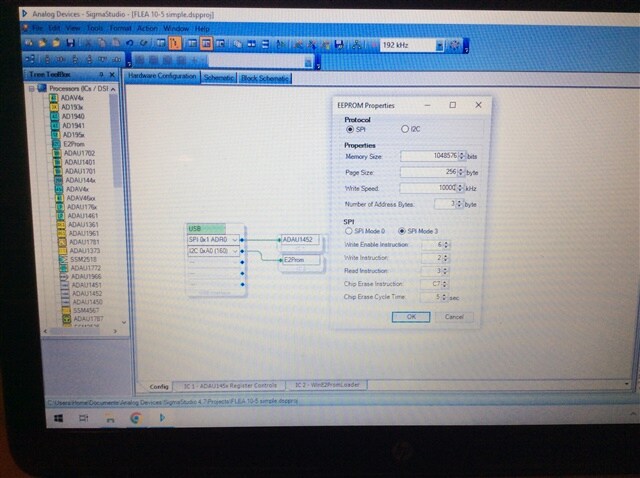
This is eeprom settings
Hello Brx,
Brx said:
After few time checking the eeprom it result ok, after some minutes it gives errors, in different addresses every time.
May I know what is the error that you are getting?
In this Eval board, the codec will run only on 48KHz by default you can't program it. I can see that your software fs is 192KHz. I don't know what your core rate is, since you didn't attach a project. If your core is also run at 192KHz. Then the converters may mute. I don't know whether you have tested the audio out.
If you set the led blinking input as 1Hz pulse and set the core rate as 48KHz and software fs as 192KHz means you will be getting 0.25Hz (1/4) for the led input. So, running everything at 48KHz will be good.
Anyway, erase your EEPROM before writing to it and try writing a basic project that I attached here. Follow the user manual step by step and try to self-boot it. Always turn off the self-boot switch while writing to the EEPROM.
If this project boots well, then we can be sure that there won't be a problem with the DSP and EEPROM communication.
test1452.dspproj
Hello thanks for the response.
The error was: fisrt mismatch value AE at index 0 differs from expected value AA.
But not everytime the same index, sometime other index contains wrong vales
Audio outputs was working well.
Trying your project:
I changed the eeprom comunication values to the last img I sended
I wonder that the output 5 and 8 flashes without turn to outputs in adau register...
Aniway the project works well but when I do selfboot don't work, this time also immediatly after eeprom write.
Followed the step by step guide.
Checking the eeprom I have the same error: first mismatch value AE at index 0 differs from expected value AA
Attached my project and your, with the correct eeprom settings.
Pregetto 4.0.dspproj
8206.test1452.dspproj
Hi Brx,
I have few questions.
I guess you are using our eval board with hardware modification? Are you trying to program the codec and clocking the codec with another source than the DSP CLKOUT? I'm asking this since you disabled the CLKOUT option.
And also, you set the MCLKOUT as base_fs*64. It means that since you set the core rate as 48KHz (N/M=1/6) then your MCLKOUT is 64*48k = 3.072MHz. I guess that won't be sufficient for the codec. It will mute. Anyhow you disabled it in the first place. Aren't you using that MCLKOUT for driving the codec?
All the serial ports are set as slave. Are you clocking the serial ports externally?
Anyway, these questions will differ from a self-boot problem but just want to make sure.
Why are you selecting I2C in USBi and SPI in properties window for connecting to the EEPROM.
Have you tried erasing the EEPROM and try a simple LED program and sine tone for self-booting?
Please let me know how you set up your hardware.
If you intend to run your project (core,software,codec) at 192KHz, then please set the N/M ratio as 2/3 in the core control.
Regards,
Harish
Hi Harish,
I'm using the eval board without codec modification, as come from factory.
About settings of clock sincerely don't know why are setted in that way.
I'm using the eval board only with analog audio in/out (minijack connectors) and not serial ports, and when download the project It works fine.
I selected 192khz as sample rate and changed the option for multi purpose in/out 5-8-9-11-12-13, to drive a led each One. Thats only register settings I Need.
I loaded a simple project but selfboot has the same behaviour, work when the board Is off for few time, when Is off for some minutes don't work and data verification of EEPROM fails.
The interface Is setted i2c in usbi yes, as the manual suggest, it seems also to me nosense, but since there Is not a phisical connection between usbi and EEPROM I leaved as It was.
So now I could try to restore register settings as default.
Regards
Hello Brx,
I have corrected your project a bit and attached here. Initially the project you attached didn't have proper MP pin configs and serial port set up and clocks setups.
since it's an eval board you can only use channels 0-1, 16-17, 32-33 and 40-41 for audio out.
Please try self-booting the attached project using "write latest compilation through DSP".
Brx said:
I'm using the eval board only with analog audio in/out (minijack connectors) and not serial ports, and when download the project It works fine.
I was just wondering that how did your project work? since every serial port was set as slave and no external clocking. Then the MP pins weren't configured as multipurpose, it was set for primary. Have you modified your project after attaching here?
Anyway, try this attached project with proper booting comments given in the user guide.
project.dspproj
Regards,
Harish
Hi Harish tank you for the response,
yes the register of my project sended was changed and wrong setted, sorry I don't know why, I was working with 2 projects opened and it seems Sigma studio mixed up the register configuration of a new project (opened in background) and schematics of my actual project.
Anyway, I'm using channels 0-1, 16-17 as inputs and 0-1,16-17, 32-33 as outputs, it seems ok.
I opened your project and tryed the selfboot but same behaviour, the selfboot works only for few minutes, after this time fail.
Check last compilation througt dsp is ok initially and fail some minutes later.
Link compile download always works fine.
Since I don't understand why the eeprom seems beyng damaged and this is the second evalboard
I'm thinking about to use an external controller to load the project that can do that when I turn on power, there is a solution for that?
Nobody can help m?
Hello Brx,
I think what you are running into is that you have to disable the Selfboot when you are writing to the EEPROM. I explain it a little further in this post along with a few other details of troubleshooting Selfboot issues.
Selfboot Problem on ADAU1452 - Q&A - SigmaDSP Processors & SigmaStudio Dev. Tool - EngineerZone (analog.com)
What revision of SigmaStudio are you using?
What are your EEPROM settings?
We did have an issue back many revisions, I think it was Rev3.3 or so where the writing to a larger EEPROM had some issues. It would write the program several times and eventually it would go above the max EEPROM address and wrap around so the data would start overwriting the first pages of the EEPROM corrupting the program. This was fixed a long time ago but you can still cause similar issues if the EEPROM configuration is wrong.
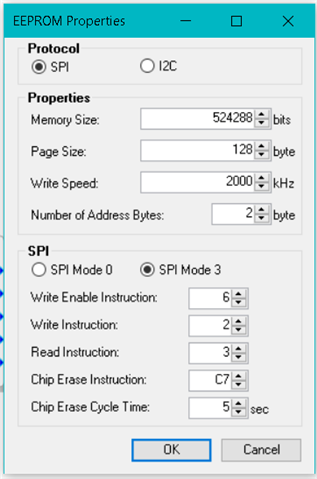
The RevB eval board should have a 1024kbit EEPROM.
So these are the settings you need to use:
For others who might be using a 512kbit EEPROM, the setting for the 512kbit EEPROM is
I think you are running into the issue I discussed in the last post I did in the link I supplied above.
Let me know how this goes.
Thanks,
Dave T

Hello Dave T,
so with the First board I had this issue its possibile that I had not disabled the selfboot switch, and this cause the EEPROM damaged.
With the second board (this rev. B) I Take care about the selfboot switch cause I read the discussion you linked here before use.
About the EEPROM (1024kbit)€ settings all Is the same, apart the write Speed. In My case Is setted to 10000Khz.
Hello Brx,
First I need to mention that forgetting to disable the selfboot will NOT damage the EEPROM. If your EEPROM was damaged then it is from another reason. If you were talking about the contents of the EEPROM being "damaged" then Yes, it can become corrupted and not work. but it does not damage the actual part.
The speed setting is up to you to set. 10MHz is not too fast for most parts and most boards. You can always try it slower.
Dave T
Please log in to reply.