SigmaStudio project with multiple inputs
Hi all!
I need to implement such a project. I have 3 inputs, 2 digital and 1 analog. These inputs must be switched through the toggle switch. When any of the digital ones is selected, it is necessary to implement mixing of the analog signal with a decrease in the volume level of the digital one by a certain number of dB, mixing of the analog signal must also be implemented through the power button, that is, if necessary, turn it on and the analog signal sounds briefly along with the digital signal, reducing its volume, if not, then the analog signal is not mixed with the digital one.Well, if we choose an analog signal source, then, of course, mixing is not relevant. Help to realize this project, thanks in advance.
Audio Signal Processors
adau1452
software
SigmaDSP Audio Processors
ADI North America will be on annual shutdown December 24, 2022 through January 2, 2023; perhaps another community member can assist you until our return on January 3.
Hello ABanditoz,
Please refer the attached project.
ABanditoz said:
through the power button
I guess you are referring a switch or a push button.
I have made a switch connection for this operation here. You can modify it with any GPIO for external toggling.
In the attached project I used GPIO7 as an input selector. Every time you toggle this pin each input will be selected, and it repeats in an order like a loop. There are a lot of ways to do this, so you can use as per your wish. You can set rising/falling edge for toggling, refer that toggle block for more info. In the below project it is designed for falling edge toggling.
If I understood your question correctly then this project would work for you.
Project:mixer bypass.dspproj
Kindly do reply if you have questions or you need any clarification.
Regards,
Harish
Thanks for the reply, I've looked at your project. I planned to change incoming sources through an external microcontroller, so I will not use GPIO. And I didn’t really understand how the lowering of the main source works when an analog signal is triggered? and I also need to change the volume reduction level, that is, there are such options to choose from: 1db, 2db and so on. Thank you
Hi Harish,
checked your project, unfortunately it does not work the way I wanted it to, let's try to implement 2 channels first then:the first digital and second analog, the first main and plays constantly, the second additional plays rarely. When there is a signal on the additional, the main lowers the volume (I also want to adjust the volume reduction, for example from 3-10 dB). On the additional volume remains the same and does not change in any way. Thanks.
Hello ABanditoz,
ABanditoz said:
I have 3 inputs, 2 digital and 1 analog. These inputs must be switched through the toggle switch
Only your digital signals are selected by an external switch and analog must be playing constantly irrespective of the external switch?
I thought all your three inputs will be selected by a toggle switch?
ABanditoz said:
it is necessary to implement mixing of the analog signal with a decrease in the volume level of the digital one by a certain number of dB
So, if there is a signal in 'additional', then the 'main' should be lowered by some dB and the mixing of 'main' (lowered by some dB) and 'additional' should happen right?
please look at the attached project. If I understand your question correctly then it will work. main_add mix.dspproj
Here the main input plays constantly if additional input is not selected. If the additional input plays, then the main will be lowered by some dB and you will hear the output of level lowered main input mixed with additional input.
If the additional input is not selected, then the main will be playing at the output without undergoing mixing and without change in the gain level.
In the output, the additional input will be in a same level of 0dBFS as the input. The main input will be lowered by 6dB then mixed with 0dB additional input.
To set the dB precisely, please do right click on the knob of the mixer block and set the value. Here for main I set -6dB and for additional I set 0dB.
You can check this project by muting unmuting the additional input block.
So, if this works as you expected then you can add that input toggling circuit from my earlier project and modify that based on your need.
How you select the input is up to you. Since you said that you were going to use uC, you can design a small logic circuit with DC cell and write '1' or '0' to any of the DC cell from the uC to choose the inputs. There are a lot of ways to do that.
If the above project doesn't satisfy your condition, then please give me some more info about your input selection and what you expect at the output.
Regards,
Harish
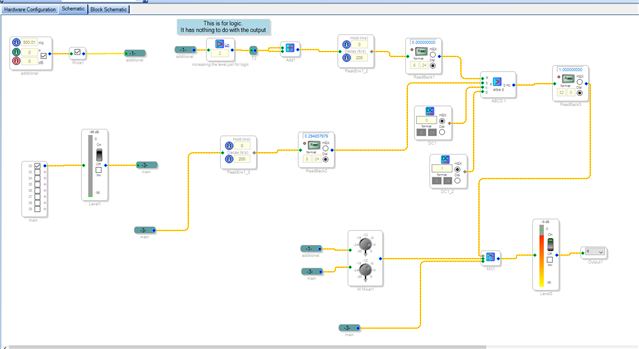
Hi Harish,
In principle, it looks like I only need the return of the volume at the main source to happen abruptly, I would like it to have a smooth return of the level like fade in fade out, there is also a side chain effect, I would like it according to this principle. Thank you.
Hello ABanditoz,
If you change the MUX in Harish's project to one with slew you will get the fade between the two signals but it will be the same fade going to and from either one. To have it suddenly change for one and not the other is a little bit more tricky to do.
I will attach a project that is for a different DSP core but the concepts shown in here for threshold switching applies to all cores. The beauty of SigmaStudio is to be able to easily customize programs to do what you want it to. I suggest you take what Harish has sent to you and this example and experiment with it until it does what you want.
ADAU1442 Threshold Signal Swtiching.dspproj
Dave T
Please log in to reply.