I am not able to set the PLL CTL and PLL DIV Register- ADSP BF548 custom board.
i am current working on ADSP BF548 custom board, I am able to set the PLL CTL and PLL DIV Register. However, I am unable to check the SCLK values in my code; is there a way to do so? I've attached my code for reference.
Please assist me since I too want to write code for the spi protocol.
ADI_SYSCTRL_VALUES sys_cntrl_write;
ADI_SYSCTRL_VALUES sys_cntrl_read;
// Set CCLK = 400 MHz, SCLK = 133 MHz, voltage to 1.25v
sys_cntrl_write.uwPllCtl = 0x2000;
sys_cntrl_write.uwPllDiv = 0x0003;
sys_cntrl_write.uwVrCtl = 0x40EB;
bfrom_SysControl ( SYSCTRL_READ | SYSCTRL_PLLCTL | SYSCTRL_PLLDIV |
SYSCTRL_VRCTL | SYSCTRL_INTVOLTAGE, &sys_cntrl_read, NULL );
printf("Before Set PLLCLT Reg : 0X%X\n",sys_cntrl_read.uwPllCtl);
printf("Before Set PLLDIV Reg : 0X%X\n",sys_cntrl_read.uwPllDiv);
printf("Before Set VRCTL Reg : 0X%X\n",sys_cntrl_read.uwVrCtl);
bfrom_SysControl( SYSCTRL_WRITE | SYSCTRL_PLLCTL | SYSCTRL_PLLDIV |
SYSCTRL_VRCTL | SYSCTRL_INTVOLTAGE, &sys_cntrl_write, NULL);
bfrom_SysControl ( SYSCTRL_READ | SYSCTRL_PLLCTL | SYSCTRL_PLLDIV |
SYSCTRL_VRCTL | SYSCTRL_INTVOLTAGE, &sys_cntrl_read, NULL );
printf("After Set PLLCLT Reg : 0X%X\n",sys_cntrl_read.uwPllCtl);
printf("After Set PLLDIV Reg : 0X%X\n",sys_cntrl_read.uwPllDiv);
printf("After Set VRCTL Reg : 0X%X\n",sys_cntrl_read.uwVrCtl);
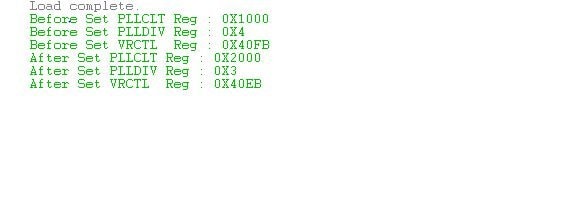
results from the board :
Audio Signal Processors
silicon 0.4
software
adsp-bf548
visual dsp++5.1.2.0
Blackfin Embedded Processors
: ADSP-BF548
blackfin
Show More
ADI North America will be on annual shutdown December 24, 2022 through January 2, 2023; perhaps another community member can assist you until our return on January 3.
Hi,
User-programmable value divides the VCO signal to generate the system clock (SCLK). You can calculate SCLK by using below formula SCLK = VCO/PLL_DIV.SSEL
VCO is calculated by VCO = (SYS_CLKIN frequency/(DF+1)) MSEL. Please refer " 18 DYNAMIC POWER MANAGEMENT " in below linked HRM:www.analog.com/.../ADSP-BF54x_hwr_rev1.2.pdf
Attached SPI transmission and reception example for BF592 across 2 EZkits. You can refer this for BF548.
SPI_ADSP-BF592.zip
Regards,
Divya,P
#include <sys/platform.h>
#include "adi_initialize.h"
#include "PSRDev.h"
#include<stdio.h>
#include "../lib/src/drivers/source/spi/adi_spi_data_bf5xx.c"
#include <services/pwr/adi_pwr.h>
#include <sys/platform.h>
#include <drivers/spi/adi_spi.h>
#include <../include/services/pwr/adi_pwr_bf5xx.h>
#include <bfrom.h>
#include <blackfin.h>
#include <stdio.h>
#include <drivers\uart\adi_uart.h>
#include <services\pwr\adi_pwr.h>
int main()
{
uint32_t clkIn = 25 * 1000000;
uint32_t coreMax = 400 * 1000000;
uint32_t sysclkMax = 100 * 1000000;
uint32_t vcoMin = 50 * 1000000;
ADI_PWR_VOLTAGE adiPwrV_default,adiPwrV_User;
uint32_t fSclk,fCclk;
if(adi_pwr_Init(clkIn, coreMax, sysclkMax, vcoMin) != ADI_PWR_SUCCESS)
{
REPORT_ERROR("Failed to initialize power service \n");
return FAILED;
}
if(adi_pwr_SetInternalVoltage(ADI_PWR_VOLTAGE_125,coreMax,sysclkMax) != ADI_PWR_SUCCESS)
{
REPORT_ERROR("Failed to Set Internal Voltage \n");
return FAILED;
}
if(adi_pwr_GetInternalVoltage(&adiPwrV_User))
{
REPORT_ERROR("Failed to Get Internal Voltage \n");
return FAILED;
}
printf("USER SET ...ADI PWR Voltage = %d \n",adiPwrV_User);
if(adi_pwr_GetSystemFreq(&fSclk) != ADI_PWR_SUCCESS)
{
REPORT_ERROR("Failed to Get System Freq \n");
return FAILED;
}
if(adi_pwr_GetCoreFreq(&fCclk) != ADI_PWR_SUCCESS)
{
REPORT_ERROR("Failed to Get core Freq \n");
return FAILED;
}
printf("SET... FSCLK = %d \t SET...FCCLK = %d\n",fSclk,fCclk);
(*pPORTB_FER) = (*pPORTB_FER) | 1<<9; // chip select 1
*pPORTB_FER = (*pPORTB_FER) | 1<<12; // SPIXSCK 1
*pPORTB_FER = (*pPORTB_FER) | 1<<13; // SPIXMOSI 1
*pPORTB_FER = (*pPORTB_FER) | 1<<14; // SPIXMISO 1
ssync();
*pSPI2_CTL = 0x4600;///
*pSPI2_FLG = 0x0002; //FLS1 (SPI2 Slave Select 1);
*pSPI2_BAUD = 24;
ssync();
//open the SPI driver
result = adi_spi_Open(2, driverMemory,ADI_SPI_DMA_MEMORY_SIZE, &hSPI2Device);
printf("adi_spi_Open result = %d \n",result);
while(1);
}
/* Device name = ADSPBF-548
Hello, I'm setting a serial clock for an SPI2 device using the code below.
If anyone could help, it would be greatly appreciated. Tell me what I'm doing incorrectly and why a decent serial clock isn't being generated.
Can someone kindly offer some advice on the steps I should take to put the SPI2 device up as a slave so that it produces the 25 MHz serial clock I need?
*/
/*------- OUTPUT WHICH IM GETTING FROM THIS CODE------*/
Load complete.
Default...ADI PWR Voltage = 15
Default...FSCLK = 50000000 Default...FCCLK = 200000000
USER SET ...ADI PWR Voltage = 14
SET... FSCLK = 100000000 SET...FCCLK = 400000000
adi_spi_Open result = 0
Following your advice, I am now able to set the PLL registers. I have configured the board with the standard UART protocol which works as expected.
Thank you for your help...
Now I need to configure the PORTB register pins (PB9, PB12, PB13, PB14) as GPIO output pins and I want to see the high/low control of these pins, but the code I have provided below has no outputs. This code is based on the ADSPBF-548 datasheet.
*pPORTB = PB9 | PB12 |PB13 | PB14; // GPIO Pin high
(*pPORTB_FER) = (*pPORTB_FER) & ~(1<<9);
(*pPORTB_FER) = (*pPORTB_FER) & ~(1<<12);
(*pPORTB_FER) = (*pPORTB_FER) & ~(1<<13);
(*pPORTB_FER) = (*pPORTB_FER) & ~(1<<14);
*pPORTB_FER = PB12 | PB13 | PB14;//Enable pins
ssync();
(*pPORTB_MUX) = (*pPORTB_MUX) & ~(1<<18); // chip select 1
(*pPORTB_MUX) = (*pPORTB_MUX) & ~(1<<19); // chip select 1
My request is please help me too figure it out, how to configure these pins as GPIO or tell me what I am doing wrong to configure it.
If you have any articles or examples on this please let me know.
Hi ,
Please download ADSP-BF548 EZ KIT Board Support Package (Rev. 1.0.0) from the below link:
download.analog.com/.../ADI_ADSP-BF548_EZKIT-Rel1.0.0.exe
After installation examples available in the below path:
<Installation path>\ADSP-BF548_EZKIT-Rel1.0.0\BF548_EZ-Kit_Lite\Blackfin\Examples
Refer Button_LED_GPIO example for GPIO output.
Also, refer "Programming Model" in the below linked HRM for more details about GPIO
www.analog.com/.../ADSP-BF54x_hwr_rev1.2.pdf
Regards,
Divya.P
hi,
we are not able to download this download.analog.com/.../ADI_ADSP-BF548_EZKIT-Rel1.0.0.exe software.
is there any other way ,so ,we can download this example..
Hi,
We have attached GPIO example. Please refer the same. Regarding BSP download, please try with different browser.Button_LED_GPIO.zip
Regards,
Divya.P
Please log in to reply.