Audio IN\OUT format realtime change
Hi,
I'm new to ADAU DSPs, still reading the datasheet and playing a bit with Sigmastudio.
My question for the moment is very simple: is it possible to change data output format and sampling frequency in realtime thorugh I2C commands?
Example: can I change output format of SDATA_OUT0 from TDM4 48kHz sampling rate to TDM8 192kHz while the DSP is running? or these parameters should be considered fixed while designing the DSP program?
Maybe is something obvious, but did not found anything in the datasheet.
Thanks and best regards
Luca
Edit Notes
typo error
[edited by: LucaL at 2:05 PM (GMT -5) on 5 Feb 2023]
Audio Signal Processors
hardware
adau1467
SigmaDSP Audio Processors
Hello Luca,
Yes, it's certainly possible to change the control registers in run time.
You can change the core rate of 48KHz to 192KHz in run time by changing the N/M ratio from 1/6 (48KHz) to 2/3 (192KHz). This register can be found in clock control page >> CLK_GEN1.
First try it from sigma studio. In the default rate of 48KHz (N/M = 1/6 in CLK GEN 1) and I2S mode, when you measure the bit clock frequency (let's say BCLK_OUT0), you will get 3.072MHz.
BCLK = No.of bits per channel x No.of channels per frame x core_fs = 32 x 2 x 48000 = 3.072MHz.
When you change that ratio N/M = 2/3 that is 192KHz, you will see
BCLK = No.of bits per channel x No.of channels per frame x core_fs = 32 x 2 x 192000 = 12.288MHz.
you can see these changes in real time without compiling again.
So, your I2C commands also have to do the same. Find the control register addresses and write the respective value in it.
The same applies with the data output format, Consider the core is running at 48KHz.
when the serial output port is set as default, when you measure the BCLK_OUT0
In I2S mode,
BCLK = No.of bits per channel x No.of channels per frame x core_fs = 32 x 2 x 48000 = 3.072MHz.
In TDM8 mode,
BCLK = No.of bits per channel x No.of channels per frame x core_fs = 32 x 8 x 48000 = 12.288MHz.
You can find this register in serial port >> serial outputs >> SDATA_OUT0 >> SERIAL BYTE 4 0. First try changing it from sigma studio in real time, here also you can see the real time changes without compiling again.
The I2C commands also have to do the same, find the registers address and write the value. These control registers are 16 bits wide.
Kindly do reply if you have any queries.
Regards,
Harish
Many thanks for your quick answer!!!
Second question: how can I assign one of the parameter inside my program (eg. mixer volume\equalizer gain) to a specific I2C command?
Hello LucalL,
I want to add a few details to what Harish wrote and also to asker your new question.
First I want to point out that the part cannot output TDM8 at 192kHz fs. This is because the bit clock rate would be higher than the serial port can produce. TDM8 is 8, 32 bit wide slots so the bit clock will be 8x32x192,000 = 49,152,000Hz (49.152MHz) The serial port cannot go too much above 24MHz. So the most channels you can output/input at 192kHz is 4 channels. To output 8 channels you have to go to two TDM4 data streams.
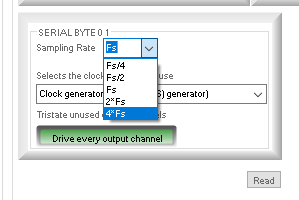
The second thing is that I usually do not recommend you change the clock generator dividers to produce 192kHz at the "Times 1" setting. Then the part internally is producing a clock that is four times that rate and that is too high and also uses more power than needed. The output of the clock generators have many different outputs, X1, X2, X4 and then /2,/4 etc/. So just change to the X4 setting and you will have 192kHz if the X1 is setup for 48kHz.
On the serial port settings page you can see the choices:
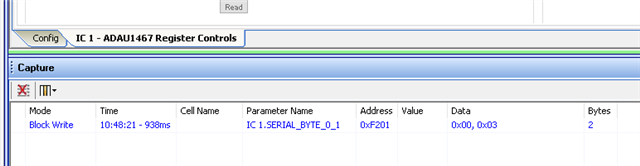
One trick to find the register that is being changed is simple to see what SigmaStudio is sending to the DSP.
I just changed the register and looked at what came up in the capture window and you can see the register address and the value that was sent to the DSP.
For controlling the DSP program from a microcontroller, you should read this tutorial. It should amswer some of your questions.
Interfacing SigmaDSP Processors with a Microcontroller [Analog Devices Wiki]
Dave T
Please log in to reply.