SigmaDSP Core locked in 48kHz process to DSP or not
HI team,
I would like to check is SigmaDSP Core locked in 48kHz process to DSP?
We are using ADAU1452 with 96kHz input freq and it generates the noise to output sinus wave.
Audio Signal Processors
adau1452
software
adau1452 sigmastudio
SigmaDSP Audio Processors
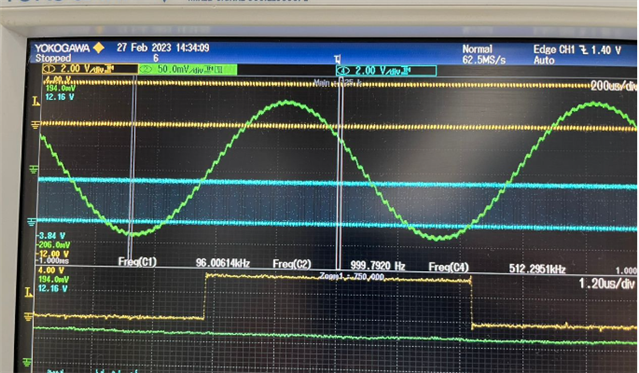
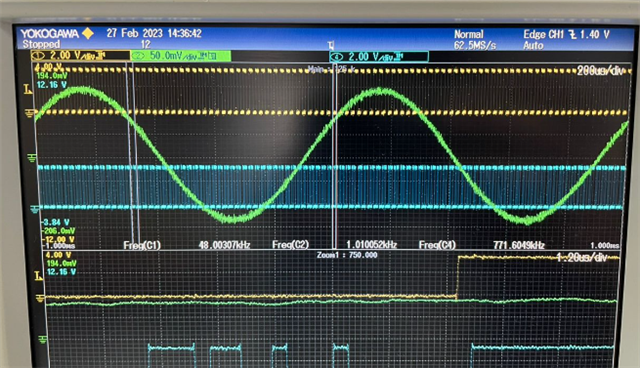
Hello JKpg,
JKpg said:
I would like to check is SigmaDSP Core locked in 48kHz process to DSP?
Do you want to check what rate the core is set to?
You can measure the LRCLK frequency that is derived from the clock generator. The default rate is 48KHz that you can see the N/M = 1/6 in the clock control page. So, now the base_fs is 48KHz. If your start pulse is also set to base_fs then the core rate is 48KHz. The start pulse is nothing but an interrupt pulse that tells the DSP to start processing the next audio sample.
You can also run the serial in/out ports at different rate than the core rate, if necessary.
To know more about sample rate systems then please follow this thread.
JKpg said:
We are using ADAU1452 with 96kHz input freq and it generates the noise to output sinus wave
Are you saying your input sine wave is 96KHz?
What is your converter's rate?
We don't know what your fs is, yet note that, your highest input frequency component must be within 24KHz for the sample rate of 48KHz.
For 96KHz input, your sample rate must be 192KHz or above.
Since you didn't attach your project, we are not sure what are all the settings that you set in your project. It would be helpful if you attach your project.
Regards,
Harish
Please log in to reply.