Use Clickless HW Slew General EQ (2nd order) Slew Parameters Were Not Saved Successfully
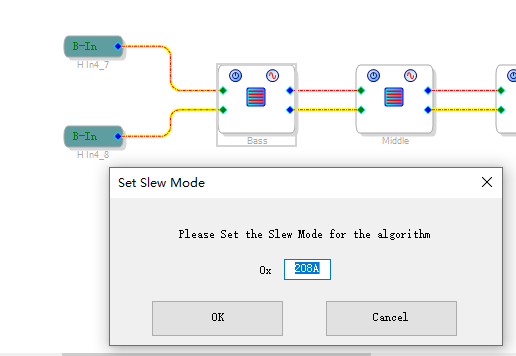
Open any sigma studio project, modify the general_eq(2nd order) of slew type parameters, save, and exit.
Open the project again and the slew type parameters are not saved successfully.
Audio Signal Processors
adau1452
sigma studio
software
sigma studio 4.6/sigma studio 4.7
SigmaDSP Audio Processors
adau1466
Show More
Hello ercan23,
Sorry, I couldn't simulate the issue in both SS 4.6 and 4.7 versions. The previous value is successfully saved when you close and open your project again. I have tried it multiple times and it all seems good. I don't know what's going on in your project or SS. If you send your project, I can try with it but mostly it may be a software problem in your side. Send your project and if I couldn't simulate even in your project then try uninstalling and reinstalling SS.
Regards,
Harish
Hi Harish,
Sorry, Maybe my description is wrong, I tried to record a video to explain this problem, I used version SS4.6 and SS4.7, also have this problem.So I hope you can help verify it.
Thanks,
ercan
Hello ercan,
ercan23 said:
Maybe my description is wrong
Your description was so clear even without a video. Now I see the video you recorded in your end. However, I still unable to simulate this. I tried with three different PCs, and all worked out well in SS V4.5/4.6/4.7. So, it doesn't seem like a bug.
Did you try uninstalling and reinstalling sigma studio? It may help.
Please let me know your results.
Regards,
Harish
Sorry to bother you again. I tried to install and uninstall different versions on my company computer and had the same problem. The video was recorded on a home computer, which also had the problem. Could you please send your installation package to my email address? Email number: ercanlee25@gmail.com.
Tks,
ercan
Hi Harish,
Are you sure?
I am facing the same problem. I changed the HW slew value, saved the Sigma project and close the Sigma project. Next time, when i open the Sigma project again, the HW slew value is changed to be the initial value.
Meanwhile, I asked the local ADI support and they feed back that the HW slew value can not be saved in the Sigma project.
So I am confused now. Could you please help to double confirm?
Thanks,
Tingting.
Hello ercan and Tingting,
I hope I didn't misunderstand your question. I have attached a video that I experimented with. Please confirm whether this is what you expect to see. I tried multiple times with different PC's and SS versions.
Tingting1992 said:
Meanwhile, I asked the local ADI support and they feed back that the HW slew value can not be saved in the Sigma project
I'm not certain about this, let me investigate further and get back to you.
SS3.zip
Regards,
Harish
Hi Harish,
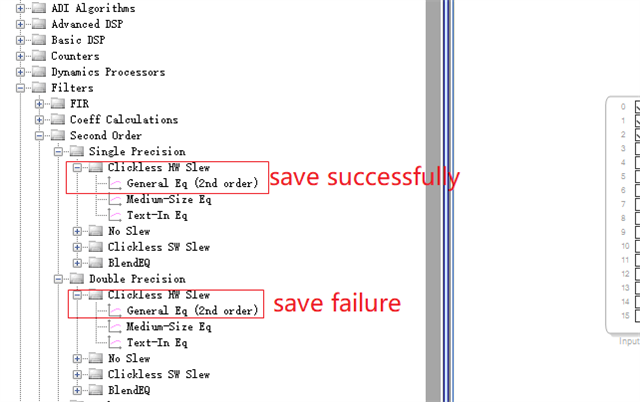
I watched the video and also verified the problem synchronously. Are we using different filters? I have also verified single-precision and double-precision filters, and found that single-precision filters can be successfully saved, while double-precision filters cannot be successfully saved, please reply again? thank you.
The filters are used in the following image.
Thanks,
ercan
Hello ercan,
Sorry for the confusion.
I can simulate your issue now. As you mentioned, the slew value of the double precision filter block is not saved.
Thanks for reporting this. We will get back to you.
Regards,
Harish
Hi all,
Cool. So it seems a bug?
Harishgowtham , is it possible to fix it in some time? It will be very useful for my project.
Thanks,
Tingting.
Hello Ercan and Tingting,
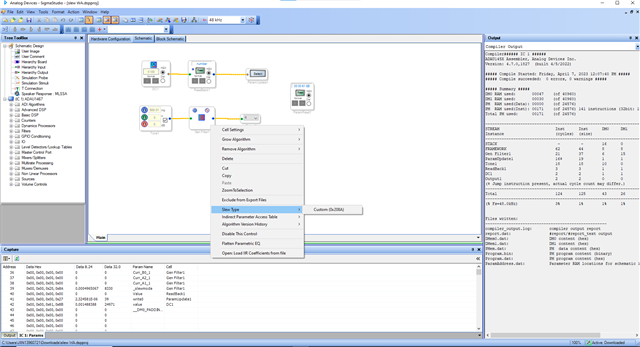
There is a workaround for this sew value to be permanently set in your project. Write the respective slew value to the parameter update cell from the DC cell. The parameter update cell should be set for filter's slew mode parameter. You can verify it by reading from DSP parameter read cell. I have attached a project please see whether it helps.
Close and open the project then compile it and read the value from parameter readback cell.
slew WA.dspproj
Regards,
Harish
Please log in to reply.