[Bug Report] SigmaStudio2+ Pulse Generator, project doesn't compile
Tried everything but whenever the Pulse Generator cell is in the schematic the project compilation fails. The platform i'm using in the project is EVAL-ADAU1452MINIZ
Edit Notes
added platform informations
[edited by: op-electronics at 7:48 AM (GMT -4) on 2 Apr 2023]
2.0
software
Hello Op-electronics,
Sorry, I'm not very certain about your software version. Are you supposed to mean version 2.0 as Sigma studio 2.0?
Our latest versions are working perfectly fine. why don't you just update to SS 4.7 and try? Is there any problem with updating to the latest version?
Regards,
Harish
Hello Harish,
Thank you
Omar
Hello omar,
op-electronics said:
i meant this:
Thank you, now I understand what you meant.
Let me check and verify this and get back to you.
Regards,
Harish
Hello omar,
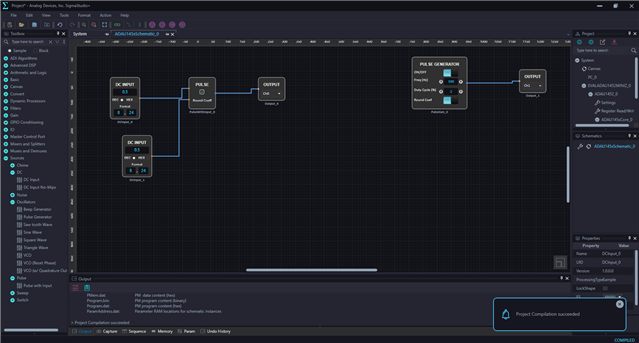
Please look at the below screenshot. It compiles fine.
Are you unable to compile like this? Or your issue is different than this?
Regards,
Harish
Hello Harish,
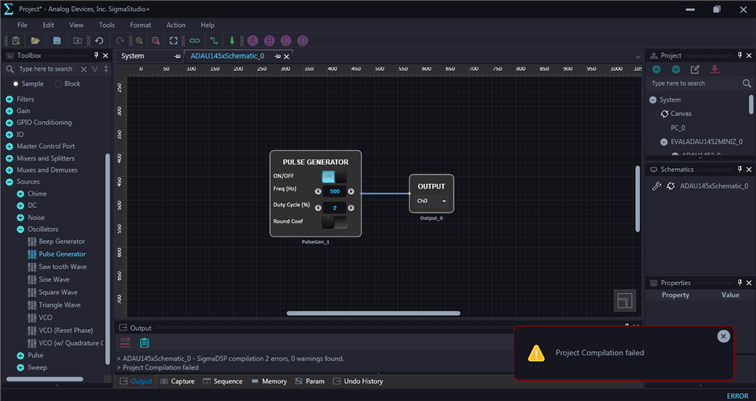
yes, i can't compile when the Pulse Generator is in the schematic:
If i replace the Pulse Generator cell with Sinewave Generator cell it compiles just fine.
I just noticed that the output winows reports some more details about the error:
> Compilation Started...
> ADAU145xSchematic_0: Compilation of the schematic started...
> PulseGen_0: error (19,PulseGen_0): Invalid arithmetic constant, must be ONE, fractional ('1' or '1.0'), or integer 'LSB' (408,14)
> PulseGen_0: error (20,PulseGen_0): Unrecognized instruction, ';' (409,14)
> ADAU145xSchematic_0: Compilation FAILED: 2 errors, 0 warnings
DM0 RAM used: 00028 (of 20480)
DM1 RAM used: 00013 (of 20480)
PM RAM used(Data): 00000 (of 8192)
PM RAM used(Inst): 00093 (of 8192) 83 instructions (32bit: 73 64bit: 10)
Total PM used: 00093 (of 8192)
> ADAU145xSchematic_0:
Files written: (C:\Users\User\AppData\Roaming\SigmaStudio\Project\ADAU145xSchematic_0/)
----------------------------------------------------
compiler_output.log: compiler output report
report.dat: #report/#report_text output
> ADAU145xSchematic_0 - SigmaDSP compilation 2 errors, 0 warnings found.
> Project Compilation failed
I'm having the same problem, compiler complaining about numbers, even if I never changed them and left the defaults:
> Compilation Started...
> ADAU146xSchematic_1: Compilation of the schematic started...
> PulseGen_0: error (19,PulseGen_0): Invalid arithmetic constant, must be ONE, fractional ('1' or '1.0'), or integer 'LSB' (419,14)
> PulseGen_0: error (20,PulseGen_0): Unrecognized instruction, ';' (420,14)
The pulse generator seems not to be the only component with such problems, I also get it for the square wave generator which I tried as a replacement. Even the example "ADAU1467 Audio Mixing and Splitting Example" from the help menu doesn't compile, gives the following error:
> Compilation Started...
> ADAU146xSchematic_0: Compilation of the schematic started...
> SingleLevelDetectorRunningAvg_0: error (12,SingleLevelDetectorRunningAvg_0): Invalid arithmetic constant, must be ONE, fractional ('1' or '1.0'), or integer 'LSB' (592,9)
> SingleLevelDetectorRunningAvg_0: error (13,SingleLevelDetectorRunningAvg_0): Unrecognized instruction, ';' (593,11)
Could it be something locale specific? I'm using german Windows, number format is with comma as a decimal separator. That's sometimes confusing other software, too.
Just starting to migrate from SS4.7 to SS+2.0, I get a couple of odd behaviours. For another thing, it refuses to save my project on a network drive, says "You don't have permission to save in this location." which is not true. The file select box is able to create a new directory there.
Hello,
Can you send over your project which is failed to compile? I will try to compile and reproduce the problem here in my PC.
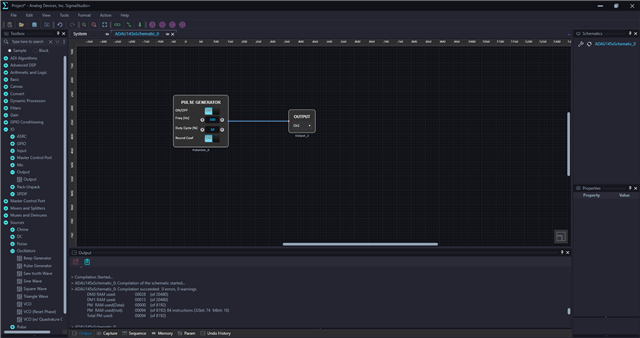
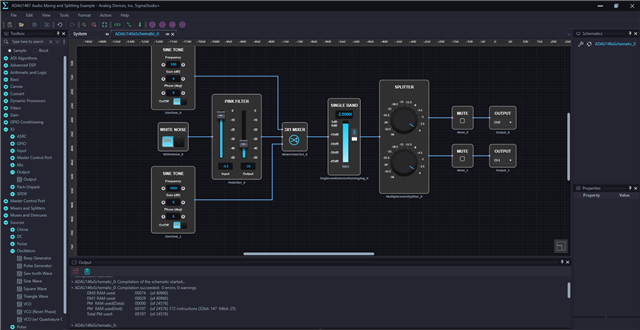
I tried the same example project that you mentioned as well as a project with the pulse generator block. It turns out to be working well in my PC. Please see the below screenshots.
So, I will attach those projects here. Please try this out and get back to us with your results. we may try to figure out where is the problem.
sigmastudio+ working projects.zip
Regards,
Harish
Thank you for the countercheck and the preparation.
Both are failing the same way as before. To get a second opinion and test my locale hypothesis, I did a fresh install of SS+2.0 on a different machine with english Windows. Installed to default path, projects placed into the suggested user path. Same again, so it's not specific to the german locale.
I have attached the compiler output from the new machine.
One more thing: On the first machine, the integrated updater in the help menu does not work for me. It offers a new version 2.0.8389, when I click install it announces to close the app, after confirming it does so, app goes away and the dialog stays for a few seconds. Then it vanishes without having done anything. On the new machine, it says "installed" after those few seconds.
However, the updated version gives still the same compilation errors.
compiler_output.zip
Hello Dragon and op-electronics,
we suspect this may be some sort of bug with number formatting in some region with “,” separator instead of “.”
So, we are analyzing this further and will fix it in the future SS+ release.
Thank you for your patience.
Regards,
Harish
Indeed, if I change the decimal separator in the region settings of Windows, it compiles successfully.
The second machine with english Windows also had german region setting, I was mistaken there.
So bottom line, it is a locale issue.
Thank you for dealing with it and fixing it some day.
(The failing software update is not fixed with that setting, this is a different issue...)
Please log in to reply.