Connect USB interface without seflboot (ADAU1701)
Hi, in our product we use an ADAU1701 without selfboot, connected to a microcontroller that downloads the program at startup and varies some parameters during execution.
In this condition (without EEPROM and with SELFBOOT pin LOW) I cannot connect with the USB interface, SigmaStudio keeps giving me "Comms Failed".
I can only connect by soldering an EEPROM to it and setting SELFBOOT high.
For testing and prototyping we use the latter configuration with selfboot, but I would like to learn how to connect with USB interface even with the board in"production configuration".
Can anyone confirm if this is possible and if there is any tricks needed to make it work?
Thanks
Audio Signal Processors
software
USBi interface
SigmaDSP Audio Processors
selfboot
adau1701
Show More
Hello razielfirst,
You should be able to do this. It all depends on what is happening with the microcontroller. The USBi cannot handle a multi-master environment.
First, before I can get into details, I need to know if are you using SPI or I2C?
A screenshot of your schematic would be helpful.
Dave T
We are using I2C for communication between DSP and micro.
I can post a screenshot of the partial schematic, but I don't think this is relevant, the connections should be correct.
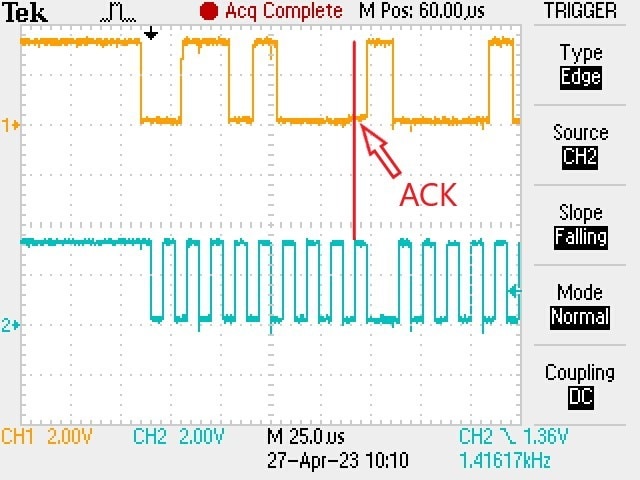
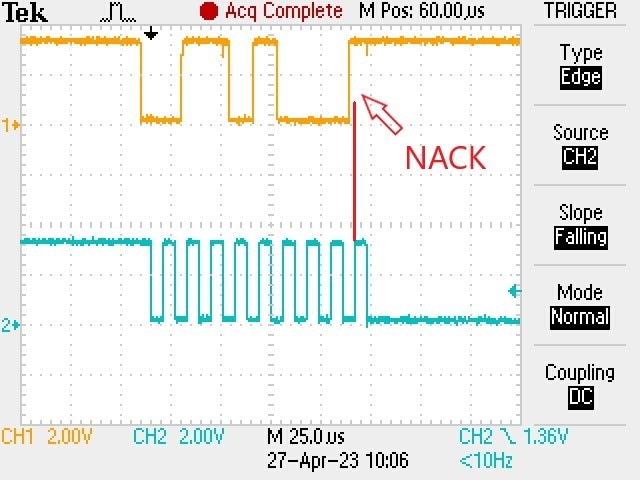
Here 2 screenshots of the communication initiated by the USBi interface when I start the download from SigmaStudio.
In the first image (selfboot ON) the DSP responds with ACK and the download continues.
In the second image (selfboot OFF) the DSP does not respond and the download fails.
In the 2 tests the only difference is the location of the selfboot resistor, all other configurations and settings are identical.

Please log in to reply.