Unable to Read EEPROM after Flashing using Flash Programmer
Dear Team,
I have an observation with the Flash Programmer module in Sigma Studio and the EEPROM Loader under Hardware Configuration.
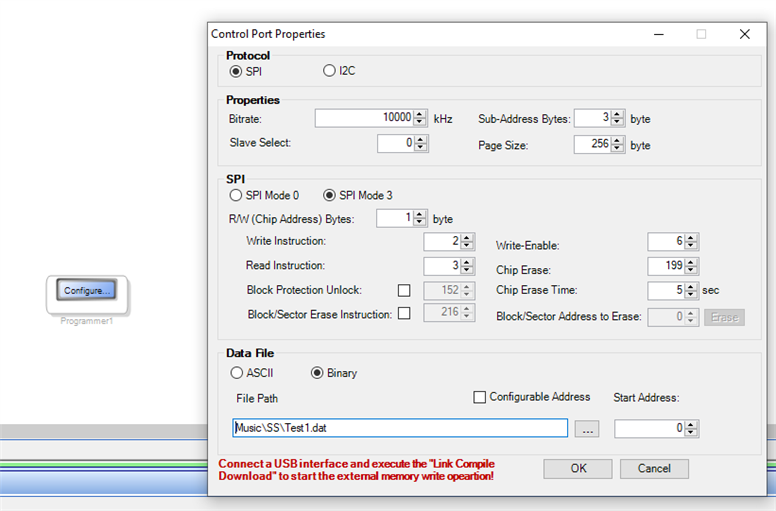
I flashed a dat file into Start Address 0 as shown below
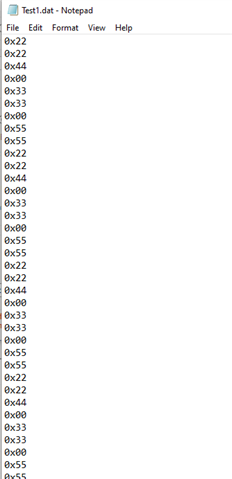
My dat file is as shown below:(Test1.dat)
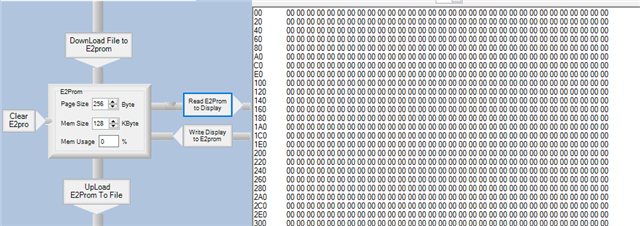
Post Flashing when i open the EEPROM Loader tab from the Hardware Configuration and click "Read E2PROM to Display" only zeroes are observed . Data I flashed is not visible here . Can anyone explain this observation and also where and how i can Read the Data i just flashed.
Regards,
Rajesh
Audio Signal Processors
adau1452
Audio Products
software
Sigma Studio 4.5
SigmaDSP Audio Processors
adau1701
Show More
Hello Rajesh,
I'm not so sure about from where you are reading this data. I guess you are using the Eval board, remember that there is no direct connection between the EEPROM and the USBi. You can only read/write the data thru the DSP unless you made a hardware modification.
You must read the EEPROM from the master control port. I will quote Dave's reply here regarding reading the EEPROM from WinE2PromLoader.
1)Some customers have setup hardware with switches to connect the USBi connection from the slave port over to the EEPROM for this purpose. They then hold the DSP in reset so there is no issue with two SPI masters. For I2C it is a little easier. So unless there are provisions in your hardware for a direct connection you will not be able to use the WinE2PromLoader to write to the EEPROM.
2)Some customers have enabled a system controller to do what SigmaStudio does, which is to load in a small pass-through program to take data from the slave port and write it out to the EEPROM via the master port. This can be done by capturing the pass-through program using SigmaStudio Capture window and embedding it into their controller code. There are posts on the forum that detail how to do this. It is a bit complicated.
3)Some customers have setup a port ( connector) to directly connect to the master port and hence the EEPROM. The important thing with doing this is that the DSP needs to be held in reset if they are using SPI and if it is I2C then be certain the DSP is not trying to communicate out onto the master port.
Here is the post.
Regards,
Harish
Hello Rajesh,
Great response Harish!
I also want to add a little bit of history here that might help to understand the EEPROM tool in SigmaStudio.
All of the early SigmaDSP parts only had one communications port. It was a slave port that would change to a master port for loading the EEPROM for selfboot. Therefore the EEPROM is on the same communications port that SigmaStudio is connected to. So the USBi interface can directly "talk" to the EEPROM. The EEPROM reading and writing utility is very handy for those parts. So if you are using an ADAU1701 this works perfect.
Then we developed the ADAU1452 (Sigma300 and Sigma350) parts which were a huge leap forward. One of the advantages is that it has two communications ports. One is always a slave port and the other is always a master port. This opens up a lot of possibilities for system design but it broke the ability for SigmaStudio to directly "talk" to the EEPROM because it is not connected to it. So you must use the DSP to communicate with the EEPROM.
So the EEPROM reading tool is there for the older SigmaDSP parts but is not usable for the newer parts. We cannot get rid of the feature because it is still needed for the old parts. You might wonder why you have to connect the EEPROM to the USBi in the configuration GUI? This is only for telling SigmaStudio to produce an EEPROM Hex file when it compiles and for giving you the ability to enter in the EEPROM details like SPI or I2C and size, write speed etc.
Dave T
Please log in to reply.