Reading EEPROM Memory in Sigma Studio
Dear Team,
We are using the Flash Programmer available as inbuilt module in Sigma Studio to flash a binary file into the EEPROM Memory.
The EEPROM memory in the ADAU1452 Rev BZ Board is an 25AA1024 - 1 Mbit SPI Bus Serial EEPROM,
Having refereed the datasheet for this EEPROM , we have found the memory address details.
Based on our understanding we flashed the binary file into Address 0x8000 in to the Flash Memory.
We need to read from this address 0x8000 and copy the same binary from this address into the DSP's internal RAM memory .
Please let us know the method of doing this.
Note :Both the Capture Window as well as EEPROM Loader View have not proved to be useful in reading the EEPROM memory at the flashed address.
Regards,
Hermione.
Audio Signal Processors
adau1452
Audio Products
software
Sigma Studio v4.5
SigmaDSP Audio Processors
Show More
Hello Hermione,
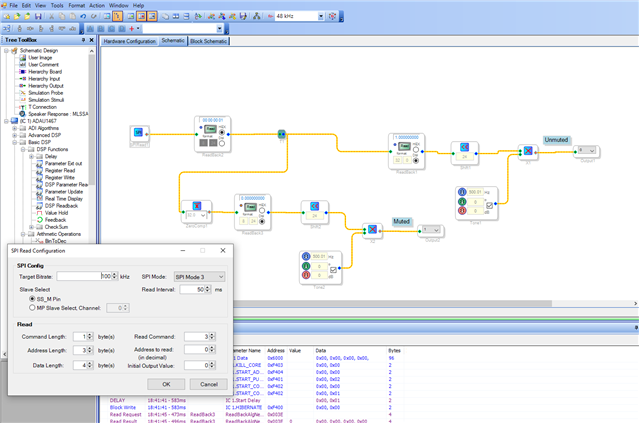
I have just replied to one of your queries related to EEPROM reading here. There I have demonstrated reading an EEPROM memory by using SPI read module. Please refer that.
Regards,
Harish
Unknown said:
We need to read from this address 0x8000 and copy the same binary from this address into the DSP's internal RAM memory .
Dear Harish ,
The above quote from my reply needs a solution.
Please check this in priority.
Regards,
Hermione
Hello Hermione,
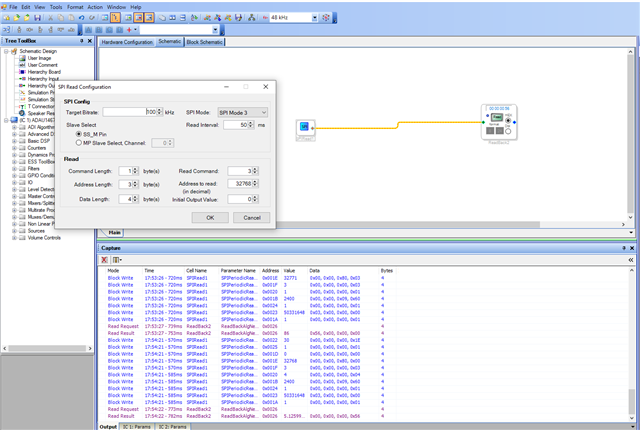
You can read the value from that address and use it in schematic. You can use that value to control any parameter etc.
Please look at the below schematic
.
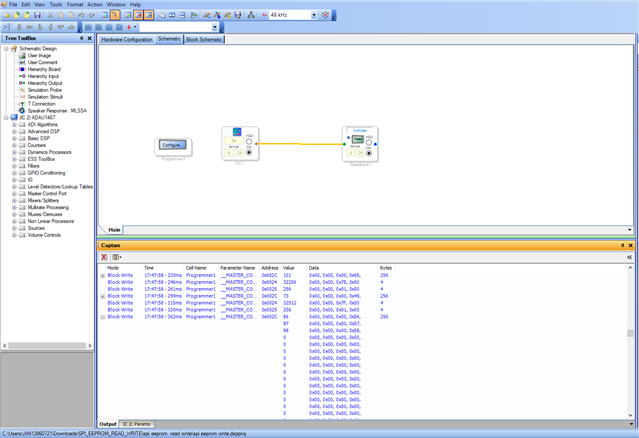
Here I have to write minimum 8192 words (4 bytes each), so that I can write to the address 32767(0 to 32767 = 32768). The address 32768 is 0x8000.
Below is the file I wrote to the EEPROM.
At the address 0x8000, the value stored is 0x56 as you can see above.
Regards,
Harish

Please log in to reply.