Interfacing GPIOs of ADAU1701 to GPIO of RPi as IR Rx to control volume and mute
Hello,
I want to implement vol+, vol-, mute and IR activity LED on my ADAU1701 board using four GPIOs.
The control signals for vol+, vol- and mute pins will come from three GPIO pins of Raspberry Pi which I intend to program as a learning IR receiver.
The vol+ and vol- pins will get a pulse (ON time = ?, total time = ?) each time the vol+ and vol- key is pressed on the IR remote.
The mute pin will change state each time you press and release the mute key on the remote.
The ADAU1701 will listen for activity on the three pins and indicate it on a fourth GPIO to momentarily turn OFF an otherwise ON LED, normally indicating PWR and self-boot ok.
I took a look at volume control methods on wiki but could not figure out which one will be best suited for this application.
I also would like to understand how values for look-up table for volume control are calculated to mimic a log potentiometer.
Any help and ideas are much appriciated.
Thank you in advance!!
Audio Signal Processors
Audio Products
software
SigmaDSP Audio Processors
adau1701
Hello KKSL,
The Wiki is a good place to start but pretty much all of this has been covered in other posts in the forum. The search feature has improved on the forum so you may find an answer more quickly.
I will give you some examples in several projects.
Here is a project that shows how to do a mute from a GPIO
4111.ADAU1701 GPIO Volume-Xover-GPIO_Toggle-Mute.dspproj
This next project has the Push-Volume block and this block has a feature where if you press both UP and DOWN buttons at the same time it mutes the audio. In this project I used an AND gate to AND a third mute button so this will be what you must likely want to use.
The volume table in this project is just a quick few points I entered for testing. I will talk about the volume table further into this post.
2553.ADAU1701 Crossover with push volume and mute.dspproj
Here is a text file I made years ago for a 33-item log values from zero to one. This is useful to control an external volume control.
Fullscreen
33 Item Table Log values from 0 to 1.txt
Download
0.00001
1.43301E-05
2.05353E-05
2.94273E-05
4.21697E-05
6.04296E-05
8.65964E-05
0.000124094
0.000177828
0.00025483
0.000365174
0.000523299
0.000749894
0.001074608
0.001539927
0.002206734
0.003162278
0.004531584
0.006493816
0.00930572
0.013335214
0.01910953
0.027384196
0.039241898
0.056234133
0.080584219
0.115478198
0.16548171
0.237137371
0.339820833
0.486967525
0.697830585
1
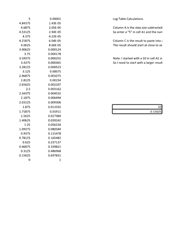
I use spreadsheets to do these calculations. Here is my rough spreadsheet I use. Nothing fancy here:
XLSX
Next is the LED part of your questions.
There are some simpler ways to do this probably using Timers where you can trigger a timer to shut off the LED for a set number of samples. There are examples of things similar to that on the forum.
This project I did here is for an LED brightness control to use it as kind of a signal presence meter where brighter is louder. You could adapt this program but there are better ways.
KJBob has posted many good examples using timers.
ADAU1701 GPIO output to a single LED to change brightness based on level.dspproj
This will get you started for sure.
Dave T
Thank you!
It would be great if a GPIO can capture IR codes and map three different captured codes to three functions (Vol+, Vol- and Mute in my case). Any three keys of any IR remote, any IR protocol. My be we would need one tactile key and one LED to guide the user in LEARN mode.
Would this be more appropriate for SigmaStudio+ where we can write some code?
Wishful thinking.
Thanks!
Please log in to reply.