Setting sample rate
How would I change the the sample rate to 96 kHz in Sigma Studio+ 2.0. It looks like fs is set to 48 kHz for every module/block in the corresponding properties widow, but that value is not editable. In Sigma Studio 4.7 there was a drop down menu at the top of the page which doesn't appear in the new software window.
Audio Signal Processors
adau1452
Sigma Studio+
Audio Products
software
SigmaDSP Audio Processors
Show More
Hello,
Please go to view in the top taskbar >> properties window >> There you can see Fs which is the software sample rate. For me that window is updated very slowly, please check in your end and get back.
Regards,
Harish
I can see that field in the properties window, but I cannot edit the value as stated previously.
Hello Kernel1757,
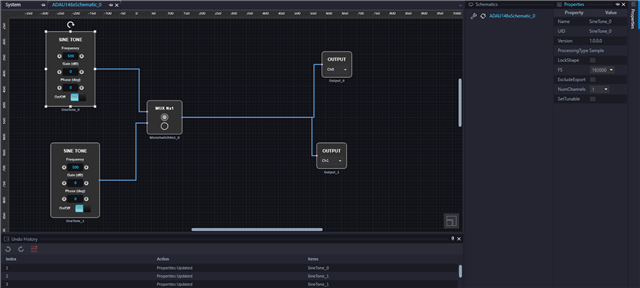
Just click the input block then the block will be high lightened and then then click the properties window, now you can see a window like below and you can change the sample rate.
I have followed the same steps and changed it. I also checked that whether the set sample rate is working properly.
I used a sine tone of 500Hz.Initially my core rate and software fs are 48KHz. So, I'm getting 500Hz in the output. Once I changed the fs of the sine tone to 96K by using above method, I was getting 250Hz though I set 500Hz in the tone block. This is because of the mismatch between the core rate and software fs.
You can also hover the wire and see what is the fs in the path.
kernel757 said:
I cannot edit the value as stated previously.
which means those options are disabled?
Regards,
Harish
Thanks for the response. Got the change working and tested as you explained. So changing the input block changes the rest of the blocks in schematics. Got it.
Please log in to reply.