DSP Readback does not appear to be updating correctly
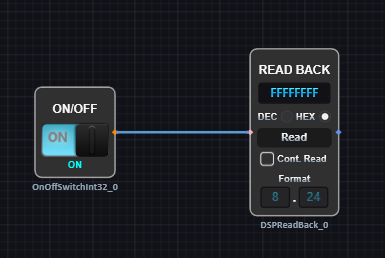
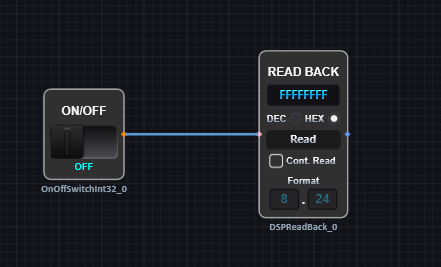
I am trying to use a DSP Readback block for debugging, but I am only receiving FFFFFFFF or -0.0000005 for a value when I click Read no matter what. I was trying to read the status of a switch as a test.
Audio Signal Processors
adau1452
Audio Products
software
Sigma Studio+ 2.0
SigmaDSP Audio Processors
Show More
Hello Kernel757,
This is a good test and something good to have in your project. I usually use a DC cell and a readback but this works just as well.
What this is telling you is that you are not communicating with the DSP. I assume you are using SPI so it is reading a constant high so you get all ones.
I have done this MANY times and I can laugh at myself afterwards. So what could it be?
No power applied to the board or the DSP
Wrong address for the DSP or wring Slave Select line being used? Check the USBi setup.
The USBi might not be seen by the computer OS?
Is the USBi plugged in? I have done that one a lot. Or I often have more than one USBi on my desk and I plug the wrong one into the eval board and wonder why I can't talk to it? Like I said, I can laugh at myself.
If it is your hardware then check the wiring for the comms port carefully. Check for shorts caused by bad solder joints or opens due to bad solder joints?
Use a scope to see if the signals are reaching close to the DSP. It is difficult to actually have the probe on the pin but you can do that with an ohm meter when the power is off.
Basically, ask your self what could stop the part from communicating with SigmaStudio?
Dave T
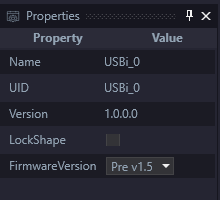
Thanks for the response. I had to change the FirmwareVersion parameter for the USBi to pre v1.5 in the properties window. My ADUSB2Z has v1.4. Then everything works as expected.
I have the same problem with the USBi 1.5, EVAL-ADAU1452REVBZ, and SigmaStudio 4.7 on Windows 10 Pro (22H2).
Power (6V) is applied to the board, and various LEDs light up in response to actions.
DSP address is "SPI 0x1 ADR0"
USBi is recognized because the SigmaStudio Communications Channel changes from red to green when plugging in.
When I execute Link-Compile-Download, the LEDs for MP5 MP9 MP11 go dark for a brief moment and then light up again.
If I press the reset button, I see the reset LED light briefly, then MP5,9,11 go dark and stay dark until the next Download.
The SELFBOOT switch is turned off and the corresponding LED is off (it changes when I move the switch, but I left it off).
I created a brand new Project and Schematic, following the tutorial, just in case my older project files had some register programmed incorrectly. I assume that the ADAU1452 evaluation board should be the easiest to get communications working, using the USBi, but no such luck
What else do I look for?
Please log in to reply.