Self booting is not working in ADAU 1452
Hi Team,
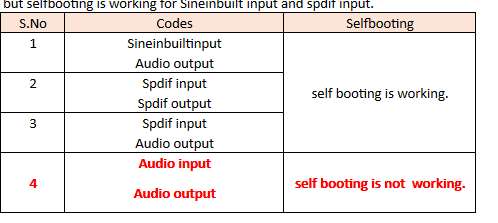
Self booting is not working in both ADAU 1452 Rev BZ and ADAU 1452 MiniZ sigma dsp boards for Analog Audio inputs.
but self booting is working for Sine inbuilt input and spdif input.
Below are the details of verification at our end:
For the above sigma dsp codes we have followed the self booting procedures as given in the ADAU 1452 data sheets.
Why self booting is not working for Analog audio input? .Please share the example that shows self booting is working for Analog audio input .
Thanks
Hermione

Hello Hermione,
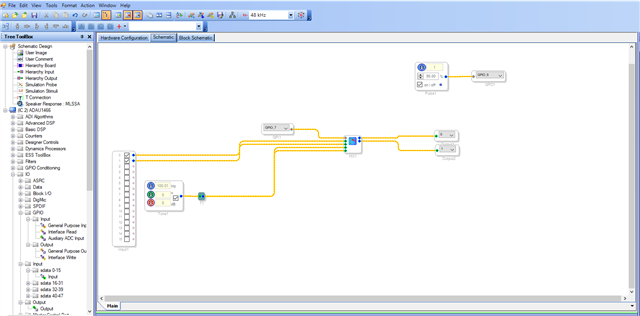
Mostly the problem will not be in the software side, and we will have to look at the hardware side. A project which worked when you link compile download will work well in self-boot scenario. However here I have attached a basic project with audio pass thru (analog in/out) and a LED (MP9) blink. Using MP7 (a switch in the eval board) you can switch between analog in and oscillator in as you can see in the below pic.
Once you complete the self-boot procedure, just look at the LED, if it blinks and switching to the oscillator input work well then there is no problem with self-booting and SPI side. we just need to look for SPORT input clocking and other clocking in your system.
Are your serial input port master or slave? where are your clocks are coming from?
If you have a scope, then try probing the serial input port pins and see whether the signal is coming from the ADC or not? If it's not present, then we need to look for the ADC and sport in clocking and the connection between the ADC and sport in.
selfboot_try.dspproj
Please try this and get back to us. we will proceed further.
Thanks Harish for your support!
We have this fixed.
I guess we had an issue with our AUX cables that had grounding issues resulting in an Audio Output with Noise . The thing that got me stumped initially was the imperceptible link between connecting USBi and Noise free Audio Output . It did deviate me from the solution for a while .
Thanks
Hermione
Please log in to reply.