Adaptive MFxLMS block not increasing filter length in SigmaStudio Plus
I've started using SigmaStudio+ 2.0 to generate feed forward ANC on the ADAU1467 eval board. When I try to change the filter length configuration of the secondary path training, the export file always outputs a max of 32 filter taps. The same when I look at the calculated Current LMS Coeffcients in the runtime mode. Please let me know how I can properly change filter lengths in the configuration setting.
Also, what is the function of the "SetTunable" setting in the MFxLMS Properties? I didn't see this option when using MFxLMS in SigmaStudio 4.7
Thanks!
TK
Hello TK,
I will look into this and get back to you.
Regards,
Harish
Hello TK,
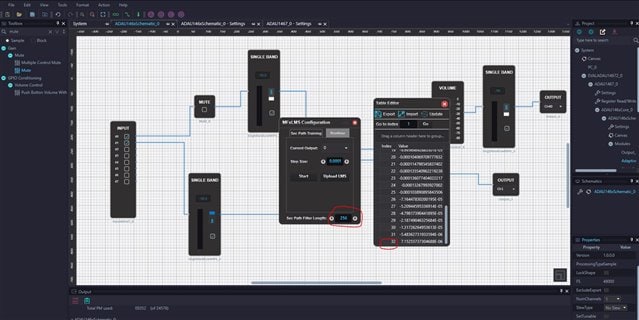
The project that I tried has worked as expected. Please find the screenshots and try the project in your end. However, I did experience some strange behavior with the tool while changing the filter taps. I will look into it further. In the meantime, try this attached project and see how it behaves in your end.
mfxlms.zip
Regards,
Harish
Thank you for the response Harish!
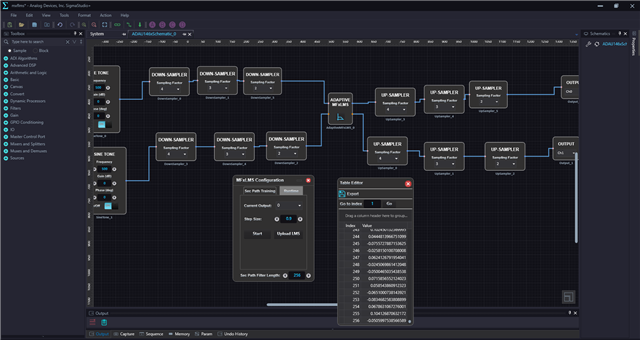
I ran your project and it did now give the 256 filter coeff in the training mode. But here a couple of observation with other settings:
- When I tried to change to a lower number of taps, it stayed at 256
- In the runtime mode, the filter coeff for the initial and current LMS coeff still stay at 32 taps when I try to change the setting to 256
A separate question - in SigmaStudio+, how do I change the software sampling frequency? In SigmaStudio 4.7, there is a drop down window with a list for fs. But I couldn't find anything in Plus where to change fs.
Thanks again!
TK
Hello TK,
I will inquire further about the filter tap settings. It did give me some trouble while changing the settings. I will into this further and get back to you.
Reg changing the fs, please refer this post that I had replied some time ago.
Regards,
Harish
Hello TK,
I have reported this bug to the development team, and it will be fixed in the future release of sigma studio+.
Thank you for reporting this!
Regards,
Harish
Please log in to reply.