Sigma Studio 4.7 crashes
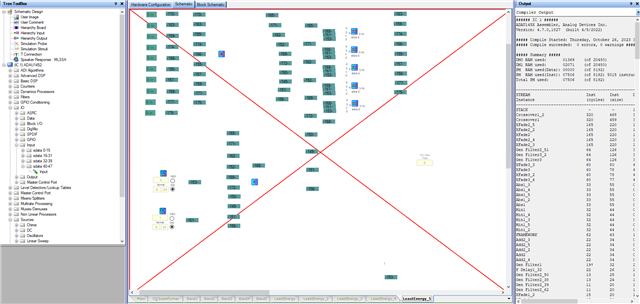
I keep getting this screen. It results in corrupt project file after, unless I've saved recently, but sometimes even after saving recently, the full project file which normally might have been 500kb, is now 1kb in size. I've lost hundreds of projects simply because I don't resave under a new name every 5 minutes or so. Is this really the way I'm supposed to use Sigma studio? I should be saving under a new project name every 5 minutes or else I will lose the project to corruption? Is anyone else experiencing this?
This above picture, btw, was from my 37th version of a software schematic I've been editing. I've learned from all my past issues throughout the years that this will continue to happen, so i just save often and nick the rev number in my filename.
Audio Signal Processors
adau1452
Audio Products
software
4.7
processors and dsp
SigmaDSP Audio Processors
Processors and Microcontrollers
adau1452 SigmaStudio 4.7
Show More
Hello bhook294,
Sorry for the inconvenience caused.
bhook294 said:
Is this really the way I'm supposed to use Sigma studio? I should be saving under a new project name every 5 minutes or else I will lose the project to corruption? Is anyone else experiencing this?
It has never happened to me; you don't need to do this every time. So, something strange is happening.
Does this happen with every project that you have? or it's only happening with a particular project?
could you send us over your project? I will take a look at it.
Regards,
Harish
Hello Harish,
I've been dealing with this issue for about 5 years now. This happens on every project, but seemingly with certain conditions. 1. very large projects, with many copy/paste operations. 2. screen scrolling / screen updates....the crash will almost certainly happen when moving the slider to view something offscreen (to the right or left, up or down ) in a large project. 3. If I haven't closed and reopened SigmaStudio in a long time.
Hello bhook294,
There are certainly issues when copying and pasting large sections of programs. I have only experienced it a few time personally and sometimes it is difficult to reproduce. The programmers will ask what steps need to be taken to make the problem show up and that can be difficult. I have had memory leak type of issues with the 1701 but not really with the 1452. But I will not discount it. You are asking a good question in that "Am I using SigmaStudio as intended?" I have found this issue with many software packages that a program is setup to be used a certain way and will not work well if you try to run it differently.
It is certainly very good practice to save often and save a safety copy under a backup name as well. That will be always true. You never know when Windows will crash or the power goes out.
I think you may have my email address? I would like to see your programs to see how you are working and there may be some suggestions as to how to prevent some of these crashes. I will not say they will never happen but we might be able to minimize it and identify some actions that can reproduce the bugs.
Are you using Hierarchy blocks? They are a good way of pasting in large blocks of code but I have had those cause crashes too. But then it is easy to go back, restart and recover. It also might be how you are trying to scroll? Are you running on a MAC by any chance?
Send me an email or a PM. If you send a PM then check your preferences to see if you allow a PM back from people who are not friends. You can send me a friend request.
Dave T
Please log in to reply.