ADAU1452 clock settings
Dear ADI Team,
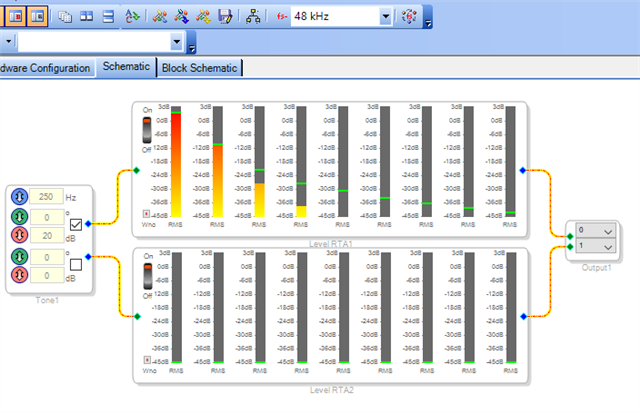
I'm just going through my first steps with ADAU1452. The example I would like to implement is simply a sine wave generator per this schematics:
The desired sampling rate is 48 kHz and I am using an I2S receiver connected to the ADAU1452 serial output that can play the sound directly to the speakers.
Although I have set everything per the ADAU1452 datasheet, there is a persisting issue with the clock/timing. The frequency I set on the generator in the schematics (currently 250Hz) results in 4x frequency when played from speakers (1000Hz) and the sound is somewhat distorted.
When checked on the scope, the sampling rate (LRCK) seems to be allright (see below). I would like to use 16bit audio in 32bit frames (and I have also set the output to 32bit mode), but trying other options here seems not to resolve this issue.
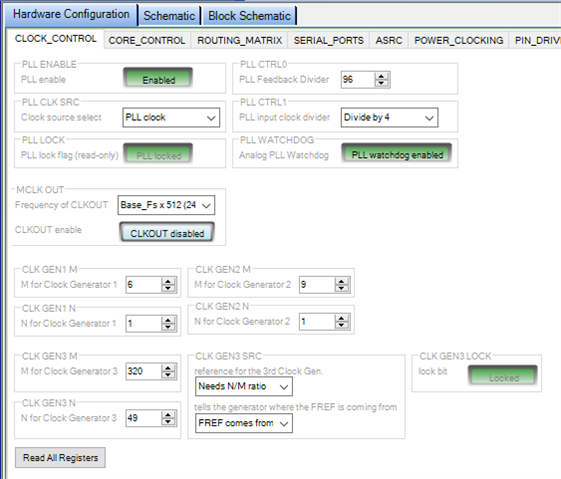
I use the following settings for the clock:
System clock: crystal oscillator at 12.888 MHz, PLL pre-divider 4, PLL feedback divider 96, system clock 294.912.
Clock generator 1: M 6, N1, Fs = 48 kHz
Clock generator 3: M 320, N 49, Fs = 44.1 kHz (currently unused)
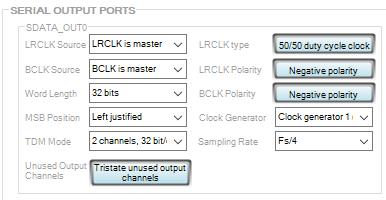
And also this settings for the serial output:
For some reason, to achieve the 48kHz sampling rate, I have to set the Fs/4 in the serial output settings, which I believe is not correct.
I have been troubleshooting this for almost 2 days and I'm afraid I run out of ideas what to try next... maybe there is some step that I am missing.
Could you please give me any hints on this?
Thank you very much for your reply,
Jan Pribyslavsky

Hello Jan Pribyslavsky,
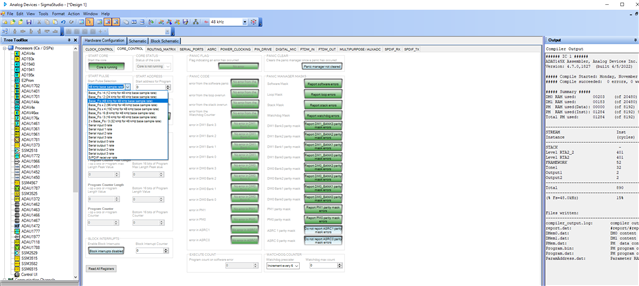
I suspect that your core rate is set for 192KHz which is labelled start pulse rate. Please look at the below screenshot.
Please verify that it is set like above. It has to be set as Base_fs, if you intent to run the core at 48KHz.
I noticed in your screenshots that you set your software sample rate (top of the window) and serial port clock rate as 48KHz. Your serial port is set for CG1 which is set for N/M=1/6 = 48KHz. Hence you are measuring 48KHz at LRCLK OUT 0. But I suspect (you haven't attached core control page) your start pulse is set for Base_fs * 4 which is 192KHz. So, here is the mismatch.
JanPribyslavsky said:
For some reason, to achieve the 48kHz sampling rate, I have to set the Fs/4 in the serial output settings, which I believe is not correct.
You don't need to do this, just change your settings like above and revert the serial port rate to Fs from Fs/4.
I believe that changing the start pulse rate as Base_fs will solve your issue. Please set that as Base_fs and let the rest as is.
If your issue persists then kindly attach your project with your next reply.
Regards,
Harish
Hello Harish,
thank you very much for your reply. Setting the Start Pulse is a step that I have not considered and changing it's value indeed have impact on how the output sine wave frequency is generated. Unfortunately, the settings I had before was already at Base_fs and to get the correct sine wave frequency, I had to set the Start Pulse to Base_fs / 4.
As I mentioned before, I also had to set the sampling frequency as Fs / 4 at the serial output settings to get the 48 kHz at LRCLK. This brought me to the idea that the overall system clock is 4 times higher than it should be - and I solved that by adjusting the PLL feedack divider from 96 to 24. But again, I don't think this is correct, as the datasheet is stating that for 12.888 MHz crystal oscillator, the PLL settings should be pre-divider 4 and feedback divider 96 (page 35, table 28).
I am attaching the project file from Sigma Studio. If there is a chance you can have a look on it, I would really appreciate that!
Thank you!
Jan
adau1452_i2c.dspproj
Hello,
This is the default flow,
12.288MHz from Oscillator, clock divider - 4
12.288MHz/4= 3.072MHz, feedback divider - 96
3.072MHz*96 = 294.912MHz
294.912MHz/1024 = 0.288MHz.
This is the number before Clock generator.
Take CG1, if it is set as N/M=1/6 = 0.166666666
0.288MHz*0.166666666 = 48000. This is the output of CG1.
When you choose the start pulse rate as Base_fs (48KHz for 48KHz base sample rate) then your start pulse is 48KHz which is your core rate.
start pulse is an interrupt which tells the core that when to start processing the next sample.
In serial port settings, you can see clock generator and sample rate, if you set CG1 and Fs respectively, then your serial port is also running at 48kHz. Now your serial port In and the core and serial port out will be running at the same rate. This is what set by default in every new sigma studio project.
As you did above, if you set clock generator as CG1 and sample rate as Fs/4 then your LRCLK OUT will be 12KHz. Now your core is processing samples at 48KHz and put it in the memory and your serial port is taking it from the memory at 12KHz rate. Here you will miss samples.
If this rate is out of sync with each other then you may either miss a sample or repeat a sample. Please look at this post for sample rate systems in sigmaDSP.
Your project works fine for me. I just changed few things for my Eval board. I enabled MCLK OUT from clock control page and set it as 256*Base_fs. since that is clock source for my CODEC. I let the serial out port 0 and core have the default settings. I get the outputs as expected.
Please try this in your end. Attach your hardware schematic if possible.
4604.adau1452_i2c.dspproj
JanPribyslavsky said:
the datasheet is stating that for 12.888 MHz crystal oscillator
It is 12.288MHz, I have seen you mentioned 12.888 twice, hope it's a typo.
Regards,
Harish
Hello Harish,
thank you again for your thorough answer!
When following the default flow of the clock, I can pretty much relate to the first part:
- The oscillator runs at 12.288Mhz (yes, I had typo here previously).
- The PLL is set as divider 4 (you said 3 in your previous answer, but now I assume that was typo also) and feedback divider 96.
- I kept the MCLK OUT enabled and set 256*Base_fs. I'm measuring 12.288Mhz at the CLKOUT pin which gives me a good sign that the Base_fs runs at 48kHz.
- Start pulse set as Base_fs
Now the strange part comes:
- Without any change, I tried the project file you sent me and the issue is persisting - I'm measuring LRCLK OUT at 192kHz and the audio sine wave comes out at 4x frequency.
- After that, I have set N/M 1/6 for both CG1 and CG2. When I select CG1 and Fs for the output, I'm measuring LRCLK OUT at 192kHz but when I select CG2 and Fs for the output, the LRCLK OUT runs at 48kHz. This is very strange as I thought the CG1 and CG2 are identical. And even when CG2 provides correct LRCLK frequency, the sine wave from the generator is still at 4x frequency.
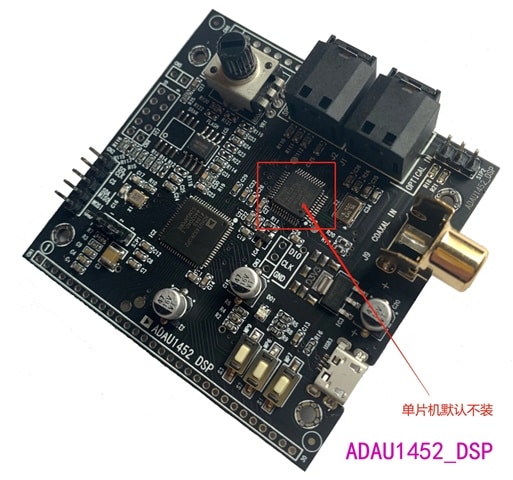
As the HW platform, I'm using 3rd party "eval" board of unknown origin. Maybe this could be the source of the problem as well...
If the HW is the problem, I may consider purchasing the original EVAL-ADAU1452RevBZ board from AD.
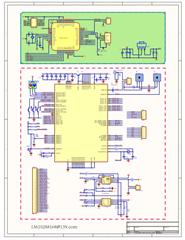
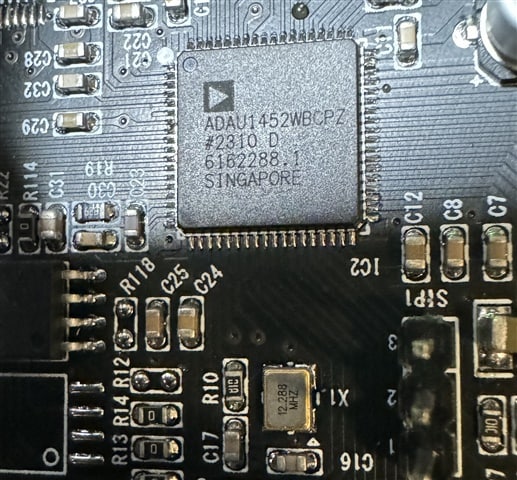
Please find attached the schematic (note that the STM32 MCU is not populated), picture of the HW board and also detailed photo of the actual ADAU1452 chip.
Thank you again for your help!
Jan
Hello,
JanPribyslavsky said:
(you said 3 in your previous answer, but now I assume that was typo also)
Yeah, it's a typo and I corrected it.
JanPribyslavsky said:
Without any change, I tried the project file you sent me and the issue is persisting - I'm measuring LRCLK OUT at 192kHz and the audio sine wave comes out at 4x frequency.
If all PLL settings are correct and CG1 is set as N/M = 1/6 and start pulse is set as base_fs and serial port is set as CG1 and Fs, if it still gives 192KHz at LRCLK_OUT then it's very strange.
JanPribyslavsky said:
After that, I have set N/M 1/6 for both CG1 and CG2. When I select CG1 and Fs for the output, I'm measuring LRCLK OUT at 192kHz but when I select CG2 and Fs for the output, the LRCLK OUT runs at 48kHz
The CG1 and CG2 give its output based on the N/M values. If any of it is set for 1/6 and serial port uses that CGx then it will give 48KHz, I have measured the correct frequency here.
JanPribyslavsky said:
the sine wave from the generator is still at 4x frequency.
The Tone module's output will differ from its given input frequency mostly in two cases, when the software sample rate and the core rate are out of sync or the core rate and serial port rate are out of sync. In your case everything seems correct in the settings.
Note that when you scroll your mouse down in the register config page, there are chances that the setting will change as you scroll down your mouse. Make sure that no changes happened in the runtime.
Take a new sigma studio project and connect the USBi and the processor and then just compile without doing anything. I mean without touching the schematic and reg config page. Now measure the LRCLK frequency.
I will have a look at your hardware schematic in a while.
Regards,
Harish
Hello Harish,
I tried to create a new project. The only thing I did there was to add USBi and ADAU1452 connected together in the Hardware Configuration - Config tab. Then I compiled and downloaded it to the device. The LRCLK at SDATA_OUT0 still shows 192kHz. There is also a quite apparent cracking noise coming from the speakers, although the schematic in Sigma Studio is completely empty.
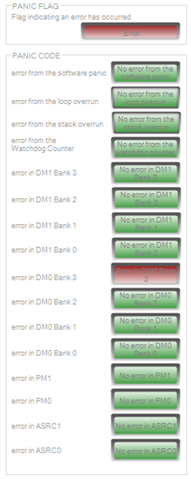
I noticed one more thing that I didn't mention earlier: there is always an active error, as shown in the attached screenshot. I have no idea what this error means.
The more I troubleshoot, the more I become suspicious of the hardware, maybe the chip itself. As it comes from a Chinese vendor, I can't verify the origin of the chip. If there is no solution, I am considering purchasing the chip from a trusted vendor and resoldering it onto the board.
Still, if you could provide some feedback on the board schematic, I would really appreciate that. But frankly, I don't expect the schematic itself will reveal any issue as it is very simple.
As in the previous case, thank you very much for your help!
Jan
Hello all,
I have resolved this problem. For the entire time I have been overlooking the fact that the ADAU1452 is connected to the serial FLASH memory and SELFBOOT is enabled. This was interfering with the programming from the Sigma Studio. Connecting the SELFBOOT to GND solved this problem.
Regards,
Jan
Hello Jan,
I'm glad that the problem has been resolved. Thanks for taking your time and notifying us.
Regards,
Harish
Please log in to reply.