ADAU1452 - simple passthrough setup with ASRC
Hello everyone,
I would like to create a very simple application on ADAU1452 that would take audio data on a serial input and passes them through to a serial output. As the sampling rate of input and output is different, the ASRC also should be utilized.
The detailed parameters are the following.
Input: Stereo I2S data, 16bit samples on 32bit frames, 44.1kHz. Routed to SDATA_IN2.
Output: Stereo I2S data, 16bit samples on 32bit frames, 48kHz. Routed from SDATA_OUT0.
Here are screenshots of the serial config:
This is the system configuration:
System clock: crystal oscillator at 12.288 MHz, PLL pre-divider 4, PLL feedback divider 96, system clock 294.912.
Clock generator 1: M 6, N1, Fs = 48 kHz
Clock generator 3: M 320, N 49, Fs = 44.1 kHz
I have also set the ASRC0 in the routing table to take data from Serial input CH32/33 and also the serial out 0 signals are set to take data from ASRC0.
But for some reason, I am not able to get any audio at the the output at all. I verified the I2S source and it is reliable and I assume no issues with it.
There are many steps to configure this setup and I probably made mistake somewhere. To be honest, there are not many tutorials that I could use to understand how to configure the ASRC properly.
I am attaching the project file to this post. If there is anyone who could give me a hint on what I am doing wrong, I would really appreciate it.
Regards,
Jan Pribyslavsky
adau1452_passthrough.dspproj
Audio Signal Processors
adau1452
Audio Products
hardware
sigma studio 4.7
SigmaDSP Audio Processors
Show More
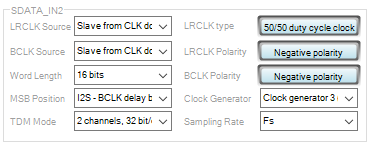
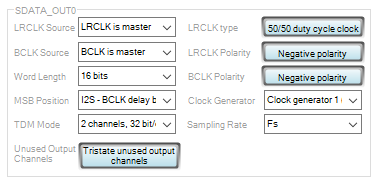
Hello Jan,
You are 99% of the way there.
Since you are using the serial output port as a clock master, there will be no signals on the internal clock busses. You had selected the serial output port rate for the ASRC output. For that to work serial output port 0 would have to be set as a slave. Then there would be clocks on the internal buss to follow that incoming rate. Since the source is internal you simply have to select the same internal clock source that the serial port is using. You are using clock Gen 1 and you are using the times1 output labeled as base_fs. This is all correct.
First, do you want to run through the core or not?
your program is passing data through the core but you are also bypassing the core.
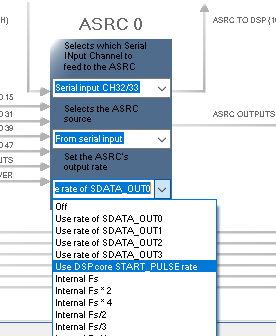
If you want to run through the core then set the ASRC up like this:
Set the ASRC output to the core start pulse rate:
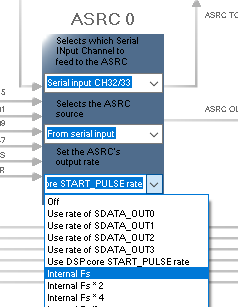
If you want to bypass the core then set it up to the same clock setting that the serial output port is using. Note that in your case these are the same clocks. The core start pulse and the 48kHz clock out since the core is set to use that same clock. So not much difference. The only little detail is that if you ever want to change the core rate the ASRC will follow if it is set to the core start pulse. Therefore, if you are bypassing the core then set the ASRC to use the clock source directly so there is nothing tied to the core.
So to bypass the core, use this setting:
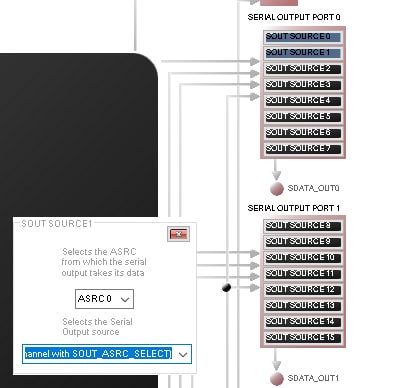
Then on to the data source for the serial output port.
You have it set to the output of the ASRC. This is good if you want to bypass the core. If not then select the DSP Core output.
Here is what you have it set to:
This is correct if you want to bypass the core. It is setup for ASRC0. Note the button is color coded to the color of the ASRC or the color of the core (black).
So I think you only have the one setting to change and that is the ASRC output clock source.
Also, the meters in the core program will still work. The core is picking up the ASRC data even though the core output to serial port 0,1 is not being used. At least I think it is? Now I am not so sure. I usually do not set it up for both signal paths at the same time.
Give that a shot.
Thanks for supplying your program. It helps to be able to look at many other settings.
Dave T
Hi Dave,
thank you very much for this thorough reply.
This passthrough application is only a begining and once I have it working I would like to apply some DSP functionality at the signal, so I guess I need to pass the signal through the core. Therefore I have updated the design according to your steps using the variant where core is not bypassed.
Unfortunately, I am still not able to get any signal not only at the output, but also at the input... the level meters in the schematics seem to not pick any signal. Strangely, only when I set the serial input 2 as master, the level meters start to pick a signal but this only result as noise at the output.
I am not sure how familiar I am with the clock domains... I can select from 0 to 3 clock domain when setting the BCLK and LRCLK signals in slave mode. How to determine which one to choose?
Again, I am attaching the design just for clearance.
Regards,
Jan
adau1452_passthrough_2.dspproj
Hello Jan,
What hardware are you using?
I was just going to test a quick modification of your program and I see it is set to I2C.
On the lower right of the SigmaStudio screen, are you seeing "compiled Comms Failed"? Or does it say "Active Downloaded"?
Dave T
I edited your project. It is currently set to SPI for communication. this project allows you to split up this problem. There is an oscillator and a volume control and some mutes that you can use to verify playback out of the DAC. Then work on the ADC side.
For the slave clock settings. The domain in the pull down menu should be set to the pins that have the clocks you want to use. So if you connect the clocks to serial input pins 2 then choose 2. If they are connected to serial pins 0 then choose zero. There are two details that can catch you.
1) The serial input port slave selections and not connected to the serial output port slave connections. You would have to connect them externally to the part.
2) If you choose a clock domain that is set to be a master, there will be no clocks on the slave domain. This is what I mentioned earlier. So if serial input port 0 is set to be a clock master then if you select slave to clock domain 0 on the serial input port 2, there will be no clocks there so nothing happens.
Dave T
adau1452_passthrough_2-DT-Edits.dspproj
Hi Dave,
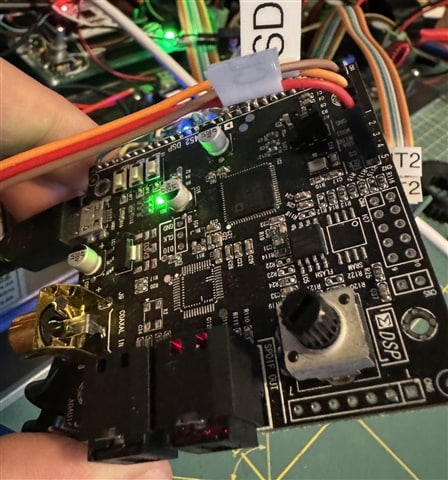
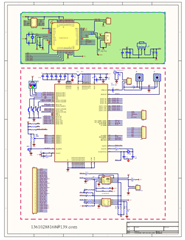
as a hardware, I'm now using this 3rd party board (see attached picture and schematics). The actual target platform is now in manufacturing and this is just a workaround until the main HW is available. On the final board, the ADAU1452 will be connected to STM32 MCU via I2C. This is why I have I2C in my setup. But I believe there is no problem in programming, as the compiling and downloading of the program always happens correctly.
Thank you very much for providing additional design. I tried that and the sine wave generator works fine. But when I switch tio the serial input, it seems that there is no signal being picked - this is apparent on the level meters in the schematics and also, when I switch the signal from the tone generator to serial input, the clock at the Output 0 works correctly, but the data line keeps transmitting a constant value (probably the last one from the tone generator before the switch occured).
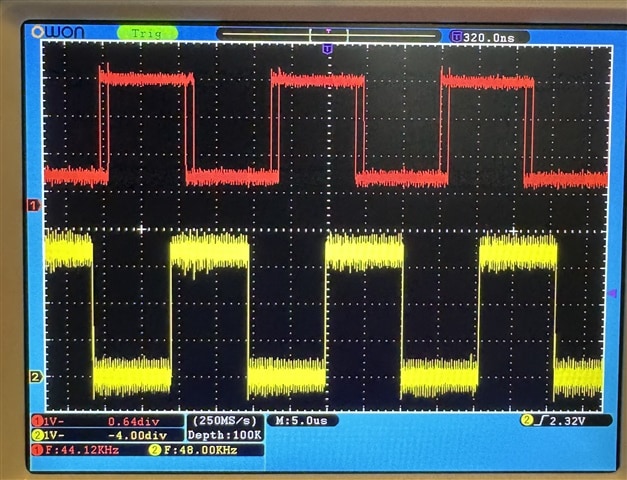
I have also verified the source of the signal that is routed to the Serial input 2 (I'm using this https://www.arylic.com/products/up2stream-mini-receiver-board) and there is no problem. In the attached scope screenshot, there is the LRCLK signal coming to the Serial input 2 (red) and LRCLK coming out the Output 0 (yellow), but still no data.
I seems that I have isloated the problem to the fact that no signal is being picked at Serial input 2, but from this point, I still need to investigate further.
If there is anything you would suggest, that would be great but I already appreciate your help very much!
Thanks,
Jan
Please log in to reply.