Confusion About E2PROM and MCU
I'm trying to integrate the ADAU1702 into a project and I'm experiencing some confusion about how a permanently connected MCU and E2PROM are meant to interact, if at all.
Do I need an E2PROM if I'm using a permanently connected MCU? Some of the documentation would suggest not, but it's not completely clear.
If an E2PROM is not necessary in this use case, how do I set up SigmaStudio correctly to account for this configuration? Do I just add the ADAU1702 and omit the E2PROM from the Hardware Configuration tab?
I'm planning on providing a smartphone-based user interface for the DSP controls. Should I be concerned with the speed of I2C slowing things down between the MCU and ADAU1702 compared to SPI? I would prefer to stick with I2C if possible, but if SPI would provide a noticeable increase in control responsiveness I might be forced to consider it.
Thank you for your time and support!
Ed
Audio Signal Processors
adau1702
Audio Products
hardware
i2c
spi
e2prom
eeprom
microcontroller
SigmaDSP Audio Processors
SigmaDSP
adau1701
Show More
Hello Ed,
upquark said:
Do I need an E2PROM if I'm using a permanently connected MCU?
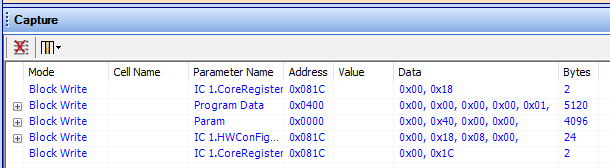
You can certainly eliminate the E2PROM and have your MCU boot your -1702. In fact, this is the preferred configuration. Essentially, your microcontroller needs to perform the same block writes as SigmaStudio does when loading your hardware, as shown in the Capture Window:
The issue here is how to get this content into your MCU program. Right after you Link-Compile-Download your project, click Export System Files to generate a gaggle of files designed to assist with this task. ADI has a system of referencing these files within your MCU source code to bring in the latest compiled object code for your -1702. Yet, for the -170x chips, it may be easier to manually insert your DSP object code directly into byte blocks in your MCU code, revising them manually as needed. The only system file you need for this is TxBuffer_IC1.dat, which contains the "raw" hex bytes of DSP code. Your first attempts at I2C boot loading can be quite frustrating, since any one thing wrong prevents successful booting -- with nary a clue as to why. Once you get it right, it just works.
upquark said:
If an E2PROM is not necessary in this use case, how do I set up SigmaStudio correctly to account for this configuration? Do I just add the ADAU1702 and omit the E2PROM from the Hardware Configuration tab?
Absolutely. Your MCU in effect substitutes for the USBi in this case. Where I work, we use a set of jumpers to connect either the USBi or the MCU to the DSP. This way we can easily jump between SigmaStudio and uC control during development. I2C has been fast enough for us, as it takes longer for the MCU to calculate new filter params than for I2C to safeload them. Your results, of course, may vary.
Best results,
Bob
upquark said:
If an E2PROM is not necessary in this use case, how do I set up SigmaStudio correctly to account for this configuration? Do I just add the ADAU1702 and omit the E2PROM from the Hardware Configuration tab?
Yes, remove the EEPROM from the Hardware Configuration tab. It will not hurt or change much if you leave it there. All that will happen is that it will create an EEPROM image file. It will not affect the MCU operation.
Dave T
Hello Dave,
Thank you for helping with this. I'm wondering if we could insert the EEPROM image file as one huge block write within the uC code to simplify booting -- presently we do a block write for each of the instructions, parameters, etc. Just curious.
Best regards,
Bob
Hello Bob,
I have often thought about doing that. It would be SO much simpler than the convoluted files of headers and other routines that is produced with the system files export. The only little detail is that the first writes would have to be done first to configure the PLL. Then wait for lock and then continue. So you would not be able to do it in one large block. It would still have to be parsed but it is a simple format. The information is detailed in the datasheet in the "EEPROM Self Boot Data Format section. It details the header and then the body of writes and then the final footer with the checksum.
I think this would be easier than the convoluted header files produced with the System Files output.
By the way. I started this reply a LONG time ago. I must have gotten distracted and then my system rebooted overnight or something and I forgot about it. So I see your post just now and click to reply and I see my response that I had started! LOL. I am often running in three directions at once.
Dave T
Please log in to reply.