SigmaStudio help and AGC(automatic gain control) implemented on ADAU1401
Hello All,
I'm working on my first ADI project via SigmaStudio, and got some questions need your support. Here are my questions:
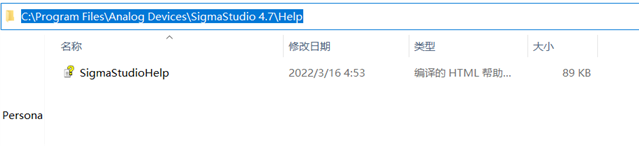
Q1. SigmaStudio 4.7 was installed on my laptop(windows 10), but there is no help file 'SigmaStudioHelp.chm' in the installed path.
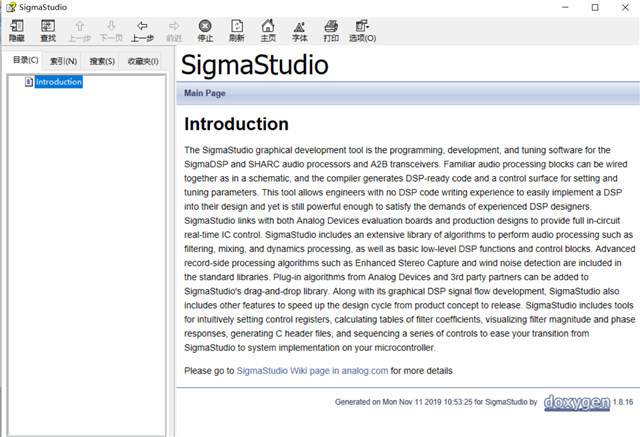
after click 'Help' in SigmaStudio, there is just a instroduction, no index, and can't search any information, shown as below
Q2: wiki is not available in China now, so i can't get any instructions for kinds of cells. Is there any way to solve this?
Q3: we are using ADAU1401 to design a audio frequency Induction loop system, the main functions or parameters including:
1. automatic gain control: dynamic range >36dB.
2. frequency response: 100Hz to 6.5kHz ±0.5dB to 1kHz at low level.
3. metal loss correction: corrects system frequency response manually when affected by metal structures. dual slope configurable MLC up to 4dB per octave.
since this is the first time to implement these functions via sigmastudio / on ADAU, i don't know which cells should be used and how to adjust the parameters. In particular, it's diffcult for a new user to combine kinds of cells to implement automatic gain control, as there is no AVC or ADAU1401.
So, could you provide some similar projects or could you help to implement these functions?
Appreciate for your help. Thanks.
Best Regards
Eason
Audio Signal Processors
Audio Products
software
adau1401
SigmaDSP Audio Processors
SigmaDSP
adau1701
Show More

ADI North America will be on winter shutdown starting December 25, 2023; perhaps another community member can assist you until our return on January 8, 2024.
Hello Eason,
The help file has been gone for some time, replaced by the wiki at:
https://wiki.analog.com/resources/tools-software/sigmastudio
You can also select any block in your schematic, and press [Function] F1. This should direct your browser to find the relevant help page in the wiki. This wiki works better than the old help file, because it's more frequently corrected and updated.
You'll find many SigmaStudio blocks which may prove useful for your application, such as:
Lowpass and highpass filters to limit your frequency range
Notch filters to remove 50 / 60 Hz line hum
For AVC, use the compressors with adjustable dB in -- dB out graphs and response times
I'm not sure how to implement metal correction, but one way may be to split the incoming frequency range into wide overlapping bands with a three-way crossover. Apply individual compressors to the three bands, then mix them back together. You can set up the high-frequency band to decrease gain at very low levels, in effect implementing the 1 KHz low-level limiting option.
The best way to learn SigmaStudio is to go ahead and try different things, referring to the help wiki as needed.
Best regards,
Bob
Hello Bob,
Thanks for your quick response. I will proceed with my application acc.to your instruction.
Besides, there may be some confusion about Wiki.Wiki is not available in China means it has been forbidden to browse. the same result with F1. I had tried to browse the wiki through a VPN but also failed, so i have no idea about the reason. i don't know if there is the same problem with your china support team, please help to check it.
Thanks.

Hello, wangea,
Thank you for letting us know.
mhennerich, can you please help wangea with the analog.com wiki issue?
Hello Wangea,
There are so many ways to do an AGC and it depends on exactly how you want it to function.
Here is a program I put together a few years back that tries to keep the output at a target level that you set. So it will increase or decrease the gain to attempt to keep it at the target level. This may give you some ideas for your application.
4762.ADAU1701 AGC Example with Target Level Setting.dspproj
You can also use some of our dynamics processors that have an external sidechain input for making a compressor that is frequency sensitive.
Dave T
Hello Dave,
Thanks for your support and the reference program. I will try to applicate it in my project.
Besides, we are considering that using an external microcontroller to monitor the output, in our application, the output of DSP conncet to an audio amplifier, so we want check if the amplifier output is clipped. if clipped, the microcontroller will decrease the gain via I2c to eliminate clip. in this case, i'm found there is the AUX ADC interface, but it's 8-bit while audio is usually 24-bits. so i not sure that it can be used for feedback and control. Or is there any other methods for our application.
Hope for your suggestion. Thanks.
Best Regards
Eason
Hi, we are working with our technical support teams to resolve the wiki issue and will report back when we have more information. Thank you.
Please log in to reply.