How to store audio file into ADAU1787
Hi,
I'm trying to store an audio file into the adau1787 dev board, but I'm not sure how to do it.
Can you provide the inputs to do that I can store the audio file into the ADAU1787 either in wav format or in mp3
I also would like to know like how to connect a external mic to the dev board, previously I tired connecting my headset to AIN2,3 input and get the output at stereo out.
But I couldn't get the output, may i know why?
Regards,
Sai
Audio Signal Processors
Audio Products
software
ADAU1787
sigma studio 4.7
Integrated/Special Purpose A/D Converters
Audio CODECs
Show More
Can someone address the query? Its been like two days.
Regards,
Sai
Hi SAIPRATHEEP ,
Apologies for the delay.
The ADAU1787 is not capable of storing any format of audio file, unfortunately. Typically, an external storage device, such as an external flash, or perhaps a microcontroller, would have to provide an external audio source to the ADAU1787 if you wish to apply a sequence of processing blocks to a desired audio file/sample.
Perhaps helping answer your question about the external microphone could also provide a temporary solution where you could utilize the analog inputs to play the desired audio file from your phone or other audio playback devices.
I created an example project that would allow for an analog microphone to route from the ADC directly to the DAC where you could monitor the stereo output with a set of headphones.
ADAU1787_AIN_Microphone_ADC_to_DAC.dspproj
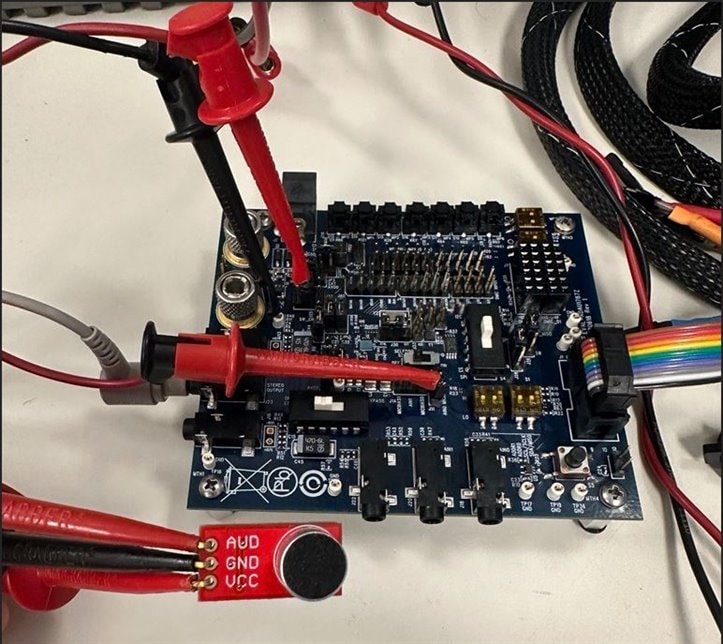
Below is a photo of my lab setup, where I used an Electret MIC Breakout Board that is powered by the internal IOVDD rail, and is connected to the AIN0 of the ADC, with MBIAS pin shunting J11 to provide the proper DC offset for the analog mic.
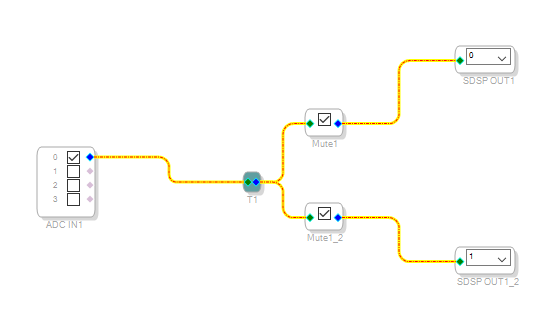
In terms of the schematic routing, the single AIN0 input is connected to a T-Connection block that duplicates the single mic input to provide a stereo signal at the DAC output. There are some Mute blocks for each channel to have the option to mute these channels to avoid any unnecessary clicks-and-pops when powering down the board while monitoring the stereo headphone out. (see schematic figure below)
This is a relatively simple example project for using a microphone input to the ADC and being able to observe the signal with headphones at the DAC output.
If you were to swop out the analog microphone for a 3.5mm unbalanced cable to the AIN0 input with audio streaming from your phone, or another playback device, this project could serve as a temporary solution to stream audio through a number of processing blocks and monitor the stereo output with a set of headphones.
In terms of using your own external microphone from your headset, have you checked the pinout of your headset to see what signals are available? Typically, a TRRS cable from a wired headset would provide signals for your Left, Right, GND, and Mic channels. This is indicated by 3 rings on the tip of the 3.5mm cable of your headset, and even then, your headset will only provide one microphone channel. So, it's not necessary to use the AIN2/3 inputs of the ADC, and only need a mic channel input.
If your headset only shows 2 rings on the tip of the 3.5mm cable, then I'm afraid it does not support a microphone channel and can only be used as a set of stereo headphones.
Please let me know if you have any further questions I can help answer, thanks!
Best,
TBM
Please log in to reply.