SPDIF 192kHz support in Eval-ADAU1466Z board
By verifying Data sheet, we understand Audio Sample Rate of 192kHz is supported in both S/PDIF transmitter and Receiver in ADAU1466 processor.
But while referring, 'EVAL-ADAU1466Z_UG-1135.pdf' could find the below comment, please confirm the 192kHz support in 'EVAL-ADAU1466Z' board, both in S/PDIF transmitter and Receiver.
'ADAU1466 S/PDIF transmitter typically transmits signals from the DSP core, meaning that the sample rate of the audio coming out of the S/PDIF transmitter on the EVAL-ADAU1466Z is typically 44.1 kHz or 48 kHz'
Audio Signal Processors
adau1452
Audio Products
hardware
SigmaDSP Audio Processors
adau1466
Show More
Hello KS2021,
KS2021 said:
ADAU1466 S/PDIF transmitter typically transmits signals from the DSP core, meaning that the sample rate of the audio coming out of the S/PDIF transmitter on the EVAL-ADAU1466Z is typically 44.1 kHz or 48 kHz'
Which means that, The SPDIF output rate follows the DSP core rate. i.e Whatever rate the start pulse register is set for, the SPDIF outputs at the same rate. By default, core rate is set for 48KHz (in a fresh sigma studio project) hence the SPDIF outputs at 48KHz, that is what mentioned in the user guide.
If you change your core rate to 192KHz, then the SPDIF output rate will be at 192KHz.
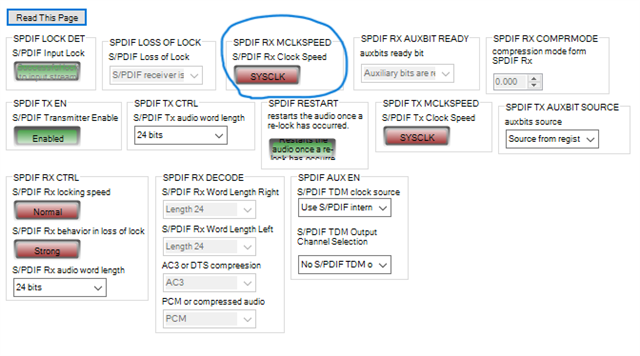
To receive the SPDIF signal at 192KHz, you have to make the change in the register like below.
The clock used to control the receiver rate must be set to run at 192KHz, it has to be SYSCLK (for 192KHz) rather that SYSCLK/2 (for 48KHz). The latter setting is the default only to maintain full backward compatibility.
Hope this helps!
Regards,
Harish
Thanks for the details, Harish.
We understand,192kHz SPDIF is supported in both Rx and Tx with the appropriate Core clock. Also, we understand 192kHz Tx is supported without any glitch observation.
Hi Harish,
We have updated the simple passthrough code for 192kHz SPDIF input and 192kHz SPDIF output with the above suggested settings. But output is not observed in our side. Please check any other settings regarding clock to be handled in the code. Even we are not receiving the input data. Please support.
Note:
>> Pumping device supported for 192kHz is verified.
>> When the code is updated for 96kHz, we have observed the SPDIF output, but glitch is observed.
1466_SpdifCode_192khz.dspproj
Hello KS2021,
Your core is running at 48KHz (since CG1's N/M ratio was set as N/M=1/6). I changed that to 192KHz (N/M=2/3). Here I have attached two projects which I used for testing SPDIF at 192KHz. Each project will Transmit and receive SPDIF signal at 192KHz. I have verified the output and it's working well.
I have modified the CODEC rate to be 192KHz, I have used two Eval boards (ADAU1467Z and ADAU1466Z) to test this. ADAU1467Z's CODEC is programmed by I2C via master control port. I have attached the xml file as well.
For ADAU1466Z, I controlled the codec by another SPI latch from the USBi. To do this codec programming modification for ADAU1466Z, please refer ADAU1452 rev B Eval board's user guide.
All the registers for transmitting and receiving SPDIF signals at 192KHz is already being set in this attached project.
1466_SpdifCode_192khz working.zip
Regards,
Harish
Thanks for your quick support, Harish. SPDIF192kHz is working for us.
In the above shared code, we have the noise observation in the SPDIF 192kHz 10kHz input, please find the image for noise observation.
For 1kHz input, this glitch issue is not observed. Recorded output for 192kHz is done with the Spectra Plus Tool.

Hello KS2021,
SPDIF is not an error free format. It is certainly possible for clocking errors to happen due to many factors like cable length, ground loops (unless you are using the optical interface of course) noise in the transmission. There is a PLL that recovers the clock from the bi-phase mark encoding. The PLL will be corrected from time to time if it drifts too much. I think at 1kHz it would be difficult to see the slight change of the waveshape but at 10kHz it stands out a little more.
This is my first impression on what is going on.
Are you hearing any clicks or pops?
Dave T
Thanks for your suggestion, Dave. While replacing the optical cable with slim and short length, this click noise is not observed.
Hello KS2021,
Thans for doing this testing to confirm my hypothesis. SPDIF is a great format but not perfect.
I do not think there is much I can suggest to do to minimize this. Any suggestions will be hardware based and so not very practical.
Dave T
Please log in to reply.