Custom Platform setup and use in SigmaStudioPlus
Trying to understand what can be done with the SS+ Custom Platform feature. The help that's available is lacking in details. wiki.analog.com/.../defineplatforms
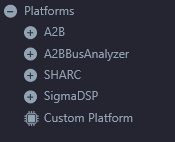
I took an existing custom platform shape and followed the directions in the help. Instead of the new platform appearing under the Platforms section:
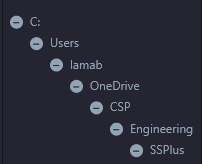
It stuck it under what amounts to the path to where I was saving the file(s), i.e. for me something like this:
I suspect the answers are buried in the .xml file but I'm hoping there's a simpler set of answers.
QUESTION 1:
How do I get my custom platform to appear under the default Platforms entry, and more specifically with some ability to group/nest like the defaults do, i.e.:
Platforms
MyCustomOnes
MySpecialOnes
Special1
Special2
....
MyOtherOnes
Other1
Other2
QUESTION 2:
How do I change the color of the box?
QUESTION 3:
How do I change the icon?
QUESTION 4:
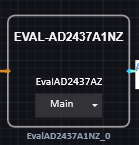
How do I add the ability to select what's inside the shape from a dropdown? e.g. like this ADI one:
Is this what the "Alternate Canvas" feature is about? The documentation isn't clear. I'm assuming this is a general SS+ feature and not one tied to A2B platforms?
software
custom platform
2.1.0
s
SigmaStudioPlus
Hi Brewster,
Question 1:
Please select the parent folder of "MyCustomOnes" as the "Custom Platforms" folder. Follow Step 2 from the wiki page for details on selecting the "Custom Platforms" folder. The sub folders inside the "Custom Platforms" folder will appear in the toolbox as tree structure.
Question 2 and 3:
Color and Icon cannot be changed.
Question 4:
Default standard platforms are specially implemented with the dropdown options. This feature is not available on Custom Platforms.
Alternate Canvas is a general feature and not tied to A2B. This allows you to have multiple canvas (for e.g. multiple Signal Flow diagrams in case of an Audio schematic) and choose one of them for compilation and code generation.
Best Regards,
John
Hi John,
Sorry for the delayed reply. Not sure what I did wrong the 1st time around but I redid it and the custom platforms are now showing up with the expected parts of the tree.
On the icon color and graphic - it would make things way more user friendly to be able to have the schematic blocks not all look the same. Feature request?
On the drop downs I would say that is another feature request - let the user control parameters in the instantiation without having to drill down in to the block. For example controlling bypass would be really helpful to see what's going on from the top level.
Brewster
Please log in to reply.